
iLoungeiLounge
  • News
    • Apple
      • AirPods Pro
      • AirPlay
      • Apps
        • Apple Music
      • iCloud
      • iTunes
      • HealthKit
      • HomeKit
      • HomePod
      • iOS 13
      • Apple Pay
      • Apple TV
      • Siri
    • Rumors
    • Humor
    • Technology
      • CES
    • Daily Deals
    • Articles
    • Web Stories
  • iPhone
    • iPhone Accessories
  • iPad
  • iPod
    • iPod Accessories
  • Apple Watch
    • Apple Watch Accessories
  • Mac
    • MacBook Air
    • MacBook Pro
  • Reviews
    • App Reviews
  • How-to
    • Ask iLounge
Font ResizerAa
iLoungeiLounge
Font ResizerAa
Search
  • News
    • Apple
    • Rumors
    • Humor
    • Technology
    • Daily Deals
    • Articles
    • Web Stories
  • iPhone
    • iPhone Accessories
  • iPad
  • iPod
    • iPod Accessories
  • Apple Watch
    • Apple Watch Accessories
  • Mac
    • MacBook Air
    • MacBook Pro
  • Reviews
    • App Reviews
  • How-to
    • Ask iLounge
Follow US

Reviews

Reviews

Review: Adaptive Sound Technologies LectroFan micro Wireless Speaker and Sleep Sound Generator

Last updated: May 16, 2021 1:23 pm UTC
By Jesse Hollington
Review: Adaptive Sound Technologies LectroFan micro Wireless Speaker and Sleep Sound Generator

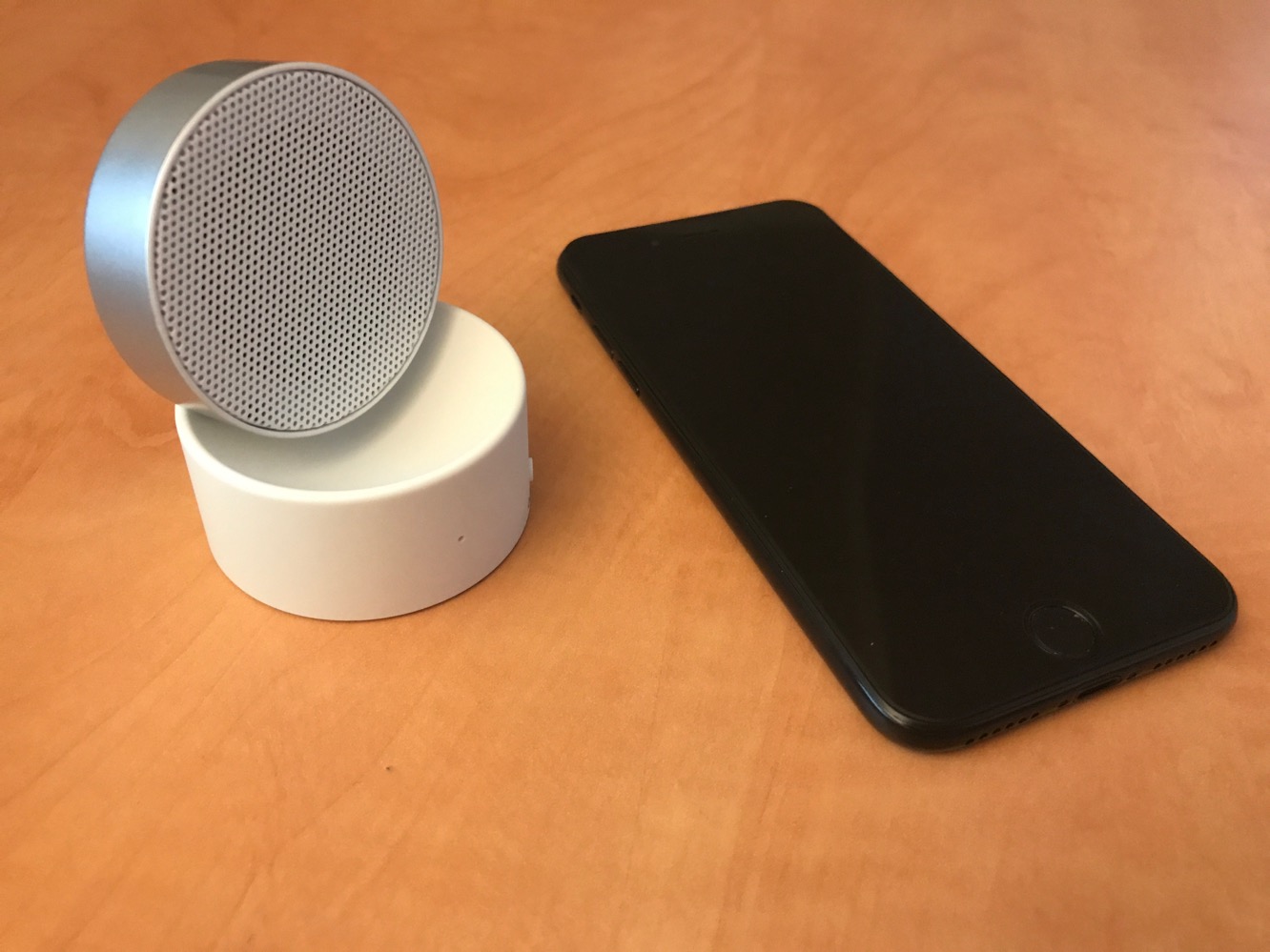
Bluetooth speaker technology is continually getting less expensive, allowing companies to come up with smaller and more basic speakers that can be paired with an iPhone or other Bluetooth device. Adaptive Sound Technologies’ new LectroFan micro is a basic no-frills pocket-sized Bluetooth speaker that doubles as a sound machine, providing ten unique digital sounds as well as the ability to play audio from your iPhone, iPad, or Bluetooth-equipped iPod. It can also be used as a speakerphone.

Review: Adaptive Sound Technologies LectroFan micro Wireless Speaker and Sleep Sound Generator

LectroFan micro comes with the unit itself and a USB-A to micro-USB charging cable; like most lower-end speakers we’ve looked at, you’ll need to supply your own USB power source to charge it. The company promises that a four-hour charge will provide up to six hours of use as a Bluetooth speaker or 16 hours as a sound generator. Three buttons on the base of the speaker provide for power, mode, volume, and track navigation control.

A single short press on the power button activates sleep-sound mode, which is ready to go out of the box without needing to pair with a Bluetooth device. A total of ten sounds can be cycled through with the previous/next buttons, including five fan sounds, four white noise sounds, and an ocean sound. The previous/next buttons can also be held for longer presses to adjust the volume up or down. Pairing to an iPhone or other Bluetooth device involves holding down the power button from the “off” state until the speaker emits a distinct beep; once paired, the same process is used to power on the speaker in Bluetooth mode. Since the power button also doubles as a play-pause button, you’ll also need to hold it down to turn the speaker off again from the Bluetooth speaker mode. It’s also worth noting that there’s no way to switch directly from sleep-sound mode into Bluetooth speaker mode without powering the speaker off first, meaning that it takes two presses of the power button to change modes.


Review: Adaptive Sound Technologies LectroFan micro Wireless Speaker and Sleep Sound Generator

LecroFan micro’s upper speaker portion swivels on the base so you can adjust it to whatever angle works best — from a horizontal position radiating upward to about an 80-degree angle, when fully collapsed, the unit is basically pocketable. Sound quality isn’t something that’s even worth really discussing here — it sounds pretty much like you’d expect a $35 speaker to sound. It’s definitely better than the built-in speakers on the iPhone 7 Plus for most purposes, but to be fair that’s not saying very much. That said, it does get considerably louder than we expected for a speaker of its size, although depending on what you’re listening to, you’ll definitely get a bit of distortion in the higher end; oddly we encountered less distortion when playing music through the speaker than we did when using it as a speakerphone. Volume control also doesn’t appear to be active in speakerphone mode, either from the buttons on the side of the unit or the iPhone itself; when being used as a speakerphone, output is fixed at whatever volume was last used for audio playback. Speakerphone call quality was otherwise adequate on both ends of a call — about on par with using speakerphone mode on the iPhone itself.


Latest News
The Apple Watch Series 11 46mm GPS Is $100 Off
1 Min Read
Clamshell Style iPhone Being Looked Into By Apple
1 Min Read
Foldable iPhones May Have the Largest Battery Ever
1 Min Read
Apple and TSMC’s 10-Year Collaboration May Be Ending
1 Min Read
The 13-inch M5 iPad Pro 256GB Wi-Fi Is $149 Off
1 Min Read
M5 Pro and M5 Max Chips for the MacBook Pro could Roll Out with macOS 26.3
1 Min Read
Mac Ordering Process Revamped
1 Min Read
Check Signed By Steve Wozniak and Steve Jobs Sold For $2.4 Million
1 Min Read
The Anker 140W 4-Port GaN USB-C Charger is $35 Off
1 Min Read
No iPhone Air 2 This Year, according to Latest Report
1 Min Read
New Report Corroborates Split iPhone Release Dates
1 Min Read
Apple Losing More Researchers As They Plan To Release 2 Siri Versions
1 Min Read

iLounge logo

iLounge is an independent resource for all things iPod, iPhone, iPad, and beyond. iPod, iPhone, iPad, iTunes, Apple TV, and the Apple logo are trademarks of Apple Inc.

This website is not affiliated with Apple Inc.
iLounge © 2001 - 2025. All Rights Reserved.
  • Contact Us
  • Submit News
  • About Us
  • Forums
  • Privacy Policy
  • Terms Of Use
Welcome Back!

Sign in to your account

Lost your password?










