
The problem with Kensington’s KeyFolio case for the iPad — the first hybrid of an iPad case and Bluetooth keyboard, developed by an Asian OEM and resold under different names by multiple companies — wasn’t the concept, the price, or the case itself. KeyFolio was dicey because of the keyboard, a critical element in such a hybrid product, which had such squishy and unreliable keys that most users would do just as well with the virtual keypad built into the iPad. So three months later, a company called Accessory Workshop has arrived with a revised version that it’s calling tyPad Gen II ($100). Made from nearly identical black synthetic leather in the shape of a folio, tyPad Gen II is so similar to KeyFolio visually that the major differences might be missed on first inspection. Yet there’s one big change that makes the new design radically better than before, and another that detracts somewhat from what otherwise would have been a bigger boost in our rating.
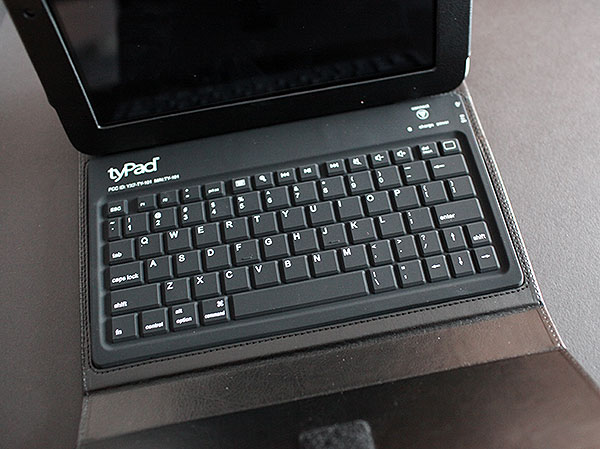
Thankfully, Accessory Workshop’s keyboard is the hugely improved component in tyPad Gen II: the new version works well enough that we actually typed this full review using the case—something we couldn’t complete to our satisfaction with the earlier KeyFolio. Keys and their rubber top coating alike feel just a little stiffer, so accidentally hitting the same key two or three times is far less common; you’ll be more likely to have the space bar or another key not register, and then only occasionally.
The iPad’s spelling correction feature is more capable of catching and fixing those mistakes.

There are still some key layout oddities, such as low apostrophes and imperfect function keys—seriously, why include a PRT SC button, F1 and F2 at all on an iPad keyboard?—but there are improvements, too. The new keyboard has a second shift key, moving the plus and equal key up into the functions row, and removes the unnecessary F-labeling of most of the top row of keys to reduce visual clutter. Home, virtual keyboard, search, volume, and track buttons work as expected, with the rest of the typing keys having just enough surface area to accommodate big American fingers. While this still isn’t a full-sized keyboard, and requires a little getting used to, it’s close and good enough to bother, something we wouldn’t have said about the prior generation.

Where tyPad Gen II misses a little is in its redesigned latching mechanism, which forgoes magnets that were found in some first-generation variants, and the gravity-dependent system used by Kensington, in favor of a large extra flap and Velcro to hold the case shut. Combined with the thick padded faux leather front and back surfaces, the flap is too big, cumbersome when laid out on a flat surface, and bulky when the otherwise plain-looking case is closed—the iPad becomes close to a full-sized MacBook in thickness when it would ideally be no bigger than, say, a MacBook Air.
When opened, the flap doesn’t prevent tyPad from being used, but it really shouldn’t be there; the change was made so that magnets wouldn’t interfere with the iPad’s compass and GPS functionality, but wasn’t as efficiently executed as it could have been. The rest of the case remains largely the same as the version we previously tested, with plenty of exposed metal on the iPad’s side, top, and bottom, which is to say that there’s still work left to be done to make tyPad and its rivals as good in the case department as they now are for typing purposes.

Other facets of the experience are more or less the same as before. Accessory Workshop bundles a micro-USB cable for recharging tyPad from any USB port, promising 55 hours of continuous use with a 3.5-hour recharging time versus 45 originally promised hours in KeyFolio with a 4.5-hour maximum recharging time; Kensington has since changed its run time to claim 90 hours of battery life. While the differences in run and recharging times are potentially non-trivial, the batteries used in both keyboards are extremely close to the same capacity—470mAh in tyPad versus 430 in KeyFolio—and in practice, both will last long enough that only occasional refueling will be necessary for most users. The same simple pairing button and small but accessible on/off switch are found on tyPad as on KeyFolio, with blue lights to indicate pairing and power status; we found it very easy to pair tyPad to an iPad, and similarly simple to turn off when not in use.











