
Pros: A hybrid iPod nano accessory combining a highly protective case, FM transmitter, and RF remote control into a single package, available in either black or white versions. Remote stows into case’s back when not in use, provides access to on-iPod radio tuning up close or from a distance, and allows for iPod control from a reliable distance of around 50 feet. Unlike Infrared remotes, doesn’t require line-of-sight between base and remote in order to connect to the iPod, and can be used indoors from a room away.
Cons: Quirky remote design is less intuitive than we prefer. Though the base has a bottom Dock Connector port for charging, audio output, and synchronization, remote’s volume controls only work through the iPod’s headphone port, requiring you to connect a second cable – not as good of a remote implementation as in recent dedicated iPod docks we’ve tested. If purchased only for FM transmitter features, more expensive than our top-rated options by a fair margin.
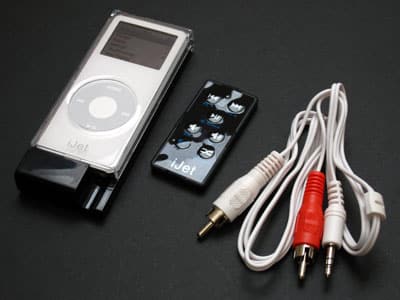
As a substantial evolution of the popular iJet RF remote control for 3G, 4G, and mini iPods, ABT’s iJet for iPod nano steps beyond its predecessor’s features, combining an FM transmitter, remote control, and protective iPod enclosure into a single package. ABT says that it’s worked overtime to ensure that the new iJet offers superior FM transmitter quality to all of its leading competitors, and now includes an on-iPod tuning screen similar to the ones found in recent Griffin and Belkin offerings. It also has a patented Dock Connector pass-through port that permits charging and/or synchronization without removing your nano from the enclosure.
Back when we tested ABT’s original iJet remote control for iPods (iLounge rating: A-), we couldn’t help but be impressed: at a time when most companies were struggling to offer iPod remote controls that delivered 30-foot broadcasting distances, ABT used radio frequency (RF technology) to deliver 110 feet of distance – enough to let you control your iPod from two full rooms or a floor of your house away. While the iJet wasn’t cheap, and had some small quirks, it was unquestionably more powerful than anything else out there.
Now ABT has released iJet for iPod nano ($70), a mostly evolutionary accessory that combines a remote control, FM transmitter, and protective iPod enclosure in a single, nano-sized package – a cosmetically similar but slightly different technology slant than DLO’s previously reviewed nanoTune (iLounge rating: B-). Both products include FM transmitters inside iPod cases, but ABT’s features a detachable RF remote control strapped to its back, while DLO instead includes a radio receiver and headphone amplifier. Of the two, there’s no doubt that iJet is the superior option, though they differ so much in features that you mightn’t even view them as comparable.
Most obviously, they share a body design.
iJet uses a sled-like white or black glossy plastic frame that connects to the bottom of your nano, then runs along its back. A clear plastic shell then covers the iPod’s entire front, save for its Click Wheel, and top, except for a tiny Hold switch hole. Snapped closed, it doubles the nano’s thickness and adds a little over half an inch to its bottom, protecting virtually everything but the Click Wheel from damage. There’s a hole at the bottom for access to the nano’s headphone port, and a pass-through Dock Connector port situated directly below the nano’s. The port’s there to let you connect the nano to virtually any iPod home or car docking accessory – remote-less speaker systems and docks, etcetera – without interrupting its ability to play music, charge, or synchronize data. ABT also includes a white minijack-to-stereo RCA audio cable for connection to the headphone port, if you need it – which you may.
The Remote Control
As predictably implemented as iJet could have been, there are actually a number of surprises here, starting with the remote control. The nano remote is more fully featured than ABT’s full-sized iJet remote, but it’s not as powerful of a broadcaster, and initially more confusing to use because it needs to provide access to both the iPod’s features and those of iJet’s integrated FM transmitter. To that end, ABT has placed seven membrane-style buttons on this remote’s face, iconically labelled with track backwards, forwards, play/pause, volume up/down, shuffle, and “Fn.” Decoded from its engineer-style abbreviation, Fn is the function button, which you’ll need to press to access certain second features of the prior buttons: playlist selection up and down for the remote, or to activate the FM transmitter for station tuning up and down, or to use the transmitter’s preset seek and store features. A red light on the remote’s top flashes once for each button press, or rapidly to let you know that it’s waiting for the next button press after you’ve hit Fn. Initially, we found the double-purposed buttons less than intuitive to use – they could have easily been done better – but we got past the confusion after an hour or so of practice.

As noted, iJet has downgraded its broadcasting power somewhat: this time out, rather than promising 150-foot distances and delivering 110, ABT promises only a 100-foot range on its web site, and in our testing delivered reliably only at an unobstructed distance of 50 feet. When walls were added to the equation at that distance, the remote became unreliable, sometimes missing button presses.
How you view iJet for iPod nano’s performance will depend on your needs: on one hand, iJet for iPod nano isn’t a breakthrough remote control on distance like its full-sized iPod equivalent, but the fact that it works at a 50-foot distance – sometimes greater – still makes it a more powerful option than most of the iPod remotes out there.

Finally, iJet’s included remote control unfortunately doesn’t affect the volume level that goes through its Dock Connector port, so if you want to change the iPod’s volume at a distance with speakers, you’ll need to (a) use a separate remote control provided with your speakers, (b) connect ABT’s included audio cable to the nano’s headphone port, and then find RCA-style stereo audio inputs on your speaker system, or, most likely (c) since the majority of iPod speakers use minijack auxiliary audio input ports rather than RCA-style ones, supply your own minijack-to-minijack cable. Since such cables are packed-in with most iPod speakers these days, and cost very little to buy separately, this isn’t a huge hassle conceptually, but for many other practical reasons, this is a sub-optimal way to have to connect your iPod if you want volume control. For this reason, if you’re thinking of buying iJet mostly for its remote functionality, you might be better off with a standalone RF-equipped dock such as Keyspan’s AV Dock for iPod (iLounge rating: A-) instead.
FM Transmission
Our single biggest disappointment with DLO’s nanoTune was its FM transmission – we thought it was amongst the worst transmitters we’d ever heard, and unacceptable for that purpose given its price. By contrast, ABT told us that it had worked overtime to ensure that the new iJet offers superior FM transmitter quality to all of its leading competitors, and though that’s not entirely accurate, the iJet design certainly has some impressive strengths. Like Griffin, Belkin, and Kensington’s most recent FM transmitters, iJet for iPod nano handles station changes with an on-iPod tuning screen that uses an old-fashioned LED-style font to show current stations and presets. In addition to tuning in U.S.-appropriate .2 increments from 87.9FM to 107.9FM, four presets can be saved using the store key on the included remote, and toggled through with the preset scan button or playlist up/down buttons. There’s also a single button on the iJet’s left side that works just like the preset scan key, shifting through the four presets or “off” as you desire. Bear in mind that the single button’s strictly optional: since all the tuning can be handled through the remote rather than the nano, this is the first FM transmitter we’ve seen that can be actively controlled from a distance, so if you need to place it closer to an antenna in your home or car and change stations as you drive, you have that option.

We have actually tested two versions of iJet for iPod nano, each with a different FM transmitter: the second version was improved to offer additional power, and is claimed to be representative of the iJets consumers will be receiving. Not surprisingly, while both transmitters did well at close distances, the newer one was considerably more powerful at far distances – almost amazingly so, especially on our favorite test station, 87.9FM. Both delivered ear-pleasing sound that was comparable to Belkin’s latest TuneFM transmitters, with plenty of bass, and lacking only a small amount in the treble department. Near our indoor test radio, both transmitters did very well on both of our test stations (87.9FM and 103.3FM) from a distance of 8 feet away, overwhelming even the challenging 103.3FM with strong audio and only a low level of static.











