
This review originally appeared within iLounge’s iOS Gems series within the compilation article, iPhone Gems: All 22 Wallet Apps, Reviewed. Additional details may be found in the original article.
1Password
(Free) is an extension of the very popular and award-winning 1Password app for Mac OS X, allowing you to sync your 1Password data from your Mac onto your iPhone via Wi-Fi and carry it around with you. Best of all, Agile has chosen to make the iPhone application free, at least for a limited time, though if you’re looking for desktop synchronization, you will need to shell out an additional $40 for the 1Password application.
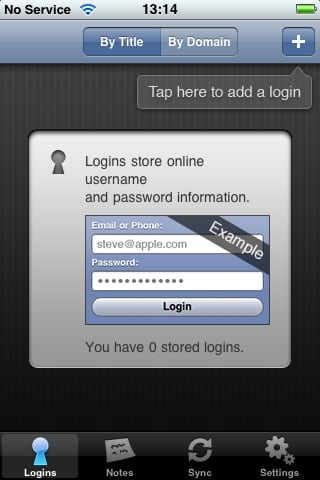
1Password is designed to store passwords, basic wallet items and secure notes. Each of these content types are also supported in the iPhone version, although you can only create and edit password and secure notes on the iPhone itself. Wallet items must be synced from the desktop application—in fact, the “Wallet” category does not even appear until this happens—and they are read-only on the iPhone itself, although you can add or edit notes to existing wallet items.
For users of the 1Password desktop client, the inability to add new wallet items or edit existing ones is unlikely to be a serious limitation for most, since this information generally does not change often. However, the inability to actually add wallet items to the iPhone version directly will limit the usefulness of 1Password on the iPhone for Windows users, or those Mac users who are not using the desktop version.

The 1Password desktop application was primarily designed to store web passwords and automatically fill web forms, and in fact the Agile team came up with a very interesting and unique solution to provide iPhone-based web password support months before the iPhone SDK was even available.
They used an encrypted bookmarklet for the MobileSafari browser that could be synced to your iPhone via your normal Safari bookmarks.
1Password for the iPhone continues to support this somewhat, but since third-party applications cannot currently plug into the MobileSafari browser, 1Password provides its own integrated web browser for secure site sign-on. Tapping a link within a password item will open the 1Password browser and load the page in there with the appropriate sign-on fields already filled in. This method works pretty much as expected, although the built-in 1Password browser does not provide support for landscape orientation, making some pages unnecessarily cumbersome to deal with.

As with most iPhone apps that synchronize with your computer, 1Password synchronization occurs over Wi-Fi and is relatively straightforward to set up. Start 1Password on your computer and click the “iPhone” icon to ensure that iPhone synchronization is enabled. Once 1Password is running on your computer, iPhone sync is enabled, and your iPhone and your Mac are on the same Wi-Fi network, simply initiate synchronization from 1Password on the iPhone. The iPhone will display a five-digit code and the 1Password desktop will prompt you to enter this code to associate the two devices.


Once the iPhone version has been paired with the desktop version, future syncs can be initiated manually from the iPhone client whenever 1Password is running on your computer and both devices are on the same Wi-Fi network.
One very interesting and unique feature that 1Password provides is a two-factor authentication system.
Both a PIN and a master password are specified when 1Password is first set up, and users can choose on an item-by-item basis which should be protected by the master password, and which items can be accessed with only a PIN. When you initially start 1Password, it merely prompts for the four-digit PIN, which gives you browse access to all of the items in your 1Password database. When you attempt to access an item that is protected by the master password, you are prompted specifically for this password.

By default, all new items synced from the desktop version of 1Password are protected by the master password, so if you want your items to be available with only a PIN, you must edit each item individually and turn OFF the “Master password protection” option. An ability to change this setting globally, or to base it on some type of category would probably be more useful, as would the ability to specify this option from the desktop version of 1Password.

1Password also provides a simple intruder lockout feature, similar to the iPhone’s own password lock system. After five invalid password attempts, 1Password will lock the user out for a fixed amount of time. This lockout duration increases with each additional invalid password attempt until a correct password is entered. In the case of the master password for accessing protected items, five invalid attempts will simply restrict access to those items’ content until the application is restarted.

1Password provides the ability to change the PIN and master passwords, and the ability to set the automatic lock timeouts for each level of password.











