
Pros: The navipod works, is techie-cool and nifty, but…
Cons: …at $50, do you really need a wireless remote for a handheld device?
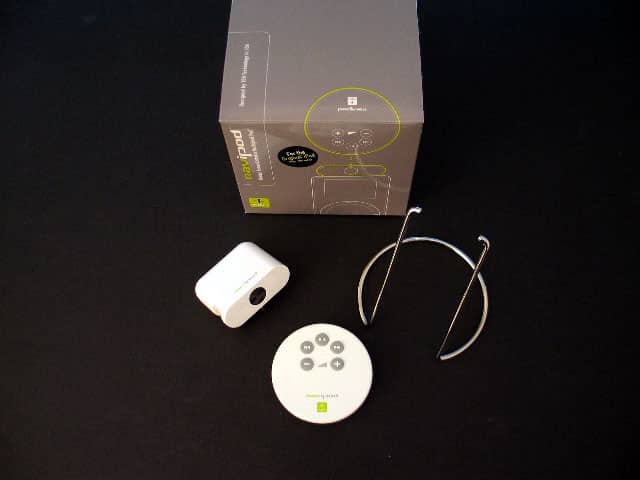
Ever since Apple introduced the wired remote for iPod, the iLounge forums have had several members posting requests for a wireless remote in the ‘Wishlist’ forum. We’re not sure why wireless didn’t come to market sooner, but two companies, Ten Technology and Engineered Audio are just now starting to bring their wireless gadgets to the masses. I’ll be going wireless with Ten’s navipod remote and see how it measures up.
In The Box
The navipod I received was for the classic iPod (non-docking) and a production unit. There is also a navipod for 3G iPods. It comes in a small square box with a receiver, remote, detachable metal stand and an instruction booklet.
The Remote
The small round remote is 2.5 inches in diameter and features volume up or down, forward, reverse and play/pause buttons. At the bottom of the remote is a slide out lid for the already installed battery, and at the top is an infrared ‘eye’ which emits the wireles signal to the reciever on iPod. The buttons are clearly marked and the layout is easy on the fingers for one-handed operation.

The Receiver
The receiver features a FireWire pass-through, and headphone port pass-through on the bottom.
On the front of the receiver is a large infrared ‘eye’ for interpreting signals coming from the remote.The FireWire pass-through comes in handy when you have to charge the iPod and can do so without having to remove the navipod receiver. The chromed metal stand can be removed from the receiver unit by pulling out both ends from each side. The receiver draws its power from the iPod’s headphone port like the Griffin iTrip, and has a slot on the left side to accomodate iPods with FireWire port covers.

The navipod for 3G iPods is smaller than the receiver for classic iPods… about the same thickness as a 3G iPod. This is due to 3G iPods having its FireWire connection (docking port) on the bottom, therefore the receiver can be smaller. There is a pass-through audio port on the back of the unit.
Going Wireless
Setting up the navipod is straight forward and simple. Just plug the receiver into the top of iPod (make sure it’s pushed in all-the-way). Also note, you’ll have to remove iPod from any case you may be using.
Set it on your desk, plug-in and put on your headphones, grab the remote and start scrolling through your list of songs, select play and you’ll see all the action happening wirelessly on your iPod’s display while your head beats with tunes. There was no noticeable difference in sound quality when using the pass-through audio port on the navipod. It’s as if you had it plugged directly into the iPod.

I tested the navipod whille my iPod was connected to my home stereo. You’ll need a RCA to minijack adapter to listen to iPod tunes through your home stereo. You can get one at any Radio Shack or Apple store. While sitting on the couch, the iPod is now about 6 feet away, so I couldn’t see what was happening on the LCD screen. Everytime I used the remote and changed the song, I had to walk over to the iPod to see where I was in the menu.











