
Pros: Solid RF wireless remote with up to 75-foot broadcasting capability when unobstructed, remote is easy to use and open. Reasonably priced, and a good compromise option overall.
Cons: Remote isn’t well-suited to being pocketed or belt clipped because it lacks a hold switch and packed-in mounts; none of its performance and features is class-leading.
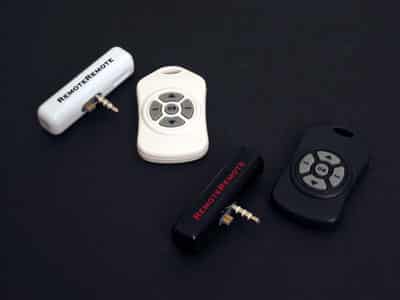
“If only” isn’t a phrase we use much around here, but this is one of those cases: if only we’d received Engineered Audio’s RemoteRemote 2 ($40) RF Wireless Remote for testing when it was released several months ago, our feelings might have been different. Back then, it would have been the iPod’s clear wireless remote champion on broadcasting performance, competing with older, Infrared-based devices such as TEN Technology’s naviPod and DLO’s iDirect, each of which achieves half or less of RemoteRemote 2’s promised 50-75 foot distance. Today, however, it falls slightly short of the performance of our three top-rated remotes in three different categories, offering a compromise that will be good for some users but not all.
A Brief Note on RF Technology
RF (radio frequency) wireless technology is an alternative to Infrared (invisible light) technology, which has been used in most but not all of the iPod’s wireless remote controls. Compared with Infrared, RF has the advantages of working through walls and equally well indoors and outdoors, and the disadvantage of working less well in an environment with strong radio interference. Since the density of your walls and the level of radio interference where you live may vary from ours, your results may also vary, and you should not regard any review’s statement of radio performance as definitive as to your own personal living situation. As such, we provide test results with our unobstructed (optimal) numbers, and a general sense of how the RemoteRemote 2 performed when obstructions were added.
Aesthetics
Visually, RemoteRemote 2 is very plain but not unattractive: the standard receiver is a white tube with the words “RemoteRemote” printed in black on its front and back, while a version made to match Apple’s iPod U2 Special Edition is black with red print instead. Each unit has a stereo minijack on its right side – a good location – and comes with a generally matching remote control.
Neither is an aesthetic match for the iPod mini, but both work just fine if installed on one, and Engineered Audio has a size and shape-matched version called RemoteRemote mini coming soon.
Engineered Audio’s standard remote control is matte white with four diamond-arrayed gray and black buttons for track forward and backward, volume up and down – a small circular play/pause button sits in the center. The U2 remote is black with identical gray and black buttons. By comparison with Griffin’s recently released AirClick and ABT’s new iJet, neither of the RemoteRemote remotes (say that a couple times fast) includes a hold switch or a belt clip, but both have a small hole that would let you wear them on a wristband or necklace. And all three remotes are capable of controlling iPod photo slideshows when used with iPod photo firmware 1.1 and later.
On balance, we preferred RemoteRemote 2’s buttons to iJet’s, which are recessed and occasionally more difficult to use, but liked AirClick’s buttons best of all. We also liked AirClick’s hold switch, which prevents its buttons from being accidentally depressed if you toss it into a pocket, something that’s missing entirely from the RemoteRemote 2 design. Though it would be sort of pointless, even the iPod’s own hold switch won’t stop RemoteRemote’s buttons from working.


As a small aside, RemoteRemote 2’s remote casing is substantially easier to pop open – only as desired – than both AirClick’s and iJet’s, which won’t matter much once you’ve inserted the included battery, but will matter whenever you need to replace it. By comparison, iJet’s remote is easy to damage with a coin when you try to open it, and AirClick requires you to use a small screwdriver.
Performance
The receiver/transmitter combination did pretty well in our testing.
You begin by pairing the remote transmitter with the receiver, a step that takes only a few seconds, but is only optional with Griffin’s AirClick. As with AirClick, you can pair multiple remotes to the same receiver, a process accomplished by holding down the play/pause button for ten or fewer seconds. Once the pairing’s complete, each remote can control your iPod equally well.
Engineered Audio promises a range of 50-75 feet when unobstructed, and says that RemoteRemote 2 – unlike Infrared-based remotes – will work through walls. Both claims were proved accurate in our testing; we were able to use RemoteRemote 2 without problems indoors and out at distances of around 75 unobstructed feet – a bit more than Griffin’s AirClick – but when the remote was around 75 feet or more away from the receiver, or went through too many solid surfaces, the play/pause button stopped performing properly and only turned the iPod off. Only infrequently, more than one button press was necessary to guarantee receipt of commands; generally RemoteRemote 2 did a very good job.

As with AirClick and iJet, distance fell off through walls, through the fall-off will vary with the density of your walls and your remote’s distance from the iPod. We were able to use RemoteRemote from two rooms (two walls) away without a problem with drywall and wood walls, but your experiences may vary.
This performance compared very favorably with the infrared remotes we’ve tested, which are lucky to get a full thirty feet of distance and unable to work through the thinnest of walls. As noted in our separate review of the iJet, however, RemoteRemote 2 is a second-place finisher on distance to that device, which was able to work without problems at a distance of 100-110 feet, and only slightly better than AirClick. When testing with a first-generation iPod photo, we experienced the same problem with RemoteRemote 2 that we did with AirClick – namely, that the broadcasting performance was substantially shortened to a dissatisfying distance of around 8-10 feet, but no other iPod (3G, 4G, or mini) we tested exhibited that problem.
Conclusions
Judged in the context of other available RF remote control options, RemoteRemote 2 is a recommendable but not highly recommendable product.











