
iLoungeiLounge
  • News
    • Apple
      • AirPods Pro
      • AirPlay
      • Apps
        • Apple Music
      • iCloud
      • iTunes
      • HealthKit
      • HomeKit
      • HomePod
      • iOS 13
      • Apple Pay
      • Apple TV
      • Siri
    • Rumors
    • Humor
    • Technology
      • CES
    • Daily Deals
    • Articles
    • Web Stories
  • iPhone
    • iPhone Accessories
  • iPad
  • iPod
    • iPod Accessories
  • Apple Watch
    • Apple Watch Accessories
  • Mac
    • MacBook Air
    • MacBook Pro
  • Reviews
    • App Reviews
  • How-to
    • Ask iLounge
Font ResizerAa
iLoungeiLounge
Font ResizerAa
Search
  • News
    • Apple
    • Rumors
    • Humor
    • Technology
    • Daily Deals
    • Articles
    • Web Stories
  • iPhone
    • iPhone Accessories
  • iPad
  • iPod
    • iPod Accessories
  • Apple Watch
    • Apple Watch Accessories
  • Mac
    • MacBook Air
    • MacBook Pro
  • Reviews
    • App Reviews
  • How-to
    • Ask iLounge
Follow US

News › iPod › iPod Accessories

iPod Accessories

iPod photo peripheral compatibility, explained, updated

Last updated: May 16, 2021 8:59 am UTC
By Jeremy Horwitz
iPod photo peripheral compatibility, explained, updated

Think you understood which digital photo peripherals worked with Apple’s iPod photo? Think again.


Updated September, 2005: We have added a collection of iPod AV cables and other accessories to the bottom of this report.
iPod photo peripheral compatibility, explained, updated

Following discussions with Belkin, maker of the Media Reader (released late 2003) and Digital Camera Link (released Spring 2004), and our review of Apple’s brand new iPod Camera Connector, iLounge can confirm the following compatibility details for all three peripherals.

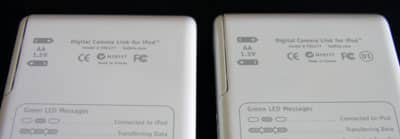
Belkin Digital Camera Link: According to Belkin, there are two revisions of this accessory. iPod photo users with any version of Apple’s firmware will find that revision 1 Digital Camera Links have compatibility problems with the iPod photo and 4G iPod. Revision 2 Digital Camera Links – sold by Belkin since October 2004 – apparently do not have these compatibility problems.


The difference between the two peripherals is an additional “01” mark on the rear of newer DCL units; older ones have only CE, FCC, and C-Tick marks. Below, you’ll see photos of the differences between new and old units, as well as the black dot that appears only on revision 2 boxes. Belkin adds that it has already notified customers on its web site that owners of revision 1 units with compatibility issues can contact the company’s customer service line to obtain a 4G/photo-compatible update.


Belkin Media Reader: There’s only one version of the Media Reader, but it behaves differently with the iPod photo based on the firmware (iPod Software Updater) you’ve installed. iPod photo users with version 1.0 of Apple’s firmware will find that Belkin’s Media Reader transfers photographs using a standard progress bar. But users with version 1.1 of Apple’s firmware will find that the Media Reader performs identically to Apple’s iPod Camera Connector, letting you preview photographs while transferring them, and view photographs on the iPod photo’s screen once transferred.


Our updated review of the Media Reader includes updated photos and interesting notes on transfer speed differences.

Apple iPod Camera Connector: Version 1.0 of the Apple firmware will not work when you insert the Camera Connector, showing a screen reading “no card inserted” when you attempt to use the Photo Import feature. However, version 1.1 will work as described in our review.

Apple iPod AV Cable: This six-foot cable from Apple, reviewed here, allows you to connect an iPod to a television to watch photo slideshows. Apple also sells an iPod Dock with line-out audio and S-Video outputs for higher-quality AV output.

BoxWave iPod Photo AV miniSync: This cable from BoxWave, reviewed here, allows you to connect an iPod to a television to watch photo slideshows, and features a retractable 45-inch cord length.



Latest News
The 14-inch MacBook Pro with M5 Chip 16GB RAM/512GB is $250 Off
1 Min Read
Noise and Static on AirPods Pro 3 Still Unfixed
1 Min Read
New iMac with 24-inch OLED Display May be Brighter With 600 Nits
1 Min Read
The 15-inch M4 MacBook Air 256GB Is $250 Off
1 Min Read
Internal Kernel Debug Kit from Apple Reveals Tests for a MacBook with A15 Chip
1 Min Read
Apple Currently In Talks With Suppliers for Chip Assembly & Packaging of iPhones in India
1 Min Read
Apple Allows Easier Battery Replacement For M5 MacBook Pro with 14-inch Display
1 Min Read
The Apple Watch SE 3 44mm GPS is $50 Off
1 Min Read
20th Anniversary iPhone May Launch in Two Years
1 Min Read
Better Image Generation Capabilities and Apple Music Integration Coming to ChatGPT
1 Min Read
A20 Pro Chip Coming to Next Gen iPad Mini OLED
1 Min Read
Amazon has the AirTag 4 Pack Marked $29 off
1 Min Read

iLounge logo

iLounge is an independent resource for all things iPod, iPhone, iPad, and beyond. iPod, iPhone, iPad, iTunes, Apple TV, and the Apple logo are trademarks of Apple Inc.

This website is not affiliated with Apple Inc.
iLounge © 2001 - 2025. All Rights Reserved.
  • Contact Us
  • Submit News
  • About Us
  • Forums
  • Privacy Policy
  • Terms Of Use
Welcome Back!

Sign in to your account

Lost your password?








