
Continuing our previous update from the iPhone Guided Tour, Apple has used the 24-minute long video to unveil a collection of new and unexpected iPhone features, including support for viewing Microsoft Word and Microsoft Excel documents that have been sent via e-mail.
Internet and E-mail: Google search is the default for the integrated Safari browser, but Yahoo can be used instead. Accessing search is available by touching the URL. The built-in e-mail application can read not only JPEGs and PDF files, but also Word and Excel documents. Business users have frequently cited ambiguity over iPhone’s support for Word or Excel documents as a potentially fatal omission, so their inclusion removes just one more potential barrier to the phone’s popularity.
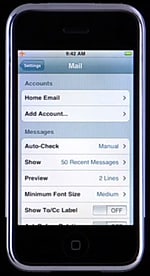
Apple claims that in “about a week,” you’ll be thumb-typing faster on iPhone than any other small keyboard. Through a settings menu, mail can be checked manually, or automatically every 15, 30, or 60 minutes. You can also choose between 0 and 5 lines to show in the mail window preview, and change between five font sizes for easier reading.
Stocks: The stock application allows you to view historical stock performance for a company on a scale of 1 day to 2 years, with 1 week, 1 month, 3 month, 6 months, or 1 year options in-between. It also lets you know whether the markets are open or closed.
You can add additional stocks to the list, and scroll through them if they don’t all fit on your screen with the performance graph in place.
 Maps: Zooming in or out can be accomplished with one or two simultaneous finger presses, in addition to pinching and expanding gestures. Though GPS is not—as some assumed—built into iPhone, a list of commonly used locations (such as Home) can be saved as starting and ending points. Maps can be overlaid with current traffic conditions using the bottom-of-screen car icon, which calls up Google’s traffic information to provide red and green map overlays.
 Settings: Airplane Mode can be activated to deactivate the unit’s Wi-Fi, cellular and Bluetooth radios during a flight.











