
iLoungeiLounge
  • News
    • Apple
      • AirPods Pro
      • AirPlay
      • Apps
        • Apple Music
      • iCloud
      • iTunes
      • HealthKit
      • HomeKit
      • HomePod
      • iOS 13
      • Apple Pay
      • Apple TV
      • Siri
    • Rumors
    • Humor
    • Technology
      • CES
    • Daily Deals
    • Articles
    • Web Stories
  • iPhone
    • iPhone Accessories
  • iPad
  • iPod
    • iPod Accessories
  • Apple Watch
    • Apple Watch Accessories
  • Mac
    • MacBook Air
    • MacBook Pro
  • Reviews
    • App Reviews
  • How-to
    • Ask iLounge
Font ResizerAa
iLoungeiLounge
Font ResizerAa
Search
  • News
    • Apple
    • Rumors
    • Humor
    • Technology
    • Daily Deals
    • Articles
    • Web Stories
  • iPhone
    • iPhone Accessories
  • iPad
  • iPod
    • iPod Accessories
  • Apple Watch
    • Apple Watch Accessories
  • Mac
    • MacBook Air
    • MacBook Pro
  • Reviews
    • App Reviews
  • How-to
    • Ask iLounge
Follow US

News › Apple Watch

Apple Watch

Fall detection on Apple Watch Series 4 only enabled by default for users 65 and over

Last updated: May 16, 2021 11:10 am UTC
By Jesse Hollington
Fall detection on Apple Watch Series 4 only enabled by default for users 65 and over

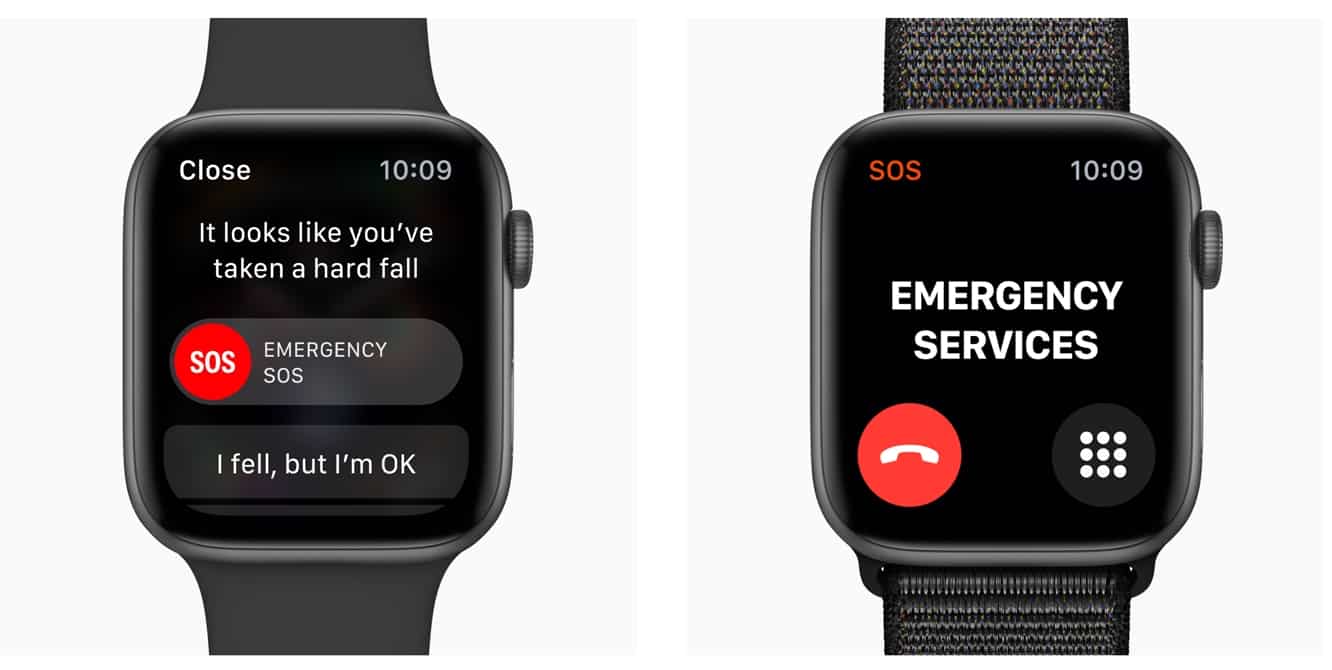
Apple has published a support document outlining the new “fall detection” feature on the Apple Watch Series 4, most notably pointing out, as reported by MacRumors, that the feature will only be automatically enabled for users who have identified themselves as 65 or older when setting up the Apple Watch or the Health app. Other users can enable the feature manually, however, by visiting the “Emergency SOS” section of the iPhone Watch app.

Fall detection on Apple Watch Series 4 only enabled by default for users 65 and over

The support document also provides more details on the Fall Detection feature, which Apple introduced at its launch event earlier this month, noting that users will be prompted with an alert after a “significant, hard fall” allowing them to call emergency services, acknowledge that they fell, but that they’re not in need of emergency assistance, or responding that they did not in fact fall — presumably the latter two options will be used to help the Watch refine its fall-detection algorithms to avoid false alerts, but also determines whether an actual fall should be recorded in the Health app.


The support document goes on to note that if the Apple Watch detects the user is immobile for more than one minute, a 15-second countdown will begin, during which time haptic feedback and audible alerts will be sounded; if there is no response after the 15-second countdown expires, a standard Emergency SOS call is automatically initiated, which includes calling emergency services and notifying your emergency contacts of your status and location, as defined in the Medical ID section of the Health app.

Apple also adds that Wrist Detection must be enabled on the Apple Watch in order for it to automatically call emergency services.

.


Latest News
The Apple Watch Series 11 46mm GPS Is $100 Off
1 Min Read
Clamshell Style iPhone Being Looked Into By Apple
1 Min Read
Foldable iPhones May Have the Largest Battery Ever
1 Min Read
Apple and TSMC’s 10-Year Collaboration May Be Ending
1 Min Read
The 13-inch M5 iPad Pro 256GB Wi-Fi Is $149 Off
1 Min Read
M5 Pro and M5 Max Chips for the MacBook Pro could Roll Out with macOS 26.3
1 Min Read
Mac Ordering Process Revamped
1 Min Read
Check Signed By Steve Wozniak and Steve Jobs Sold For $2.4 Million
1 Min Read
The Anker 140W 4-Port GaN USB-C Charger is $35 Off
1 Min Read
No iPhone Air 2 This Year, according to Latest Report
1 Min Read
New Report Corroborates Split iPhone Release Dates
1 Min Read
Apple Losing More Researchers As They Plan To Release 2 Siri Versions
1 Min Read

iLounge logo

iLounge is an independent resource for all things iPod, iPhone, iPad, and beyond. iPod, iPhone, iPad, iTunes, Apple TV, and the Apple logo are trademarks of Apple Inc.

This website is not affiliated with Apple Inc.
iLounge © 2001 - 2025. All Rights Reserved.
  • Contact Us
  • Submit News
  • About Us
  • Forums
  • Privacy Policy
  • Terms Of Use
Welcome Back!

Sign in to your account

Lost your password?









