
iLoungeiLounge
  • News
    • Apple
      • AirPods Pro
      • AirPlay
      • Apps
        • Apple Music
      • iCloud
      • iTunes
      • HealthKit
      • HomeKit
      • HomePod
      • iOS 13
      • Apple Pay
      • Apple TV
      • Siri
    • Rumors
    • Humor
    • Technology
      • CES
    • Daily Deals
    • Articles
    • Web Stories
  • iPhone
    • iPhone Accessories
  • iPad
  • iPod
    • iPod Accessories
  • Apple Watch
    • Apple Watch Accessories
  • Mac
    • MacBook Air
    • MacBook Pro
  • Reviews
    • App Reviews
  • How-to
    • Ask iLounge
Font ResizerAa
iLoungeiLounge
Font ResizerAa
Search
  • News
    • Apple
    • Rumors
    • Humor
    • Technology
    • Daily Deals
    • Articles
    • Web Stories
  • iPhone
    • iPhone Accessories
  • iPad
  • iPod
    • iPod Accessories
  • Apple Watch
    • Apple Watch Accessories
  • Mac
    • MacBook Air
    • MacBook Pro
  • Reviews
    • App Reviews
  • How-to
    • Ask iLounge
Follow US

News › Apple

AppleAppsiTunes

Apple unveils redesigned App Store web preview pages

Last updated: May 16, 2021 12:15 pm UTC
By Jesse Hollington
Apple unveils redesigned App Store web preview pages

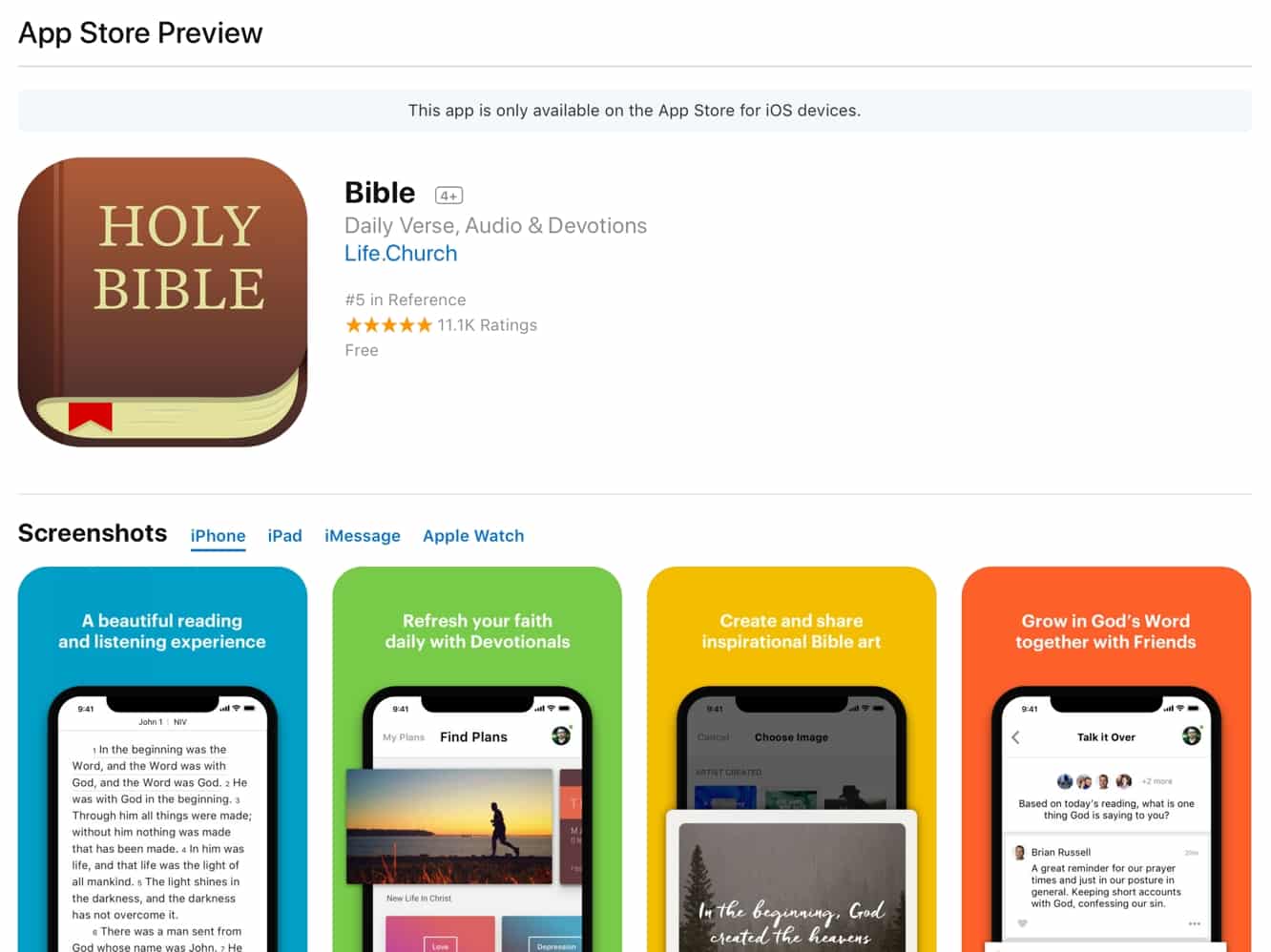
Following a major overhaul of the App Store in iOS 11, Apple has quietly revamped the App Store’s web preview pages to bring them more in line with new iOS design aesthetic. The new layout opens up with a clear banner notifying users that they will need to open the App Store on their iOS device to actually download the app, followed by a cleaner title area with a larger icon, title, subtitle, developer link, ranking/rating information, and price. Below that the new preview page now focuses on screenshots rather than a description, with links to switch between iPhone, iPad, iMessage, and Apple Watch screenshots; Apple TV screenshots are notably absent from the new preview pages, however.

Apple unveils redesigned App Store web preview pages

Description and What’s New sections come after the screenshots, followed by a more conspicuous customer reviews section that features a design first introduced in the Apple TV App Store.
Apple unveils redesigned App Store web preview pages

Notably, the new preview pages also now feature iPhone X screenshots wherever possible; however since several iPhone X apps we checked still include older screenshots, this seems like this may be based on whether the developer has submitted iPhone X screenshots and not merely whether the app has been updated for the iPhone X. Screenshots are also not clickable, and video previews are available only within the on-device App Store, not on the web-based preview pages. The redesigned reviews section also removes the ability to sort or report reviews or indicate whether they are helpful or not.


Further, only shows three reviews are shown, and it’s unclear what determines which reviews are shown.

Apple unveils redesigned App Store web preview pages

Interestingly, listings of apps by developer do not yet appear to have been redesigned, as clicking on a developer’s name on the new pages will take you to an old-style “iTunes Preview” page, complete with a “View in iTunes” button that actually still works to take you to the listing of apps with links that are accessible within iTunes itself — although as of iTunes 12.7 the individual app pages show a greyed out “iOS App Store Only” button in place of the usual download button.

Apple unveils redesigned App Store web preview pages

Naturally, the preview pages within iTunes — which shouldn’t be accessible directly in iTunes 12.7 or later — still feature the older design, omitting iPhone X screenshots but providing a button to view Apple
TV screenshots in addition to iPhone, iPad, iMessage, and Apple Watch versions, and preserving the older style ratings view.



Latest News
The 14-inch MacBook Pro with M5 Chip 16GB RAM/512GB is $250 Off
1 Min Read
Noise and Static on AirPods Pro 3 Still Unfixed
1 Min Read
New iMac with 24-inch OLED Display May be Brighter With 600 Nits
1 Min Read
The 15-inch M4 MacBook Air 256GB Is $250 Off
1 Min Read
Internal Kernel Debug Kit from Apple Reveals Tests for a MacBook with A15 Chip
1 Min Read
Apple Currently In Talks With Suppliers for Chip Assembly & Packaging of iPhones in India
1 Min Read
Apple Allows Easier Battery Replacement For M5 MacBook Pro with 14-inch Display
1 Min Read
The Apple Watch SE 3 44mm GPS is $50 Off
1 Min Read
20th Anniversary iPhone May Launch in Two Years
1 Min Read
Better Image Generation Capabilities and Apple Music Integration Coming to ChatGPT
1 Min Read
A20 Pro Chip Coming to Next Gen iPad Mini OLED
1 Min Read
Amazon has the AirTag 4 Pack Marked $29 off
1 Min Read

iLounge logo

iLounge is an independent resource for all things iPod, iPhone, iPad, and beyond. iPod, iPhone, iPad, iTunes, Apple TV, and the Apple logo are trademarks of Apple Inc.

This website is not affiliated with Apple Inc.
iLounge © 2001 - 2025. All Rights Reserved.
  • Contact Us
  • Submit News
  • About Us
  • Forums
  • Privacy Policy
  • Terms Of Use
Welcome Back!

Sign in to your account

Lost your password?








