
iLoungeiLounge
  • News
    • Apple
      • AirPods Pro
      • AirPlay
      • Apps
        • Apple Music
      • iCloud
      • iTunes
      • HealthKit
      • HomeKit
      • HomePod
      • iOS 13
      • Apple Pay
      • Apple TV
      • Siri
    • Rumors
    • Humor
    • Technology
      • CES
    • Daily Deals
    • Articles
    • Web Stories
  • iPhone
    • iPhone Accessories
  • iPad
  • iPod
    • iPod Accessories
  • Apple Watch
    • Apple Watch Accessories
  • Mac
    • MacBook Air
    • MacBook Pro
  • Reviews
    • App Reviews
  • How-to
    • Ask iLounge
Font ResizerAa
iLoungeiLounge
Font ResizerAa
Search
  • News
    • Apple
    • Rumors
    • Humor
    • Technology
    • Daily Deals
    • Articles
    • Web Stories
  • iPhone
    • iPhone Accessories
  • iPad
  • iPod
    • iPod Accessories
  • Apple Watch
    • Apple Watch Accessories
  • Mac
    • MacBook Air
    • MacBook Pro
  • Reviews
    • App Reviews
  • How-to
    • Ask iLounge
Follow US

News › Apple

AppleArticles

Apple posts removal guide for U2’s Songs of Innocence album

Last updated: May 16, 2021 4:06 pm UTC
By Jesse Hollington
Apple posts removal guide for U2’s Songs of Innocence album

Apple posts removal guide for U2’s Songs of Innocence album

Following last week’s iTunes exclusive release of U2’s new Songs of Innocence album, the company has now posted a new support article for users looking to remove the album from their iTunes libraries. During Apple’s iPhone event, Apple CEO Tim Cook and U2 frontman Bono jointly announced that the album would be distributed free to all iTunes customers, and took the unprecedented move of not only making the album available for free on the iTunes Store, but actually in fact automatically adding it directly to the music libraries of 500 million iTunes users.
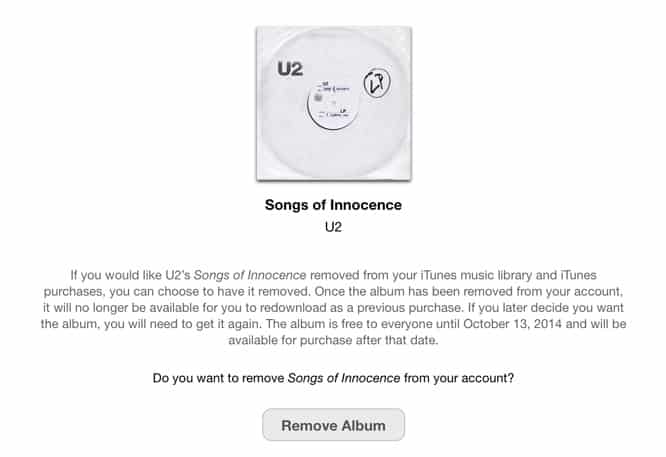

Apple posts removal guide for U2’s Songs of Innocence album

Songs of Innocence was soon pushed out as a download to users, resulting in a mix of praise and complaints.

For those who may not have fully appreciated this unexpected gift, the Apple support article, Remove iTunes gift album “Songs of Innocence” from your iTunes music library and purchases explains how users can go about deleting the album; a special SOI Removal page has been created on iTunes.com allowing users to remove the album from their iTunes music library and purchase history.

Users can permanently remove the album and will need to purchase it again after October 13, 2014 if they want to get it back—alternatively, users can choose to simply hide purchased items if they want to keep the album but not have it displayed in their music library.

.


Latest News
The Apple Watch Series 11 46mm GPS Is $100 Off
1 Min Read
Clamshell Style iPhone Being Looked Into By Apple
1 Min Read
Foldable iPhones May Have the Largest Battery Ever
1 Min Read
Apple and TSMC’s 10-Year Collaboration May Be Ending
1 Min Read
The 13-inch M5 iPad Pro 256GB Wi-Fi Is $149 Off
1 Min Read
M5 Pro and M5 Max Chips for the MacBook Pro could Roll Out with macOS 26.3
1 Min Read
Mac Ordering Process Revamped
1 Min Read
Check Signed By Steve Wozniak and Steve Jobs Sold For $2.4 Million
1 Min Read
The Anker 140W 4-Port GaN USB-C Charger is $35 Off
1 Min Read
No iPhone Air 2 This Year, according to Latest Report
1 Min Read
New Report Corroborates Split iPhone Release Dates
1 Min Read
Apple Losing More Researchers As They Plan To Release 2 Siri Versions
1 Min Read

iLounge logo

iLounge is an independent resource for all things iPod, iPhone, iPad, and beyond. iPod, iPhone, iPad, iTunes, Apple TV, and the Apple logo are trademarks of Apple Inc.

This website is not affiliated with Apple Inc.
iLounge © 2001 - 2025. All Rights Reserved.
  • Contact Us
  • Submit News
  • About Us
  • Forums
  • Privacy Policy
  • Terms Of Use
Welcome Back!

Sign in to your account

Lost your password?









