
iLoungeiLounge
  • News
    • Apple
      • AirPods Pro
      • AirPlay
      • Apps
        • Apple Music
      • iCloud
      • iTunes
      • HealthKit
      • HomeKit
      • HomePod
      • iOS 13
      • Apple Pay
      • Apple TV
      • Siri
    • Rumors
    • Humor
    • Technology
      • CES
    • Daily Deals
    • Articles
    • Web Stories
  • iPhone
    • iPhone Accessories
  • iPad
  • iPod
    • iPod Accessories
  • Apple Watch
    • Apple Watch Accessories
  • Mac
    • MacBook Air
    • MacBook Pro
  • Reviews
    • App Reviews
  • How-to
    • Ask iLounge
Font ResizerAa
iLoungeiLounge
Font ResizerAa
Search
  • News
    • Apple
    • Rumors
    • Humor
    • Technology
    • Daily Deals
    • Articles
    • Web Stories
  • iPhone
    • iPhone Accessories
  • iPad
  • iPod
    • iPod Accessories
  • Apple Watch
    • Apple Watch Accessories
  • Mac
    • MacBook Air
    • MacBook Pro
  • Reviews
    • App Reviews
  • How-to
    • Ask iLounge
Follow US

News

News

SmallCubed Mail Act-On

Last updated: May 16, 2021 1:46 pm UTC
By Jesse Hollington
SmallCubed Mail Act-On

SmallCubed Mail Act-On

SmallCubed Mail Act-On

SmallCubed Mail Act-On

SmallCubed Mail Act-On

SmallCubed Mail Act-On

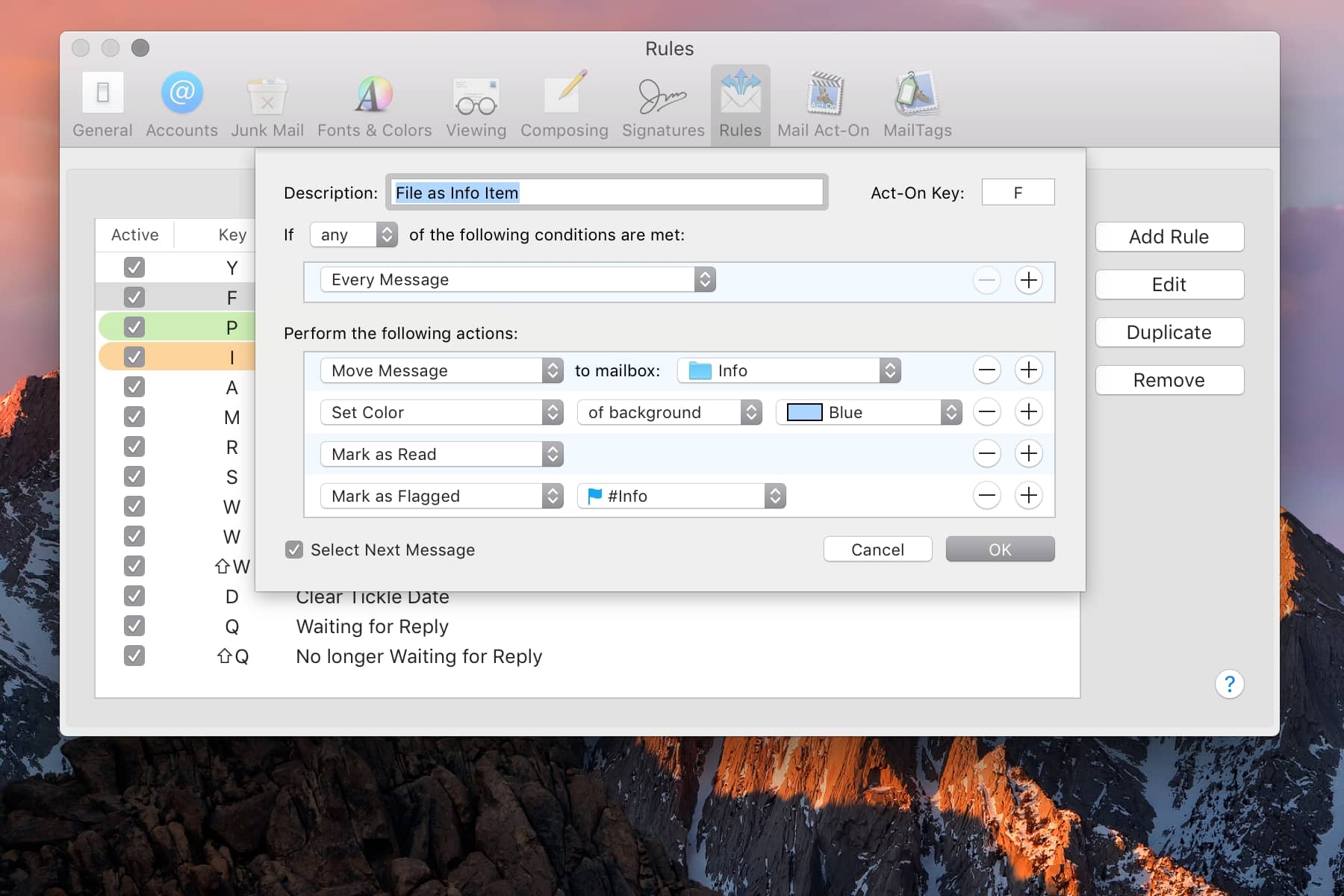
For those who aren’t quite comfortable living entirely on the web, Apple’s macOS Mail is actually a pretty capable e-mail app, providing a nice, clean user interface and all of the features that most users would need. However, like most Apple apps, power users will probably find Apple Mail to be a bit light on more advanced features, which is where third-party developers come in with to fill the gaps with plugins to extend Mail’s functionality while preserving it’s straightforward design. SmallCubed’s Mail Act-On ($30) is at the top of our list of indispensable plugins that add significant power to the Apple Mail experience — allowing you to file messages into folders using only the keyboard, set up sophisticated “macros” using standard Apple Mail rules that can be triggered using keyboard shortcuts, and even creating rules that can be applied to outgoing messages.


As if all of that wasn’t enough, Mail Act-On also bakes in the ability to create templates for quickly sending canned replies.

Once you’ve begun using Mail Act-On, the keyboard shortcuts it provides become so intuitive you’ll feel it missing when you use Apple Mail on a Mac where it’s not installed. Quick key sequences allow for messages to be very quickly filed away into folders of your choice, and if you use SmallCubed’s companion plugin, MailTags, you can even apply labels on the fly in much the same manner.


Once Mail Act-On is installed, you’ll also gain two additional tabs in the built-in Rules preferences: one for rules that are applied to outgoing messages, and one for creating rules that can be assigned to keyboard shortcuts. This allows you use the same rules-based “language” that you’re already familiar with to build sophisticated workflows where you can use a single key sequence to apply an action to a message or group of messages. Similarly, rules can be created which will apply to outgoing messages, both before sending and after sending, allowing you to change or add recipients, set your from address, or even delay sending the message based on whether it matches a given rule or not, and then automatically filing the message into a different folder after sending.



Latest News
The Apple Watch Series 11 42mm GPS is $100 Off
1 Min Read
Apple Launching A New Education Hub In India Teaching Robotics and Swift Programming
1 Min Read
Women’s and Men’s Golf Added to Apple Sports
1 Min Read
Apple Adding Civilization VII and Other Games To Apple Arcade
1 Min Read
AirPods 4 ANC Is $59 Off
1 Min Read
Apple Using 2NM Process For Their M6 and A20 Chip
1 Min Read
iPhone 18 Models Will Not Have a Big Redesign
1 Min Read
Launch of MacBook Pro M5 Pro and M5 Max Models is Approaching
1 Min Read
Get the iPad Mini 7 256GB Wi-Fi at $99 Off
1 Min Read
Mozilla Now Allows Turning AI Features Off
1 Min Read
Barcelona Passeig de Gràcia Apple Store Temporarily Closing
1 Min Read
Apple’s Plans to Enter the Smart Glasses Market is Changing the Industry
1 Min Read

iLounge logo

iLounge is an independent resource for all things iPod, iPhone, iPad, and beyond. iPod, iPhone, iPad, iTunes, Apple TV, and the Apple logo are trademarks of Apple Inc.

This website is not affiliated with Apple Inc.
iLounge © 2001 - 2025. All Rights Reserved.
  • Contact Us
  • Submit News
  • About Us
  • Forums
  • Privacy Policy
  • Terms Of Use
Welcome Back!

Sign in to your account

Lost your password?








