
iLoungeiLounge
  • News
    • Apple
      • AirPods Pro
      • AirPlay
      • Apps
        • Apple Music
      • iCloud
      • iTunes
      • HealthKit
      • HomeKit
      • HomePod
      • iOS 13
      • Apple Pay
      • Apple TV
      • Siri
    • Rumors
    • Humor
    • Technology
      • CES
    • Daily Deals
    • Articles
    • Web Stories
  • iPhone
    • iPhone Accessories
  • iPad
  • iPod
    • iPod Accessories
  • Apple Watch
    • Apple Watch Accessories
  • Mac
    • MacBook Air
    • MacBook Pro
  • Reviews
    • App Reviews
  • How-to
    • Ask iLounge
Font ResizerAa
iLoungeiLounge
Font ResizerAa
Search
  • News
    • Apple
    • Rumors
    • Humor
    • Technology
    • Daily Deals
    • Articles
    • Web Stories
  • iPhone
    • iPhone Accessories
  • iPad
  • iPod
    • iPod Accessories
  • Apple Watch
    • Apple Watch Accessories
  • Mac
    • MacBook Air
    • MacBook Pro
  • Reviews
    • App Reviews
  • How-to
    • Ask iLounge
Follow US

News › Apps

Apps

Overmacs PhotoSweeper 2.0

Last updated: May 16, 2021 4:04 pm UTC
By Jesse Hollington
Overmacs PhotoSweeper 2.0

Overmacs PhotoSweeper 2.0

Overmacs PhotoSweeper 2.0

Overmacs PhotoSweeper 2.0

Overmacs PhotoSweeper 2.0

Overmacs PhotoSweeper 2.0

Overmacs PhotoSweeper 2.0

Overmacs PhotoSweeper 2.0

Overmacs PhotoSweeper 2.0

For some of us, keeping our photos in order can be a confusing mess, and the longer you’ve been into digital photography, the more problematic this is likely to be for all but the most hardcore archivists. While Apple’s iCloud Photo Library promises to fix this going forward, chances are that between Aperture/iPhoto, Finder, and your iOS Camera Roll, some duplicate photos may have crept in somewhere along the way. Sadly, most photo management tools don’t really do a very good job of even preventing you from importing duplicates in the first place, much less finding them after the fact.


Fortunately, for those looking to tackle this problem, there’s PhotoSweeper ($10), a handy little tool provided by Overmacs that can quickly crunch through your photos — just about wherever they happen to be stored — and identify various forms of duplicates so that you can more effectively deal with them and clean up your library. We’ve been fans of PhotoSweeper for a while, and with version 2.0 it gets even faster and more intuitive.

PhotoSweeper starts up with a blank slate that you can fill with photos from your Aperture, iPhoto, or even Lightroom libraries, as well as any photos you have laying around in your file system.


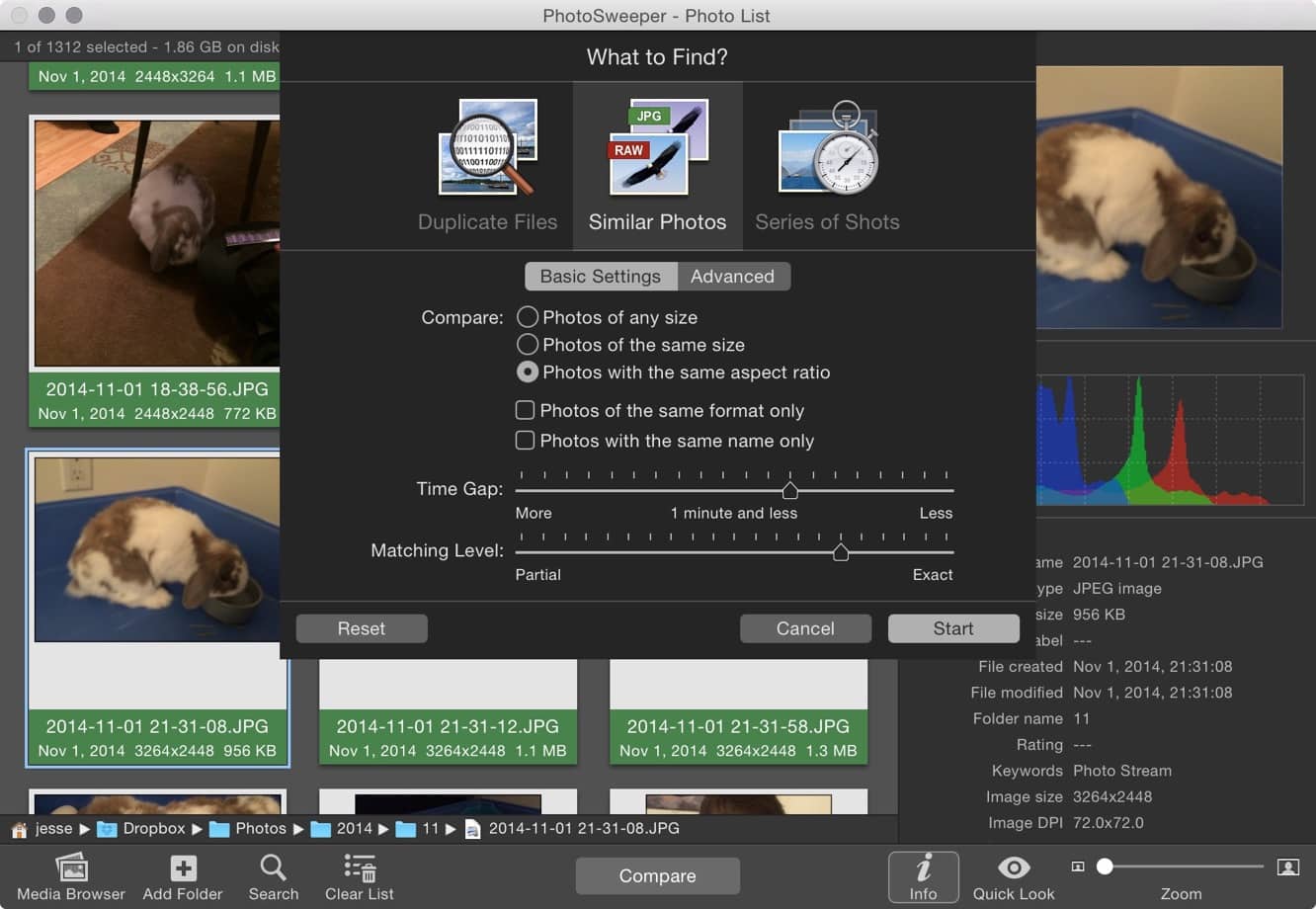
You can even add photos across multiple libraries — useful if you use both iPhoto and Lightroom, for example, and don’t want to keep your photos in both places. Once you’ve filled up the PhotoSweeper window with all of your photos, one click on the “Compare” button presents a set of easy-to-understand options for making comparisons ranging from exact duplicates to working with similar or serial photos, so you can even use the app to get rid of superfluous burst shots from your DSLR or iPhone. The initial comparison will simply present all of the matches in a different, customizable view, and you can then either go through them manually, or use PhotoSweeper’s “Auto Mark” function – a powerful feature that lets you make short work of duplicates by automatically flagging the photos you want to get rid of based on criteria you set, such as file size, date and time, rating, or which folder or library a photo is located in.



Latest News
The Apple Watch Series 11 42mm GPS is $100 Off
1 Min Read
Apple Launching A New Education Hub In India Teaching Robotics and Swift Programming
1 Min Read
Women’s and Men’s Golf Added to Apple Sports
1 Min Read
Apple Adding Civilization VII and Other Games To Apple Arcade
1 Min Read
AirPods 4 ANC Is $59 Off
1 Min Read
Apple Using 2NM Process For Their M6 and A20 Chip
1 Min Read
iPhone 18 Models Will Not Have a Big Redesign
1 Min Read
Launch of MacBook Pro M5 Pro and M5 Max Models is Approaching
1 Min Read
Get the iPad Mini 7 256GB Wi-Fi at $99 Off
1 Min Read
Mozilla Now Allows Turning AI Features Off
1 Min Read
Barcelona Passeig de Gràcia Apple Store Temporarily Closing
1 Min Read
Apple’s Plans to Enter the Smart Glasses Market is Changing the Industry
1 Min Read

iLounge logo

iLounge is an independent resource for all things iPod, iPhone, iPad, and beyond. iPod, iPhone, iPad, iTunes, Apple TV, and the Apple logo are trademarks of Apple Inc.

This website is not affiliated with Apple Inc.
iLounge © 2001 - 2025. All Rights Reserved.
  • Contact Us
  • Submit News
  • About Us
  • Forums
  • Privacy Policy
  • Terms Of Use
Welcome Back!

Sign in to your account

Lost your password?








