
iLoungeiLounge
  • News
    • Apple
      • AirPods Pro
      • AirPlay
      • Apps
        • Apple Music
      • iCloud
      • iTunes
      • HealthKit
      • HomeKit
      • HomePod
      • iOS 13
      • Apple Pay
      • Apple TV
      • Siri
    • Rumors
    • Humor
    • Technology
      • CES
    • Daily Deals
    • Articles
    • Web Stories
  • iPhone
    • iPhone Accessories
  • iPad
  • iPod
    • iPod Accessories
  • Apple Watch
    • Apple Watch Accessories
  • Mac
    • MacBook Air
    • MacBook Pro
  • Reviews
    • App Reviews
  • How-to
    • Ask iLounge
Font ResizerAa
iLoungeiLounge
Font ResizerAa
Search
  • News
    • Apple
    • Rumors
    • Humor
    • Technology
    • Daily Deals
    • Articles
    • Web Stories
  • iPhone
    • iPhone Accessories
  • iPad
  • iPod
    • iPod Accessories
  • Apple Watch
    • Apple Watch Accessories
  • Mac
    • MacBook Air
    • MacBook Pro
  • Reviews
    • App Reviews
  • How-to
    • Ask iLounge
Follow US

News › Apps

AppsReviews

Mac Gaming: Use a PlayStation 3 or Xbox 360 Controller

Last updated: May 17, 2021 1:14 pm UTC
By Nick Guy
Mac Gaming: Use a PlayStation 3 or Xbox 360 Controller

Mac Gaming: Use a PlayStation 3 or Xbox 360 Controller

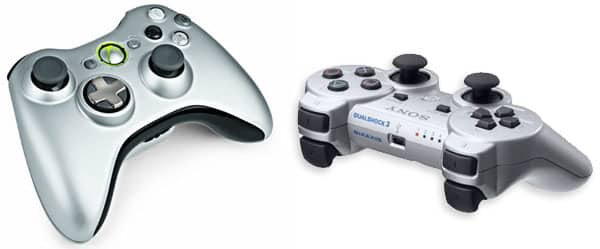
If you’ve been playing computer games for a long time, you’re probably used to keyboards and mice as substitutes for joysticks. But console gamers may prefer standard gamepads for Mac gaming, particularly given how widely available and popular they are. Luckily, it’s pretty easy to play Mac games with Sony’s PlayStation 3 and Microsoft’s Xbox 360 controllers. Start with the PS3’s DualShock 3, which uses the same Bluetooth standards embraced by every recent Mac.


You’ll need a controller as well as the USB cable—any Mini-USB to standard USB cable should do the trick. Connect the cable and controller to your computer and then open System Preferences to ensure that Bluetooth is on and discoverable. Then, hold down the PS button for three seconds and unplug the cable from the Mac. That’s it: the Sony controller will have connected with Bluetooth and be ready to go, driver-free.

Feral Interactive has a video that walks you through the process.

Microsoft makes things a bit more difficult if you want to go wireless with the Xbox 360 controller. First, you’ll need to purchase the company’s Wireless Gaming Receiver. Then, you should download and install Tattiebogle’s driver from this website.



Latest News
The 14-inch MacBook Pro with M5 Chip 16GB RAM/512GB is $250 Off
1 Min Read
Noise and Static on AirPods Pro 3 Still Unfixed
1 Min Read
New iMac with 24-inch OLED Display May be Brighter With 600 Nits
1 Min Read
The 15-inch M4 MacBook Air 256GB Is $250 Off
1 Min Read
Internal Kernel Debug Kit from Apple Reveals Tests for a MacBook with A15 Chip
1 Min Read
Apple Currently In Talks With Suppliers for Chip Assembly & Packaging of iPhones in India
1 Min Read
Apple Allows Easier Battery Replacement For M5 MacBook Pro with 14-inch Display
1 Min Read
The Apple Watch SE 3 44mm GPS is $50 Off
1 Min Read
20th Anniversary iPhone May Launch in Two Years
1 Min Read
Better Image Generation Capabilities and Apple Music Integration Coming to ChatGPT
1 Min Read
A20 Pro Chip Coming to Next Gen iPad Mini OLED
1 Min Read
Amazon has the AirTag 4 Pack Marked $29 off
1 Min Read

iLounge logo

iLounge is an independent resource for all things iPod, iPhone, iPad, and beyond. iPod, iPhone, iPad, iTunes, Apple TV, and the Apple logo are trademarks of Apple Inc.

This website is not affiliated with Apple Inc.
iLounge © 2001 - 2025. All Rights Reserved.
  • Contact Us
  • Submit News
  • About Us
  • Forums
  • Privacy Policy
  • Terms Of Use
Welcome Back!

Sign in to your account

Lost your password?








