
iLoungeiLounge
  • News
    • Apple
      • AirPods Pro
      • AirPlay
      • Apps
        • Apple Music
      • iCloud
      • iTunes
      • HealthKit
      • HomeKit
      • HomePod
      • iOS 13
      • Apple Pay
      • Apple TV
      • Siri
    • Rumors
    • Humor
    • Technology
      • CES
    • Daily Deals
    • Articles
    • Web Stories
  • iPhone
    • iPhone Accessories
  • iPad
  • iPod
    • iPod Accessories
  • Apple Watch
    • Apple Watch Accessories
  • Mac
    • MacBook Air
    • MacBook Pro
  • Reviews
    • App Reviews
  • How-to
    • Ask iLounge
Font ResizerAa
iLoungeiLounge
Font ResizerAa
Search
  • News
    • Apple
    • Rumors
    • Humor
    • Technology
    • Daily Deals
    • Articles
    • Web Stories
  • iPhone
    • iPhone Accessories
  • iPad
  • iPod
    • iPod Accessories
  • Apple Watch
    • Apple Watch Accessories
  • Mac
    • MacBook Air
    • MacBook Pro
  • Reviews
    • App Reviews
  • How-to
    • Ask iLounge
Follow US

News › Apps

Apps

Mac Attender Network Radar

Last updated: May 14, 2021 4:51 pm UTC
By Jeremy Horwitz
Mac Attender Network Radar

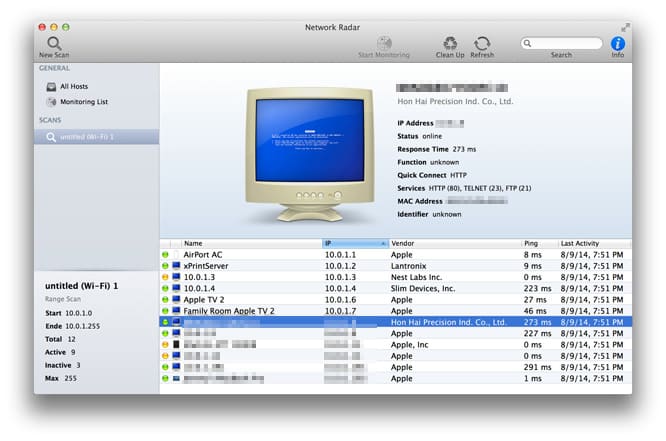
Diagnosing problems with your Mac’s wireless network can be seriously challenging — average users can’t hope to master the science of examining individual devices for issues, or getting a big picture sense of how everything’s working together. Mac Attender’s Network Radar ($20) isn’t the least expensive way to help you tackle network issues, but it’s the best-designed option we’ve seen. After you choose a wireless or wired network to scan, it presents you with a list of green/yellow/red status devices, their IP addresses, vendor information, ping speeds, and last activity times.

Mac Attender Network Radar

One glance lets you quickly determine what each device on your network is, as well as what might be slowing things down or failing to work at all. More detailed information, including the MAC Address, available services, and identifiers, can be found by clicking on any device that interests you.

Network Radar’s shortcuts go beyond just the concise initial screen.

You can double-click on devices to automatically connect to their web interfaces, a handy trick that may bring you to an older, unnamed printer in need of a firmware update. Tools such as Whois, SSH, and Telnet can help you identify and communicate with devices, and each device can be named and re-iconed for ease of future reference. A potentially troublesome device can be placed on a monitoring list and watched over time, using OS X notifications to show status changes over time.



Latest News
The 14-inch MacBook Pro with M5 Chip 16GB RAM/512GB is $250 Off
1 Min Read
Noise and Static on AirPods Pro 3 Still Unfixed
1 Min Read
New iMac with 24-inch OLED Display May be Brighter With 600 Nits
1 Min Read
The 15-inch M4 MacBook Air 256GB Is $250 Off
1 Min Read
Internal Kernel Debug Kit from Apple Reveals Tests for a MacBook with A15 Chip
1 Min Read
Apple Currently In Talks With Suppliers for Chip Assembly & Packaging of iPhones in India
1 Min Read
Apple Allows Easier Battery Replacement For M5 MacBook Pro with 14-inch Display
1 Min Read
The Apple Watch SE 3 44mm GPS is $50 Off
1 Min Read
20th Anniversary iPhone May Launch in Two Years
1 Min Read
Better Image Generation Capabilities and Apple Music Integration Coming to ChatGPT
1 Min Read
A20 Pro Chip Coming to Next Gen iPad Mini OLED
1 Min Read
Amazon has the AirTag 4 Pack Marked $29 off
1 Min Read

iLounge logo

iLounge is an independent resource for all things iPod, iPhone, iPad, and beyond. iPod, iPhone, iPad, iTunes, Apple TV, and the Apple logo are trademarks of Apple Inc.

This website is not affiliated with Apple Inc.
iLounge © 2001 - 2025. All Rights Reserved.
  • Contact Us
  • Submit News
  • About Us
  • Forums
  • Privacy Policy
  • Terms Of Use
Welcome Back!

Sign in to your account

Lost your password?








