
iLoungeiLounge
  • News
    • Apple
      • AirPods Pro
      • AirPlay
      • Apps
        • Apple Music
      • iCloud
      • iTunes
      • HealthKit
      • HomeKit
      • HomePod
      • iOS 13
      • Apple Pay
      • Apple TV
      • Siri
    • Rumors
    • Humor
    • Technology
      • CES
    • Daily Deals
    • Articles
    • Web Stories
  • iPhone
    • iPhone Accessories
  • iPad
  • iPod
    • iPod Accessories
  • Apple Watch
    • Apple Watch Accessories
  • Mac
    • MacBook Air
    • MacBook Pro
  • Reviews
    • App Reviews
  • How-to
    • Ask iLounge
Font ResizerAa
iLoungeiLounge
Font ResizerAa
Search
  • News
    • Apple
    • Rumors
    • Humor
    • Technology
    • Daily Deals
    • Articles
    • Web Stories
  • iPhone
    • iPhone Accessories
  • iPad
  • iPod
    • iPod Accessories
  • Apple Watch
    • Apple Watch Accessories
  • Mac
    • MacBook Air
    • MacBook Pro
  • Reviews
    • App Reviews
  • How-to
    • Ask iLounge
Follow US

Reviews

Reviews

Logitech Rechargeable Trackpad T651

Last updated: May 17, 2021 2:36 am UTC
By Nick Guy
Logitech Rechargeable Trackpad T651

Logitech Rechargeable Trackpad T651

Logitech Rechargeable Trackpad T651

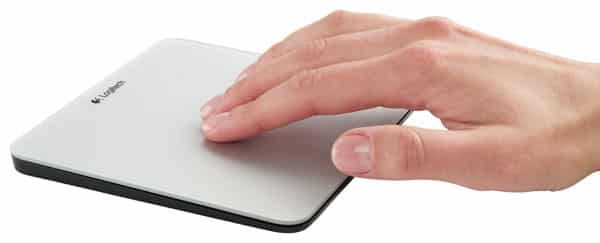
Apple’s Magic Trackpad went two and a half years without an equally appealing third-party competitor for the Mac. Finally, someone has taken a stab at improving on our favorite input device: Logitech’s Rechargeable Trackpad ($70) looks like a real contender. It has all the same features and functionalities of Apple’s controller, plus a built-in rechargeable battery, for roughly the same price.


Just like the Magic Trackpad, Rechargeable Trackpad’s top surface is glass, and it supports all the Multi-Touch gestures you’ve come to know. It has a mechanical click for button presses, as well—absolutely essential, in our opinion.

When it comes time to juice up the Bluetooth device, you simply plug in the USB cable and it’s good to go. If you don’t mind wires, you can even leave it plugged in and never worry about running out of power.

Update: A few notes from initial hands-on testing of the Rechargeable Trackpad T651, a numerical distinction that separates it from a Windows version called Rechargeable Trackpad T650. The unit has a slightly larger touchable surface than the Magic Trackpad, and it’s more obviously made from matte-finished glass; a Logitech logo on the top center casts a shadow on the metallic silver surface beneath it. Apple’s unit feels like metal and glass; Logitech’s more like glass and plastic—not hugely different, but different.


A green and blue light peers out from the upper right corner of the top surface to indicate power and pairing status before disappearing, a nice effect.

T651 also has a slanted triangular side profile, which removes Apple’s battery tube in favor of a large, flat battery pack that rests directly below the control surface. In addition to a Micro-USB port on the computer-facing back side, a power switch on the right enables T651 to be easily turned on and off, while a Bluetooth pairing button on the bottom lets you re-pair it in the event that you don’t pair it successfully the first time with your Mac, or want to use it with a second machine. Four rubber feet are on the bottom, with the lower two serving as the “click” mechanism; the click isn’t quite as satisfying as on the Magic Trackpad, but again, not terribly different.

Logitech requires you to download a driver in order to use the Trackpad fully with your Mac.


Latest News
The Apple Watch Series 11 46mm GPS Is $100 Off
1 Min Read
Clamshell Style iPhone Being Looked Into By Apple
1 Min Read
Foldable iPhones May Have the Largest Battery Ever
1 Min Read
Apple and TSMC’s 10-Year Collaboration May Be Ending
1 Min Read
The 13-inch M5 iPad Pro 256GB Wi-Fi Is $149 Off
1 Min Read
M5 Pro and M5 Max Chips for the MacBook Pro could Roll Out with macOS 26.3
1 Min Read
Mac Ordering Process Revamped
1 Min Read
Check Signed By Steve Wozniak and Steve Jobs Sold For $2.4 Million
1 Min Read
The Anker 140W 4-Port GaN USB-C Charger is $35 Off
1 Min Read
No iPhone Air 2 This Year, according to Latest Report
1 Min Read
New Report Corroborates Split iPhone Release Dates
1 Min Read
Apple Losing More Researchers As They Plan To Release 2 Siri Versions
1 Min Read

iLounge logo

iLounge is an independent resource for all things iPod, iPhone, iPad, and beyond. iPod, iPhone, iPad, iTunes, Apple TV, and the Apple logo are trademarks of Apple Inc.

This website is not affiliated with Apple Inc.
iLounge © 2001 - 2025. All Rights Reserved.
  • Contact Us
  • Submit News
  • About Us
  • Forums
  • Privacy Policy
  • Terms Of Use
Welcome Back!

Sign in to your account

Lost your password?










