
iLoungeiLounge
  • News
    • Apple
      • AirPods Pro
      • AirPlay
      • Apps
        • Apple Music
      • iCloud
      • iTunes
      • HealthKit
      • HomeKit
      • HomePod
      • iOS 13
      • Apple Pay
      • Apple TV
      • Siri
    • Rumors
    • Humor
    • Technology
      • CES
    • Daily Deals
    • Articles
    • Web Stories
  • iPhone
    • iPhone Accessories
  • iPad
  • iPod
    • iPod Accessories
  • Apple Watch
    • Apple Watch Accessories
  • Mac
    • MacBook Air
    • MacBook Pro
  • Reviews
    • App Reviews
  • How-to
    • Ask iLounge
Font ResizerAa
iLoungeiLounge
Font ResizerAa
Search
  • News
    • Apple
    • Rumors
    • Humor
    • Technology
    • Daily Deals
    • Articles
    • Web Stories
  • iPhone
    • iPhone Accessories
  • iPad
  • iPod
    • iPod Accessories
  • Apple Watch
    • Apple Watch Accessories
  • Mac
    • MacBook Air
    • MacBook Pro
  • Reviews
    • App Reviews
  • How-to
    • Ask iLounge
Follow US

Reviews

Reviews

Logitech MX Ergo Trackball

Last updated: May 16, 2021 12:26 pm UTC
By Jesse Hollington
Logitech MX Ergo Trackball

Logitech MX Ergo Trackball

Logitech MX Ergo Trackball

Logitech MX Ergo Trackball

Logitech MX Ergo Trackball

Logitech MX Ergo Trackball

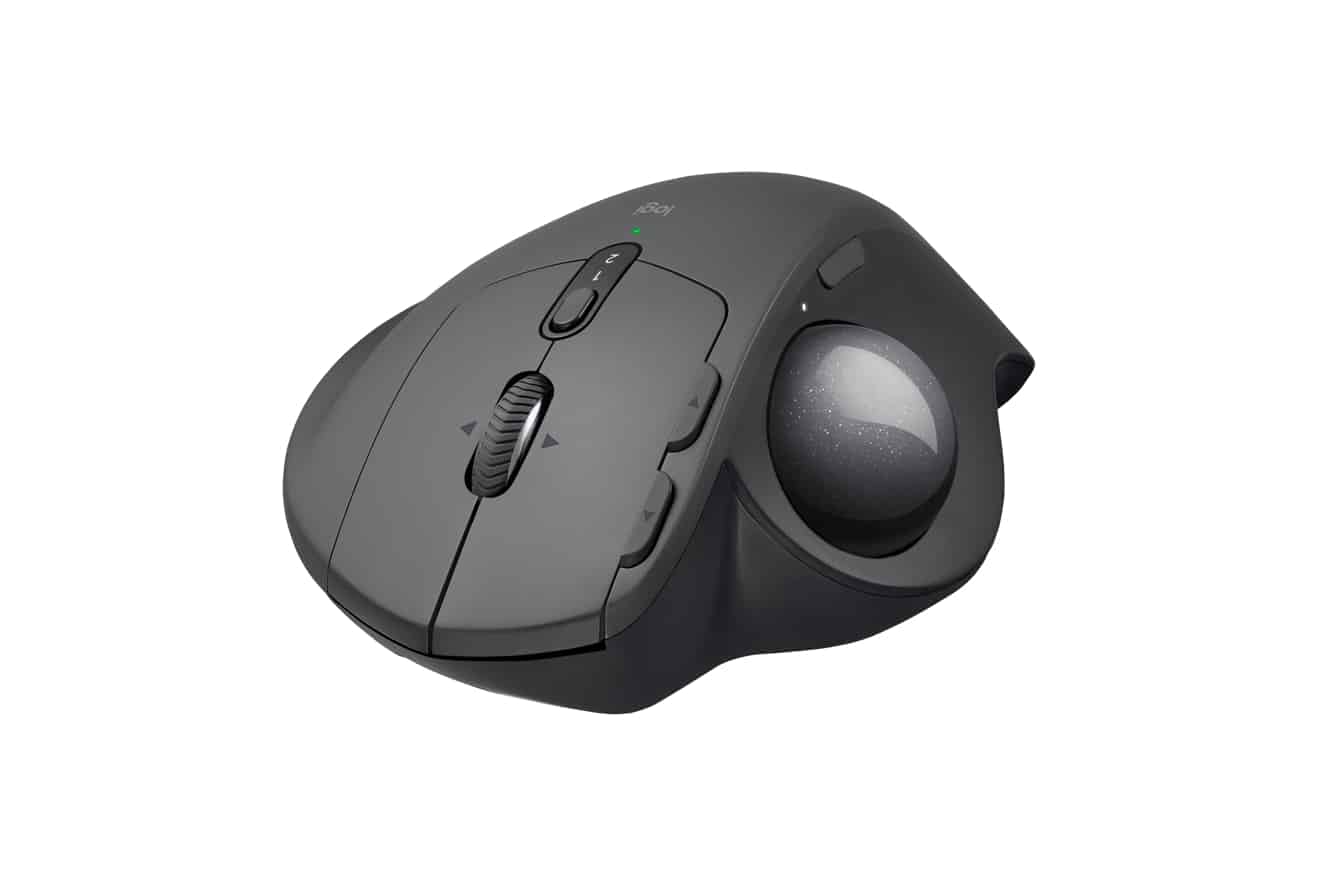
After more than a decade of mice and trackpads, Logitech has brought back the classic trackball design in the form of MX Ergo, an advanced wireless trackball designed with a focus on both comfort and precision. Inspired by feedback from Logitech trackball users over the years, MX Ergo features an adjustable hinge for comfortable ergonomics and a precision tracking feature that allows users to quickly switch cursor speeds for finer-grained navigation.


Logitech notes that MX Ergo reduces muscular strain by 20 percent compared to a standard mouse, with the adjustable hinge allowing the sideways angle to be increased from 0 to 20 degrees for better wrist posture.

The shape has also been carefully sculpted to provide full palm and finger support and features a very comfortable grip that felt great to lay our hands onto. The trackball has a very smooth and natural feel to its spin, and a button directly above can be used to switch into “precision mode,” dramatically slowing down the cursor to allow you to precisely navigate within a smaller area. A built-in rechargeable battery promises up to four months of use on a full charge, and Logitech indicates that a quick one-minute charge will get you back to a full day of use should you find yourself suddenly out of power.


Logitech’s Options software provides full customizability of all of the buttons — even the precision mode button can be reassigned to another function, providing more flexibility in apps where you don’t need fine-grained control. Logitech’s easy switch feature also allows MX Ergo to be paired with two Bluetooth devices, although we should note that it’s Bluetooth 4.2 Low Energy, so if you’re using an older Mac you’ll need to use Logitech’s bundled USB Unifying receiver to pair it up instead. If you’re a trackball fan who has never quite adjusted to life with mice and trackpads, Logitech’s MX Ergo is the peripheral you’ve been waiting for.



Latest News
The Apple Watch Series 11 46mm GPS Is $100 Off
1 Min Read
Clamshell Style iPhone Being Looked Into By Apple
1 Min Read
Foldable iPhones May Have the Largest Battery Ever
1 Min Read
Apple and TSMC’s 10-Year Collaboration May Be Ending
1 Min Read
The 13-inch M5 iPad Pro 256GB Wi-Fi Is $149 Off
1 Min Read
M5 Pro and M5 Max Chips for the MacBook Pro could Roll Out with macOS 26.3
1 Min Read
Mac Ordering Process Revamped
1 Min Read
Check Signed By Steve Wozniak and Steve Jobs Sold For $2.4 Million
1 Min Read
The Anker 140W 4-Port GaN USB-C Charger is $35 Off
1 Min Read
No iPhone Air 2 This Year, according to Latest Report
1 Min Read
New Report Corroborates Split iPhone Release Dates
1 Min Read
Apple Losing More Researchers As They Plan To Release 2 Siri Versions
1 Min Read

iLounge logo

iLounge is an independent resource for all things iPod, iPhone, iPad, and beyond. iPod, iPhone, iPad, iTunes, Apple TV, and the Apple logo are trademarks of Apple Inc.

This website is not affiliated with Apple Inc.
iLounge © 2001 - 2025. All Rights Reserved.
  • Contact Us
  • Submit News
  • About Us
  • Forums
  • Privacy Policy
  • Terms Of Use
Welcome Back!

Sign in to your account

Lost your password?








