
iLoungeiLounge
  • News
    • Apple
      • AirPods Pro
      • AirPlay
      • Apps
        • Apple Music
      • iCloud
      • iTunes
      • HealthKit
      • HomeKit
      • HomePod
      • iOS 13
      • Apple Pay
      • Apple TV
      • Siri
    • Rumors
    • Humor
    • Technology
      • CES
    • Daily Deals
    • Articles
    • Web Stories
  • iPhone
    • iPhone Accessories
  • iPad
  • iPod
    • iPod Accessories
  • Apple Watch
    • Apple Watch Accessories
  • Mac
    • MacBook Air
    • MacBook Pro
  • Reviews
    • App Reviews
  • How-to
    • Ask iLounge
Font ResizerAa
iLoungeiLounge
Font ResizerAa
Search
  • News
    • Apple
    • Rumors
    • Humor
    • Technology
    • Daily Deals
    • Articles
    • Web Stories
  • iPhone
    • iPhone Accessories
  • iPad
  • iPod
    • iPod Accessories
  • Apple Watch
    • Apple Watch Accessories
  • Mac
    • MacBook Air
    • MacBook Pro
  • Reviews
    • App Reviews
  • How-to
    • Ask iLounge
Follow US

Reviews

Reviews

Kensington Laptop Locking Station 2.0

Last updated: May 16, 2021 1:20 pm UTC
By Jesse Hollington
Kensington Laptop Locking Station 2.0

Kensington Laptop Locking Station 2.0

Kensington Laptop Locking Station 2.0

Kensington Laptop Locking Station 2.0

Kensington Laptop Locking Station 2.0

Kensington Laptop Locking Station 2.0

Kensington Laptop Locking Station 2.0

Kensington Laptop Locking Station 2.0

Few will argue that Apple’s latest MacBook Pros look great, but one small but important thing that they’ve lost in their quest for aesthetics is the traditional security slots used for locking them down. Even if you never leave your MacBook unattended in a coffee shop, there are a lot of office environments where securely tethering your MacBook is a good idea — especially since these days it’s not just the hardware you need to worry about, but the data that’s stored on your laptop falling into the wrong hands.


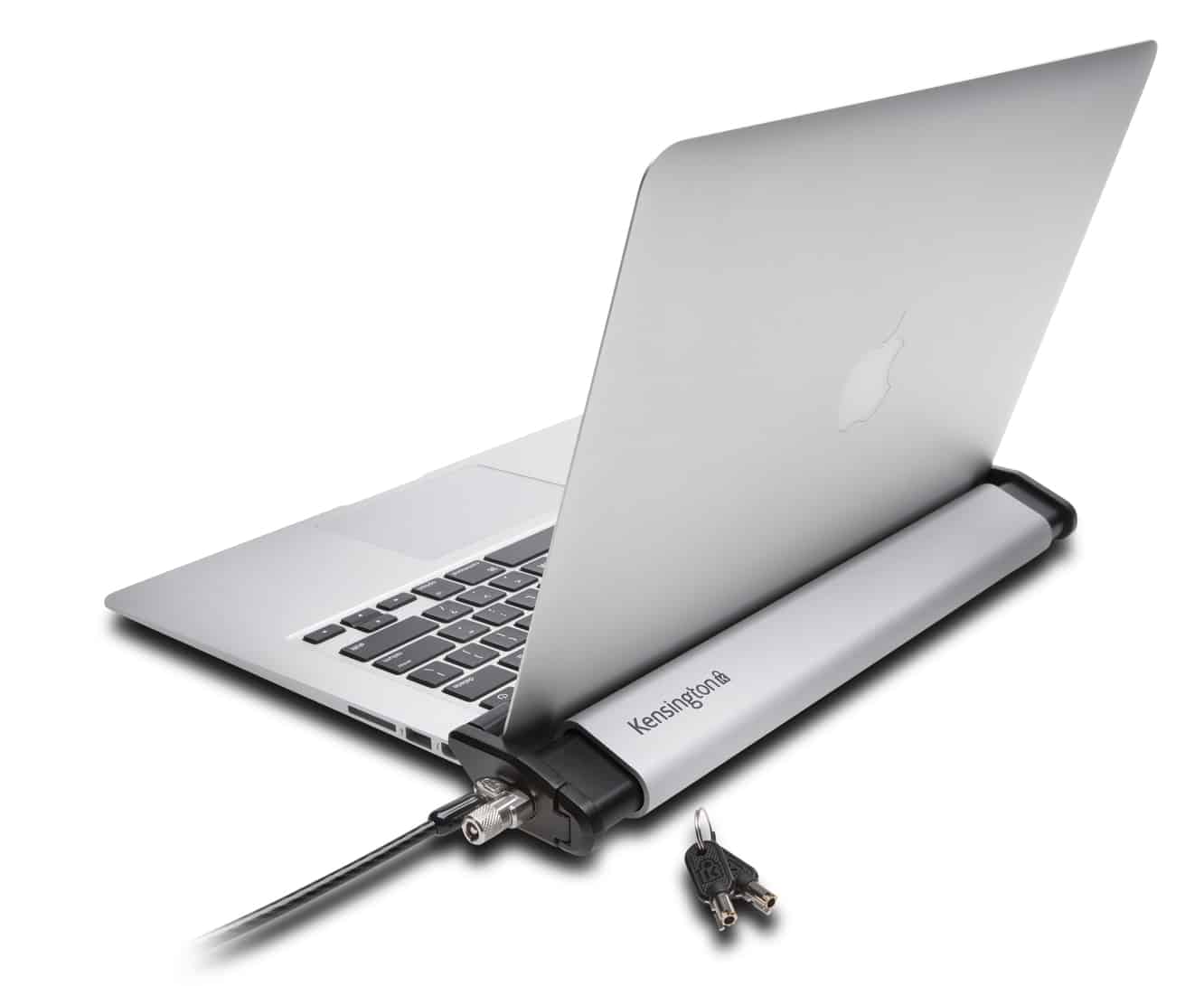
Fortunately, Kensington has a solution in the form of its new Laptop Locking Station 2.0, a base station that allows you to secure your laptop on your desk without adding unnecessary bulk, sacrificing convenience, or requiring that you install anything on your MacBook.

The Laptop Locking Station features a brushed aluminum design that fits right in with the Apple aesthetic, along with scratch resistant bumpers to protect your MacBook when inserting and removing it.

Two adjustable security arms, one on each side, allow it to accommodate anything from an 11” MacBook Air to Apple’s largest 15” MacBook Pro; once you’ve initially adjusted the arms to the width of your MacBook, inserting and removing it is simply a matter of sliding it in, flipping the right arm closed to secure it, and then attaching a security cable into the industry-standard Kensington Security Slot on the side in order to lock it into place. If you’ve already got your own security cable, you can purchase the Laptop Locking Station 2.0 by itself for $90, or with your choice of either a MicroSaver 2.0 Keyed Lock or Combination Lock for $120.



Latest News
The 14-inch MacBook Pro with M5 Chip 16GB RAM/512GB is $250 Off
1 Min Read
Noise and Static on AirPods Pro 3 Still Unfixed
1 Min Read
New iMac with 24-inch OLED Display May be Brighter With 600 Nits
1 Min Read
The 15-inch M4 MacBook Air 256GB Is $250 Off
1 Min Read
Internal Kernel Debug Kit from Apple Reveals Tests for a MacBook with A15 Chip
1 Min Read
Apple Currently In Talks With Suppliers for Chip Assembly & Packaging of iPhones in India
1 Min Read
Apple Allows Easier Battery Replacement For M5 MacBook Pro with 14-inch Display
1 Min Read
The Apple Watch SE 3 44mm GPS is $50 Off
1 Min Read
20th Anniversary iPhone May Launch in Two Years
1 Min Read
Better Image Generation Capabilities and Apple Music Integration Coming to ChatGPT
1 Min Read
A20 Pro Chip Coming to Next Gen iPad Mini OLED
1 Min Read
Amazon has the AirTag 4 Pack Marked $29 off
1 Min Read

iLounge logo

iLounge is an independent resource for all things iPod, iPhone, iPad, and beyond. iPod, iPhone, iPad, iTunes, Apple TV, and the Apple logo are trademarks of Apple Inc.

This website is not affiliated with Apple Inc.
iLounge © 2001 - 2025. All Rights Reserved.
  • Contact Us
  • Submit News
  • About Us
  • Forums
  • Privacy Policy
  • Terms Of Use
Welcome Back!

Sign in to your account

Lost your password?








