
iLoungeiLounge
  • News
    • Apple
      • AirPods Pro
      • AirPlay
      • Apps
        • Apple Music
      • iCloud
      • iTunes
      • HealthKit
      • HomeKit
      • HomePod
      • iOS 13
      • Apple Pay
      • Apple TV
      • Siri
    • Rumors
    • Humor
    • Technology
      • CES
    • Daily Deals
    • Articles
    • Web Stories
  • iPhone
    • iPhone Accessories
  • iPad
  • iPod
    • iPod Accessories
  • Apple Watch
    • Apple Watch Accessories
  • Mac
    • MacBook Air
    • MacBook Pro
  • Reviews
    • App Reviews
  • How-to
    • Ask iLounge
Font ResizerAa
iLoungeiLounge
Font ResizerAa
Search
  • News
    • Apple
    • Rumors
    • Humor
    • Technology
    • Daily Deals
    • Articles
    • Web Stories
  • iPhone
    • iPhone Accessories
  • iPad
  • iPod
    • iPod Accessories
  • Apple Watch
    • Apple Watch Accessories
  • Mac
    • MacBook Air
    • MacBook Pro
  • Reviews
    • App Reviews
  • How-to
    • Ask iLounge
Follow US

Reviews

Reviews

Henge Docks Vertical Docking Station

Last updated: May 14, 2021 4:51 pm UTC
By Jeremy Horwitz
Henge Docks Vertical Docking Station

Henge Docks Vertical Docking Station

Henge Docks Vertical Docking Station

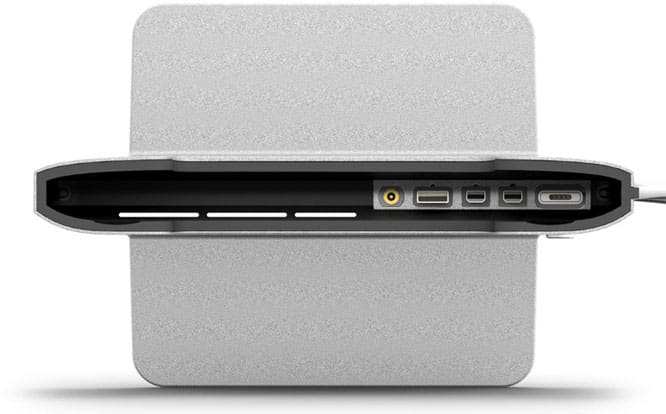
Henge Docks is back at it again, this time giving 13” and 15” Retina MacBook Pros some love with its latest Vertical Docking Stations ($90-$120). Available this month, the docks come in your choice of glossy white plastic, or, our preference, Mac-matching brushed metal. Both sizes come with pre-installed passthrough cables, making them ready to go out of the box. Because it stands your Mac up on its edge, the Vertical Docking Station is a good choice for hooking up to an external display on a desk with limited room.


Update: Our original preview from May has been updated with new hands-on impressions and photos!

After hands-on testing of the Vertical Docking Station for the 13” Retina MacBook Pro, we’re almost entirely thrilled by the design, and a little underwhelmed by the frills. The Station comes with two Mini DisplayPort ports, one USB 3.0 port, and a 3.5mm audio pass-through cable. You notably have to supply the MagSafe power adapter yourself, and if you need Thunderbolt speeds, you’ll have to swap in your own Thunderbolt cables for the ones Henge Docks includes—a process that may cosmetically scuff the cable’s housing in the name of keeping it secure. A nifty stowable hex wrench and two MagSafe-securing plastic clips are included to let you insert the MagSafe tip, obscuring its power light in the process, as well as to pull out and replace any of the pre-installed plugs.


If there’s any one thing that makes the Vertical Docking Station impressive, it’s the Mac-matching aluminum base, which feels substantial and looks pretty close to gorgeous on a desk. While your MacBook will become an unnaturally tall tower when resting atop the base, Henge did a fantastic job shaping and lining the metal, providing ample ventilation and a nice cable-managing channel in the back of the dock. Everything connects simply to the proper ports on the MacBook Pro after you complete a quick initial locking-in of the MagSafe connector, and so long as you’re satisfied with these ports, you’ll love the Vertical Docking Station.

The only issue we saw, beyond the now-hidden MagSafe power indicator light, was the way Henge handled the ports.



Latest News
The Apple Watch Series 11 46mm GPS Is $100 Off
1 Min Read
Clamshell Style iPhone Being Looked Into By Apple
1 Min Read
Foldable iPhones May Have the Largest Battery Ever
1 Min Read
Apple and TSMC’s 10-Year Collaboration May Be Ending
1 Min Read
The 13-inch M5 iPad Pro 256GB Wi-Fi Is $149 Off
1 Min Read
M5 Pro and M5 Max Chips for the MacBook Pro could Roll Out with macOS 26.3
1 Min Read
Mac Ordering Process Revamped
1 Min Read
Check Signed By Steve Wozniak and Steve Jobs Sold For $2.4 Million
1 Min Read
The Anker 140W 4-Port GaN USB-C Charger is $35 Off
1 Min Read
No iPhone Air 2 This Year, according to Latest Report
1 Min Read
New Report Corroborates Split iPhone Release Dates
1 Min Read
Apple Losing More Researchers As They Plan To Release 2 Siri Versions
1 Min Read

iLounge logo

iLounge is an independent resource for all things iPod, iPhone, iPad, and beyond. iPod, iPhone, iPad, iTunes, Apple TV, and the Apple logo are trademarks of Apple Inc.

This website is not affiliated with Apple Inc.
iLounge © 2001 - 2025. All Rights Reserved.
  • Contact Us
  • Submit News
  • About Us
  • Forums
  • Privacy Policy
  • Terms Of Use
Welcome Back!

Sign in to your account

Lost your password?








