
iLoungeiLounge
  • News
    • Apple
      • AirPods Pro
      • AirPlay
      • Apps
        • Apple Music
      • iCloud
      • iTunes
      • HealthKit
      • HomeKit
      • HomePod
      • iOS 13
      • Apple Pay
      • Apple TV
      • Siri
    • Rumors
    • Humor
    • Technology
      • CES
    • Daily Deals
    • Articles
    • Web Stories
  • iPhone
    • iPhone Accessories
  • iPad
  • iPod
    • iPod Accessories
  • Apple Watch
    • Apple Watch Accessories
  • Mac
    • MacBook Air
    • MacBook Pro
  • Reviews
    • App Reviews
  • How-to
    • Ask iLounge
Font ResizerAa
iLoungeiLounge
Font ResizerAa
Search
  • News
    • Apple
    • Rumors
    • Humor
    • Technology
    • Daily Deals
    • Articles
    • Web Stories
  • iPhone
    • iPhone Accessories
  • iPad
  • iPod
    • iPod Accessories
  • Apple Watch
    • Apple Watch Accessories
  • Mac
    • MacBook Air
    • MacBook Pro
  • Reviews
    • App Reviews
  • How-to
    • Ask iLounge
Follow US

Reviews

Reviews

Elgato Thunderbolt 2 Dock

Last updated: May 14, 2021 4:50 pm UTC
By Jeremy Horwitz
Elgato Thunderbolt 2 Dock

Elgato Thunderbolt 2 Dock

Elgato Thunderbolt 2 Dock

Elgato Thunderbolt 2 Dock

Elgato Thunderbolt 2 Dock

Elgato Thunderbolt 2 Dock

Elgato Thunderbolt 2 Dock

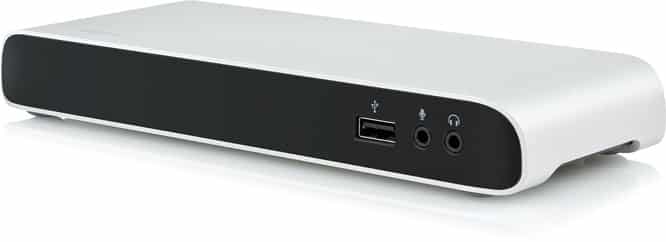
It was only a half year ago that we were writing about Elgato’s original Thunderbolt Dock, a handsome little hub designed to connect a bundle of peripherals to any Thunderbolt-equipped Mac. Now Elgato’s back with the Thunderbolt 2 Dock ($230), a remixed version that looks mostly the same but adds throughput to accommodate Thunderbolt 2-equipped Macs and accessories. Still made from aluminum with a black plastic core, the Thunderbolt 2 Dock rearranges and enhances its predecessor’s ports, shipping with a power supply, 1.6-foot Thunderbolt cable, and either one U.S. or two European wall plugs, depending on where it’s purchased. Read on for our hands-on impressions.


Just like the original model, the Thunderbolt 2 Dock includes three USB 3.0 ports, two Thunderbolt ports, an audio input port, an audio out port, an Ethernet port and an HDMI port. You can tell the old and new units apart because of their order: the new model’s front-mounted mic and headphone ports are swapped relative to the original’s, and the rear Ethernet port has moved between the HDMI and power-in ports, pushing the USB and Thunderbolt ports further left. This time, the Thunderbolt 2 ports promise up to 20Gb/second, bi-directional input and output, the HDMI port supports 1.4b (4096×2160 resolution) HDCP output, and the USB 3.0 ports include standalone 1.5-Amp power output with USB Battery Charging 1.2/UASP standard compliance. The stereo headphone output is USB-based and Dock-amplified, with a monaural mic input beside it. Elgato notes that you need to download the company’s free Thunderbolt Dock Utility to enable simultaneous all-device ejection, high-speed USB support, and iPad charging on the Mac.


In hands-on testing of the Thunderbolt 2 Dock, we had no trouble squeezing full performance out of USB 3.0 accessories: with USB 3.0-compatible Macs, a G-Drive USB ran at identical (150MB/second) speeds going through the Dock’s Thunderbolt-out versus through the computer’s USB port, and on a Mac without USB 3.0 support, we still saw 150MB/second speeds when the Dock’s Thunderbolt output. By comparison, we noticed a slight drop in Thunderbolt throughput when testing a Thunderbolt Drive+ connected to the Dock versus a direct connection to a Mac: peak write speeds dropped from around 328MB/sec to 287MB/sec across multiple tests, though read speeds stayed identical at around 373MB/sec. It’s unclear whether this speed discrepancy will be remedied with a driver update, but it’s possible.

The major thing the Thunderbolt 2 Dock offers is convenience. Your ability to connect three USB peripherals, one Thunderbolt 2 peripheral, Ethernet, HDMI and audio cables to a hub and then make a single connection to a Thunderbolt 2-equipped Mac is great, although there will obviously be some compromise in speeds when all of those connections are sharing one pipeline to your Mac.



Latest News
The 14-inch MacBook Pro with M5 Chip 16GB RAM/512GB is $250 Off
1 Min Read
Noise and Static on AirPods Pro 3 Still Unfixed
1 Min Read
New iMac with 24-inch OLED Display May be Brighter With 600 Nits
1 Min Read
The 15-inch M4 MacBook Air 256GB Is $250 Off
1 Min Read
Internal Kernel Debug Kit from Apple Reveals Tests for a MacBook with A15 Chip
1 Min Read
Apple Currently In Talks With Suppliers for Chip Assembly & Packaging of iPhones in India
1 Min Read
Apple Allows Easier Battery Replacement For M5 MacBook Pro with 14-inch Display
1 Min Read
The Apple Watch SE 3 44mm GPS is $50 Off
1 Min Read
20th Anniversary iPhone May Launch in Two Years
1 Min Read
Better Image Generation Capabilities and Apple Music Integration Coming to ChatGPT
1 Min Read
A20 Pro Chip Coming to Next Gen iPad Mini OLED
1 Min Read
Amazon has the AirTag 4 Pack Marked $29 off
1 Min Read

iLounge logo

iLounge is an independent resource for all things iPod, iPhone, iPad, and beyond. iPod, iPhone, iPad, iTunes, Apple TV, and the Apple logo are trademarks of Apple Inc.

This website is not affiliated with Apple Inc.
iLounge © 2001 - 2025. All Rights Reserved.
  • Contact Us
  • Submit News
  • About Us
  • Forums
  • Privacy Policy
  • Terms Of Use
Welcome Back!

Sign in to your account

Lost your password?








