
iLoungeiLounge
  • News
    • Apple
      • AirPods Pro
      • AirPlay
      • Apps
        • Apple Music
      • iCloud
      • iTunes
      • HealthKit
      • HomeKit
      • HomePod
      • iOS 13
      • Apple Pay
      • Apple TV
      • Siri
    • Rumors
    • Humor
    • Technology
      • CES
    • Daily Deals
    • Articles
    • Web Stories
  • iPhone
    • iPhone Accessories
  • iPad
  • iPod
    • iPod Accessories
  • Apple Watch
    • Apple Watch Accessories
  • Mac
    • MacBook Air
    • MacBook Pro
  • Reviews
    • App Reviews
  • How-to
    • Ask iLounge
Font ResizerAa
iLoungeiLounge
Font ResizerAa
Search
  • News
    • Apple
    • Rumors
    • Humor
    • Technology
    • Daily Deals
    • Articles
    • Web Stories
  • iPhone
    • iPhone Accessories
  • iPad
  • iPod
    • iPod Accessories
  • Apple Watch
    • Apple Watch Accessories
  • Mac
    • MacBook Air
    • MacBook Pro
  • Reviews
    • App Reviews
  • How-to
    • Ask iLounge
Follow US

News › Apps

Apps

Dropbox Mailbox for Mac

Last updated: May 16, 2021 4:06 pm UTC
By Jesse Hollington
Dropbox Mailbox for Mac

When it was released for the iPhone and the iPad last year, Mailbox took the iOS world by storm with its unique and streamlined approach to e-mail management on the go. Users with overflowing inboxes striving for “Inbox Zero” nirvana came to appreciate the ability to quickly and easily file messages away or defer them for later with straightforward swipe and tap gestures. The missing piece for many power users, however, was access to the same e-mail management features from the desktop—although Mailbox tied into a standard Gmail or iCloud account, users were left to look for a web interface or other e-mail client while sitting at their desk.
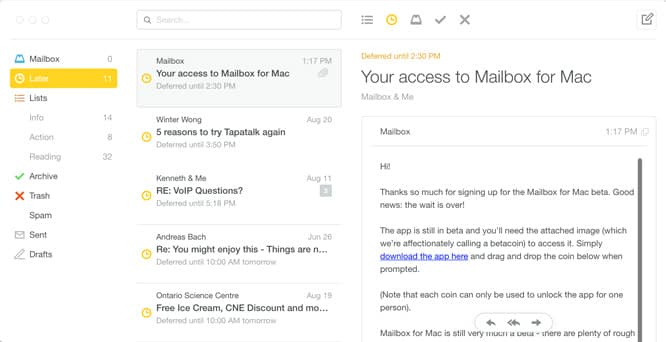

Dropbox Mailbox for Mac

That’s now changed with the public beta release of Mailbox for Mac, giving users the same powerful mail management features across both the desktop and mobile platforms.

Mailbox for Mac is currently only available in a limited public beta; much like the original iOS release, Dropbox is going with a staged rollout that serves to avoid overwhelming their servers while also generating additional demand for the product. Users can download the app right away, but you will need to sign up for a “Betacoin,” which you will need to drop into the app before you can begin actually using it.


Mailbox for Mac will be readily familiar to any user of the iOS app. All of the same features are present for deferring and filing messages, however the Mac version also brings support for synchronizing settings between devices via Dropbox, including support for draft messages synced in the same manner. A new defer option is also available allowing users to send a message to the Desktop or Mobile platforms rather than deferring to a specific time—a really handy feature when you want to get something out of the way on your iPhone but know that you’ll need to deal with it when you’re back at your desk.



Latest News
The Apple Watch Series 11 42mm GPS is $100 Off
1 Min Read
Apple Launching A New Education Hub In India Teaching Robotics and Swift Programming
1 Min Read
Women’s and Men’s Golf Added to Apple Sports
1 Min Read
Apple Adding Civilization VII and Other Games To Apple Arcade
1 Min Read
AirPods 4 ANC Is $59 Off
1 Min Read
Apple Using 2NM Process For Their M6 and A20 Chip
1 Min Read
iPhone 18 Models Will Not Have a Big Redesign
1 Min Read
Launch of MacBook Pro M5 Pro and M5 Max Models is Approaching
1 Min Read
Get the iPad Mini 7 256GB Wi-Fi at $99 Off
1 Min Read
Mozilla Now Allows Turning AI Features Off
1 Min Read
Barcelona Passeig de Gràcia Apple Store Temporarily Closing
1 Min Read
Apple’s Plans to Enter the Smart Glasses Market is Changing the Industry
1 Min Read

iLounge logo

iLounge is an independent resource for all things iPod, iPhone, iPad, and beyond. iPod, iPhone, iPad, iTunes, Apple TV, and the Apple logo are trademarks of Apple Inc.

This website is not affiliated with Apple Inc.
iLounge © 2001 - 2025. All Rights Reserved.
  • Contact Us
  • Submit News
  • About Us
  • Forums
  • Privacy Policy
  • Terms Of Use
Welcome Back!

Sign in to your account

Lost your password?








