
iLoungeiLounge
  • News
    • Apple
      • AirPods Pro
      • AirPlay
      • Apps
        • Apple Music
      • iCloud
      • iTunes
      • HealthKit
      • HomeKit
      • HomePod
      • iOS 13
      • Apple Pay
      • Apple TV
      • Siri
    • Rumors
    • Humor
    • Technology
      • CES
    • Daily Deals
    • Articles
    • Web Stories
  • iPhone
    • iPhone Accessories
  • iPad
  • iPod
    • iPod Accessories
  • Apple Watch
    • Apple Watch Accessories
  • Mac
    • MacBook Air
    • MacBook Pro
  • Reviews
    • App Reviews
  • How-to
    • Ask iLounge
Font ResizerAa
iLoungeiLounge
Font ResizerAa
Search
  • News
    • Apple
    • Rumors
    • Humor
    • Technology
    • Daily Deals
    • Articles
    • Web Stories
  • iPhone
    • iPhone Accessories
  • iPad
  • iPod
    • iPod Accessories
  • Apple Watch
    • Apple Watch Accessories
  • Mac
    • MacBook Air
    • MacBook Pro
  • Reviews
    • App Reviews
  • How-to
    • Ask iLounge
Follow US

News › Apps

Apps

Bloom Day One 2

Last updated: May 16, 2021 2:50 pm UTC
By Jesse Hollington
Bloom Day One 2

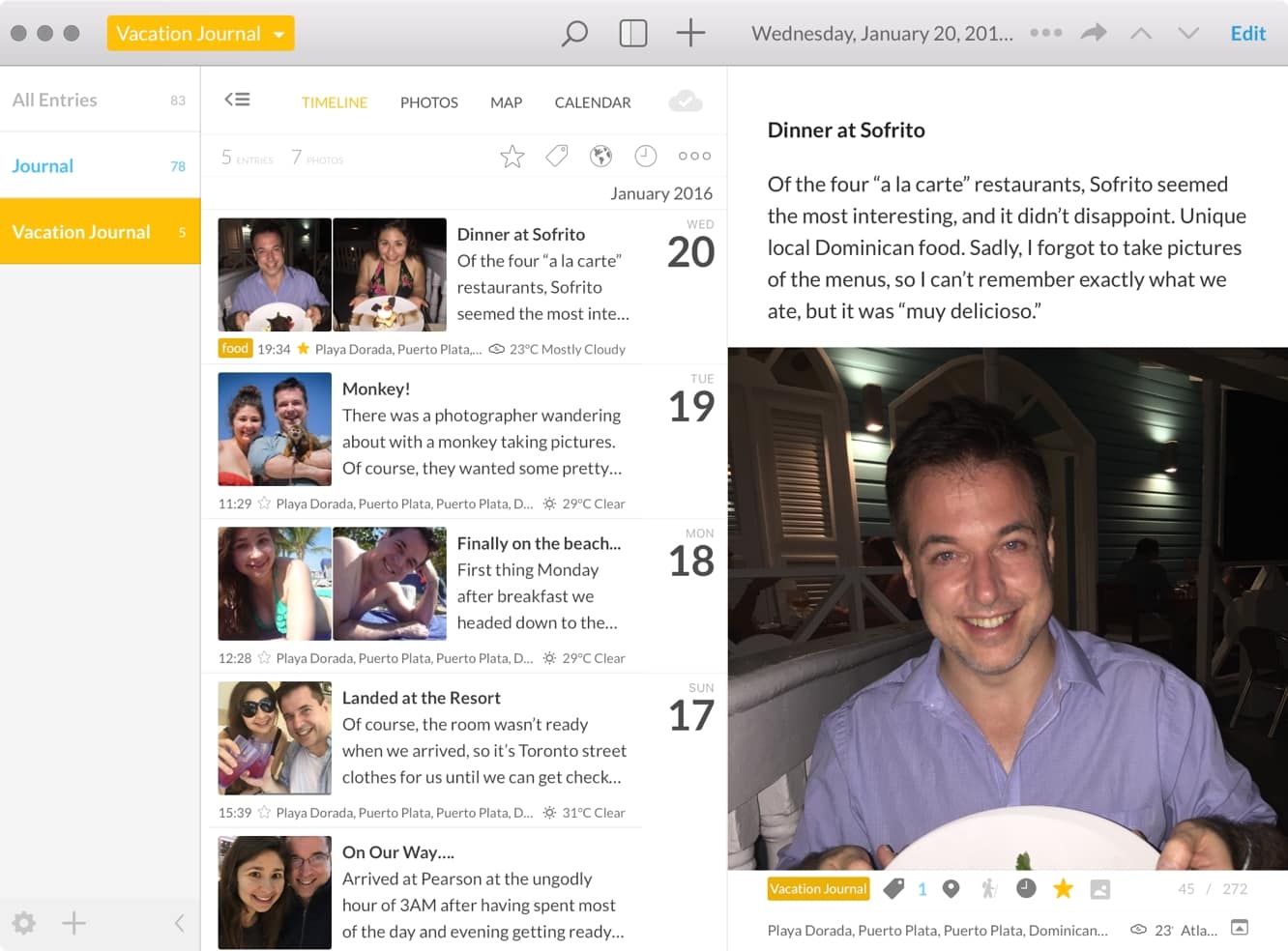
If “life blogging” or even simply keeping a personal journal of your activities is your thing, you’ll definitely be interested in taking a look at Bloom’s newly-updated Day One 2 ($20). The company has taken its popular note-taking and journaling app and pumped it up with some great new features, including support for multiple journals and multiple photos per journal entry, an entirely redesigned and modernized user interface, and the company’s own Day One Sync 2.0 service, to tie it in with other Macs and the companion Day One 2 for IOS.

Bloom Day One 2

The ability to create multiple journals means you can now more easily separate your life’s activities into appropriate journals, keeping individual collections for personal thoughts, brainstorming ideas, vacation experiences, and more. The ability to insert multiple photos into each journal entry will also now make for much richer entries, and photos can be positioned anywhere within your text, allowing you to narrate your story more effectively.

The redesigned Mac app also sports a photo view so you can get a quick glance of every photo in a journal, and you can filter by tag, location, date, activity, or even the music you were listening to at the time. Day One 2 records as much of this information as possible with each of your journal entries, even extracting location and time details from photos you insert, looking up weather information for each entry, and pulling in motion activity, music, and step count from entries created in the companion iOS app.



Latest News
The Apple Watch Series 11 42mm GPS is $100 Off
1 Min Read
Apple Launching A New Education Hub In India Teaching Robotics and Swift Programming
1 Min Read
Women’s and Men’s Golf Added to Apple Sports
1 Min Read
Apple Adding Civilization VII and Other Games To Apple Arcade
1 Min Read
AirPods 4 ANC Is $59 Off
1 Min Read
Apple Using 2NM Process For Their M6 and A20 Chip
1 Min Read
iPhone 18 Models Will Not Have a Big Redesign
1 Min Read
Launch of MacBook Pro M5 Pro and M5 Max Models is Approaching
1 Min Read
Get the iPad Mini 7 256GB Wi-Fi at $99 Off
1 Min Read
Mozilla Now Allows Turning AI Features Off
1 Min Read
Barcelona Passeig de Gràcia Apple Store Temporarily Closing
1 Min Read
Apple’s Plans to Enter the Smart Glasses Market is Changing the Industry
1 Min Read

iLounge logo

iLounge is an independent resource for all things iPod, iPhone, iPad, and beyond. iPod, iPhone, iPad, iTunes, Apple TV, and the Apple logo are trademarks of Apple Inc.

This website is not affiliated with Apple Inc.
iLounge © 2001 - 2025. All Rights Reserved.
  • Contact Us
  • Submit News
  • About Us
  • Forums
  • Privacy Policy
  • Terms Of Use
Welcome Back!

Sign in to your account

Lost your password?








