
iLoungeiLounge
  • News
    • Apple
      • AirPods Pro
      • AirPlay
      • Apps
        • Apple Music
      • iCloud
      • iTunes
      • HealthKit
      • HomeKit
      • HomePod
      • iOS 13
      • Apple Pay
      • Apple TV
      • Siri
    • Rumors
    • Humor
    • Technology
      • CES
    • Daily Deals
    • Articles
    • Web Stories
  • iPhone
    • iPhone Accessories
  • iPad
  • iPod
    • iPod Accessories
  • Apple Watch
    • Apple Watch Accessories
  • Mac
    • MacBook Air
    • MacBook Pro
  • Reviews
    • App Reviews
  • How-to
    • Ask iLounge
Font ResizerAa
iLoungeiLounge
Font ResizerAa
Search
  • News
    • Apple
    • Rumors
    • Humor
    • Technology
    • Daily Deals
    • Articles
    • Web Stories
  • iPhone
    • iPhone Accessories
  • iPad
  • iPod
    • iPod Accessories
  • Apple Watch
    • Apple Watch Accessories
  • Mac
    • MacBook Air
    • MacBook Pro
  • Reviews
    • App Reviews
  • How-to
    • Ask iLounge
Follow US

News › Apps

Apps

Ambient Design ArtRage Studio Pro

Last updated: May 14, 2021 7:10 pm UTC
By Jeremy Horwitz
Ambient Design ArtRage Studio Pro

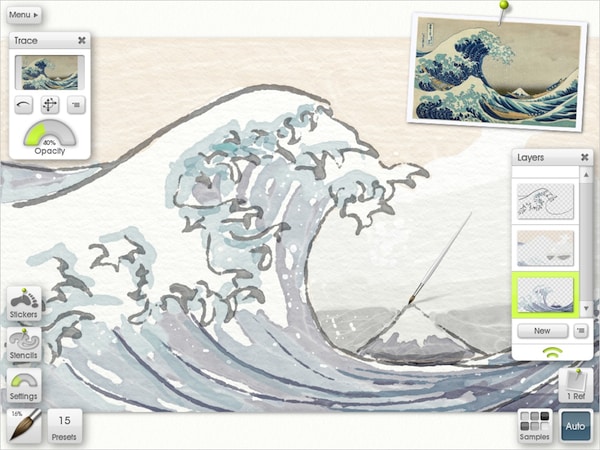
Back in ye olden days o’ Macintosh, artists could play with Apple’s MacPaint, a basic piece of software that created basic black and white drawings. When you see Ambient Design’s ArtRage Studio Pro ($80) for the Mac, you’ll be amazed at how far art programs have come since then—from metallic oils to realistic watercolors and airbrushes, ArtRage Studio Pro goes so far beyond even the tools in Photoshop and Illustrator that you can actually create digital paintings that look like physical ones. There are less expensive $20 and $40 versions, as well as an iPad edition, but Pro is loaded with extra tools and layer features that serious artists will want to have at their disposal.

Ambient Design ArtRage Studio Pro

ArtRage Studio Pro’s interface is wonderfully streamlined, and actually quite similar on the Mac to the version for the iPad. Rather than overloading you with text, the app has an attractive collection of brushes and tools in an arc off to the left, with a color picker on the right, using additional intuitive buttons and sliders to let you control layers, zoom levels, metallic effects, and preset selections. As nice as the iPad version feels, it’s missing some of the distinctive tools found here, including the “gloop pen,” shown in this screenshot, which creates brighter edges with a dimmed center—just one of many really cool textured, realistic brushes in the collection.

Ambient Design even provides settings to make the on-screen paint behave realistically with quick drying or “wet” characteristics that change how additional paint will interact with what’s there. All that’s missing is Mac App Store support; ArtRage Studio Pro can be downloaded directly from the developer’s web site.

.


Latest News
The Apple Watch Series 11 46mm GPS Is $100 Off
1 Min Read
Clamshell Style iPhone Being Looked Into By Apple
1 Min Read
Foldable iPhones May Have the Largest Battery Ever
1 Min Read
Apple and TSMC’s 10-Year Collaboration May Be Ending
1 Min Read
The 13-inch M5 iPad Pro 256GB Wi-Fi Is $149 Off
1 Min Read
M5 Pro and M5 Max Chips for the MacBook Pro could Roll Out with macOS 26.3
1 Min Read
Mac Ordering Process Revamped
1 Min Read
Check Signed By Steve Wozniak and Steve Jobs Sold For $2.4 Million
1 Min Read
The Anker 140W 4-Port GaN USB-C Charger is $35 Off
1 Min Read
No iPhone Air 2 This Year, according to Latest Report
1 Min Read
New Report Corroborates Split iPhone Release Dates
1 Min Read
Apple Losing More Researchers As They Plan To Release 2 Siri Versions
1 Min Read

iLounge logo

iLounge is an independent resource for all things iPod, iPhone, iPad, and beyond. iPod, iPhone, iPad, iTunes, Apple TV, and the Apple logo are trademarks of Apple Inc.

This website is not affiliated with Apple Inc.
iLounge © 2001 - 2025. All Rights Reserved.
  • Contact Us
  • Submit News
  • About Us
  • Forums
  • Privacy Policy
  • Terms Of Use
Welcome Back!

Sign in to your account

Lost your password?









