
iLoungeiLounge
  • News
    • Apple
      • AirPods Pro
      • AirPlay
      • Apps
        • Apple Music
      • iCloud
      • iTunes
      • HealthKit
      • HomeKit
      • HomePod
      • iOS 13
      • Apple Pay
      • Apple TV
      • Siri
    • Rumors
    • Humor
    • Technology
      • CES
    • Daily Deals
    • Articles
    • Web Stories
  • iPhone
    • iPhone Accessories
  • iPad
  • iPod
    • iPod Accessories
  • Apple Watch
    • Apple Watch Accessories
  • Mac
    • MacBook Air
    • MacBook Pro
  • Reviews
    • App Reviews
  • How-to
    • Ask iLounge
Font ResizerAa
iLoungeiLounge
Font ResizerAa
Search
  • News
    • Apple
    • Rumors
    • Humor
    • Technology
    • Daily Deals
    • Articles
    • Web Stories
  • iPhone
    • iPhone Accessories
  • iPad
  • iPod
    • iPod Accessories
  • Apple Watch
    • Apple Watch Accessories
  • Mac
    • MacBook Air
    • MacBook Pro
  • Reviews
    • App Reviews
  • How-to
    • Ask iLounge
Follow US

News › Apps

Apps

Adobe Photoshop Elements 15 + Premiere Elements 15 Bundle

Last updated: May 16, 2021 2:04 pm UTC
By Jesse Hollington
Adobe Photoshop Elements 15 + Premiere Elements 15 Bundle

Adobe Photoshop Elements 15 + Premiere Elements 15 Bundle

Adobe Photoshop Elements 15 + Premiere Elements 15 Bundle

Adobe Photoshop Elements 15 + Premiere Elements 15 Bundle

Adobe Photoshop Elements 15 + Premiere Elements 15 Bundle

Adobe has just rolled out two major new releases to its consumer-grade photo and video editing apps, Photoshop Elements 15 and Premiere Elements 15. Available in a bundle for $150 for new customers, or $120 for those upgrading from a previous version of either, the two new apps add some interesting new features for users who want to take their photo and videos to the next level but aren’t interested in the price or complexity of Adobe’s full Photoshop or Premiere applications.


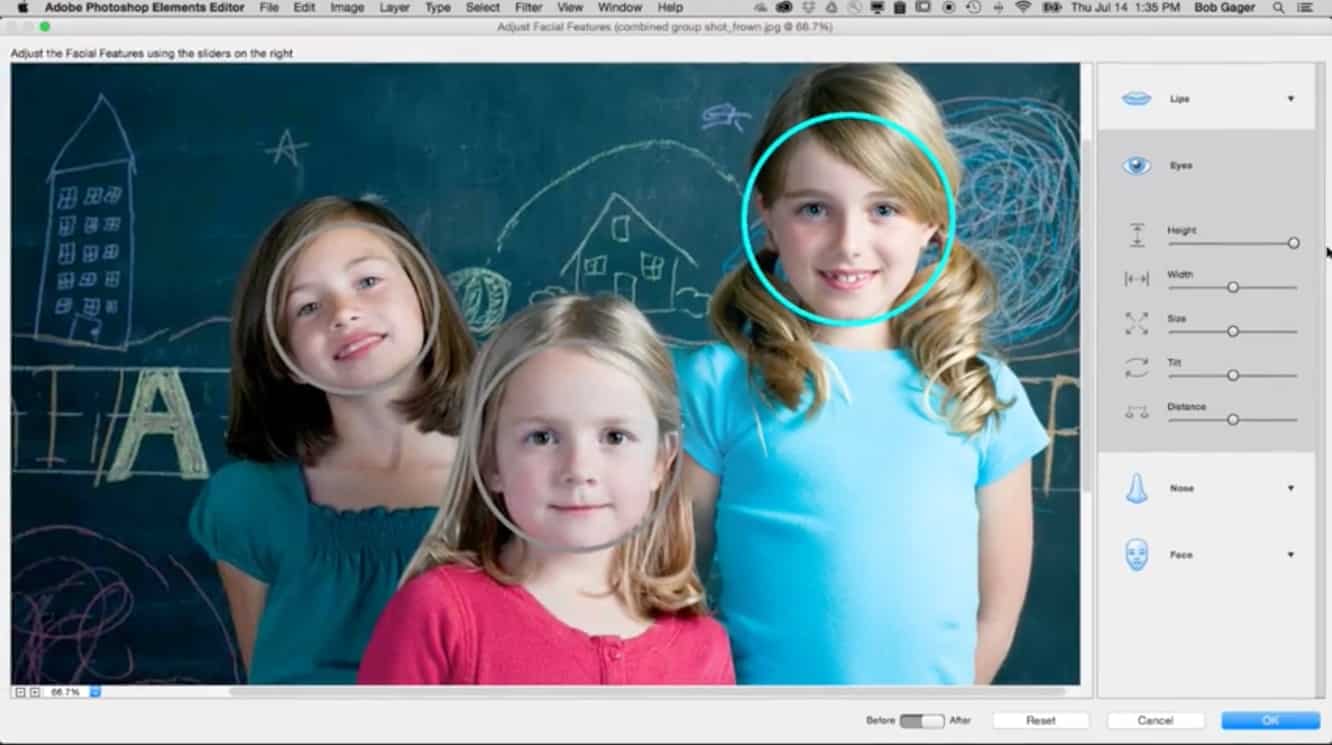
New organizational tools let you catalog your entire photo library, tracking down photos by people, places, and even subjects like sunsets, birthdays, or pets by analyzing your photos and applying smart tags based on their content. A new Facial Feature Adjustment tool lets you transform frowns into smiles and make other changes to facial features in your photos, and Premiere Elements 15 now includes a haze elimination tool to automatically sharpen your videos.

Five new guided edits in Photoshop Elements 15 let you transfer a photo into editable text, paint effects onto objects, and add motion blur, custom frames, or a collage of multiple effects to a single photo. Dynamic collages of photos and videos can also now be easily created for sharing on social media, while filters, batch editing, and social sharing have all been improved in the new version.



Latest News
The Apple Watch Series 11 46mm GPS Is $100 Off
1 Min Read
Clamshell Style iPhone Being Looked Into By Apple
1 Min Read
Foldable iPhones May Have the Largest Battery Ever
1 Min Read
Apple and TSMC’s 10-Year Collaboration May Be Ending
1 Min Read
The 13-inch M5 iPad Pro 256GB Wi-Fi Is $149 Off
1 Min Read
M5 Pro and M5 Max Chips for the MacBook Pro could Roll Out with macOS 26.3
1 Min Read
Mac Ordering Process Revamped
1 Min Read
Check Signed By Steve Wozniak and Steve Jobs Sold For $2.4 Million
1 Min Read
The Anker 140W 4-Port GaN USB-C Charger is $35 Off
1 Min Read
No iPhone Air 2 This Year, according to Latest Report
1 Min Read
New Report Corroborates Split iPhone Release Dates
1 Min Read
Apple Losing More Researchers As They Plan To Release 2 Siri Versions
1 Min Read

iLounge logo

iLounge is an independent resource for all things iPod, iPhone, iPad, and beyond. iPod, iPhone, iPad, iTunes, Apple TV, and the Apple logo are trademarks of Apple Inc.

This website is not affiliated with Apple Inc.
iLounge © 2001 - 2025. All Rights Reserved.
  • Contact Us
  • Submit News
  • About Us
  • Forums
  • Privacy Policy
  • Terms Of Use
Welcome Back!

Sign in to your account

Lost your password?








