
iLoungeiLounge
  • News
    • Apple
      • AirPods Pro
      • AirPlay
      • Apps
        • Apple Music
      • iCloud
      • iTunes
      • HealthKit
      • HomeKit
      • HomePod
      • iOS 13
      • Apple Pay
      • Apple TV
      • Siri
    • Rumors
    • Humor
    • Technology
      • CES
    • Daily Deals
    • Articles
    • Web Stories
  • iPhone
    • iPhone Accessories
  • iPad
  • iPod
    • iPod Accessories
  • Apple Watch
    • Apple Watch Accessories
  • Mac
    • MacBook Air
    • MacBook Pro
  • Reviews
    • App Reviews
  • How-to
    • Ask iLounge
Font ResizerAa
iLoungeiLounge
Font ResizerAa
Search
  • News
    • Apple
    • Rumors
    • Humor
    • Technology
    • Daily Deals
    • Articles
    • Web Stories
  • iPhone
    • iPhone Accessories
  • iPad
  • iPod
    • iPod Accessories
  • Apple Watch
    • Apple Watch Accessories
  • Mac
    • MacBook Air
    • MacBook Pro
  • Reviews
    • App Reviews
  • How-to
    • Ask iLounge
Follow US

News › Apps

Apps

Adobe Photoshop and Premiere Elements 14

Last updated: May 16, 2021 3:23 pm UTC
By Jesse Hollington
Adobe Photoshop and Premiere Elements 14

Adobe Photoshop and Premiere Elements 14

Adobe Photoshop and Premiere Elements 14

Adobe Photoshop and Premiere Elements 14

Adobe Photoshop and Premiere Elements 14

Adobe Photoshop and Premiere Elements 14

Adobe Photoshop and Premiere Elements 14

Adobe Photoshop and Premiere Elements 14

Adobe Photoshop and Premiere Elements 14

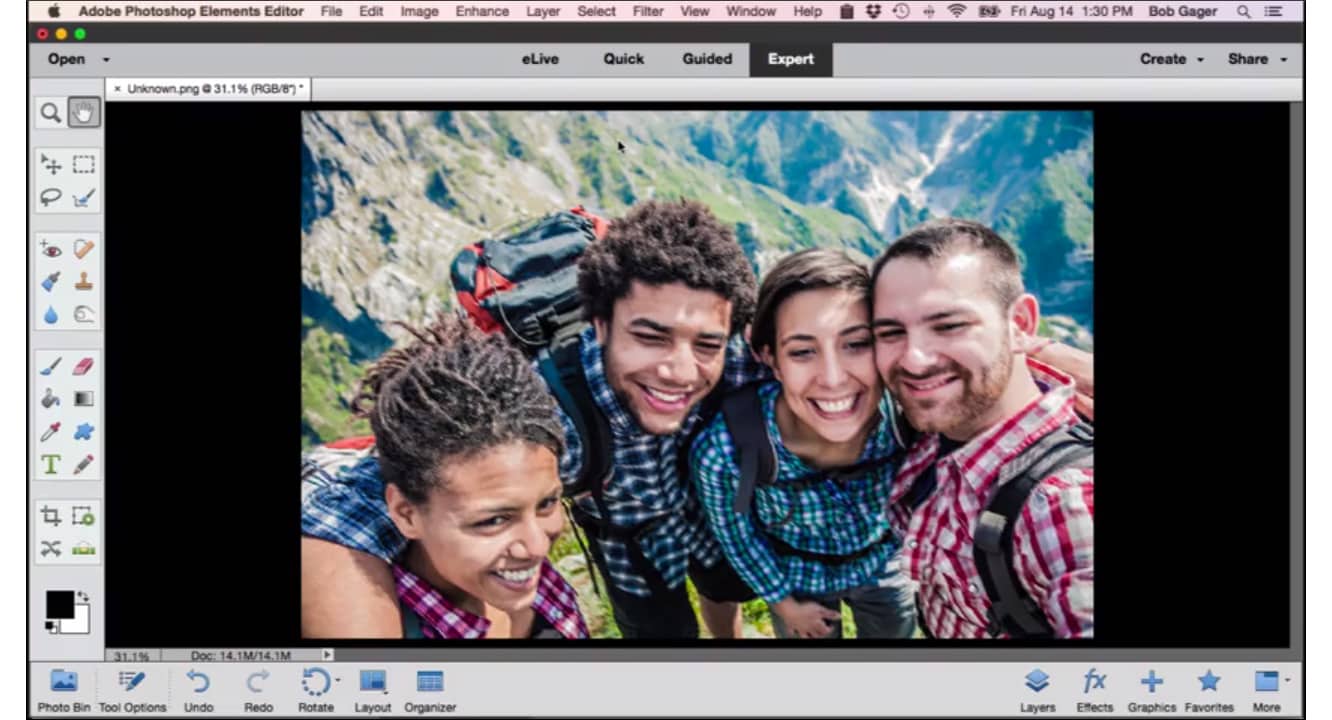
If you’re looking for a photo or video editing solution and don’t want to break the bank with Adobe’s full “pro” editions of Photoshop or Premiere, the good news is that you can still stay in the Adobe family with its reasonably powerful “prosumer” Elements editions. Freshly updated new versions of Adobe Photoshop Elements 14 ($100) and Adobe Premiere Elements 14 ($100) gain several handy new features bringing them a bit closer to their much more powerful siblings, while also refining the user interface for more ease of use.


Photoshop Elements 14 now includes tools for removing camera shake and haze, bringing over some of the features from the 2015 Creative Cloud update to Photoshop CC.

Selection tools have also been enhanced to provide more granularity for selecting fine details, and Guided Edits take you through common tasks step by step, such as adding a sense of motion to your photos or resizing them to a specific frame size. A new Quick Edit mode also allows you to rotate and make quick fixes a lot faster than before, and Elements can analyze subject, color, and lighting to provide tailored effects for your photos. Searching features have also been enhanced, adding facial recognition to allow you to find photos of specific people later, view photos and videos on a map based on where they were taken, and organize photos and videos based on the events they capture.


Premiere Elements 14 also adds places and event support as well as Guided Edits that allow you to perform tasks such as popping colors out in a scene, creating slow-motion and fast-motion effects, and more. Premiere Elements 14 also adds 4K video support, enhanced audio tuning controls, motion titles, and enhanced export features that provide recommended settings for everything from an iPad or iPod to a 4K TV, in both 4:3 and 16:9 formats. Adobe Photoshop Elements 14 and Adobe Premiere Elements 14 are available from the Adobe Online Store for $100 each, or $150 together in a bundle; users can upgrade from a prior version for $80 each, or $120 in a bundle.



Latest News
The Apple Watch Series 11 42mm GPS is $100 Off
1 Min Read
Apple Launching A New Education Hub In India Teaching Robotics and Swift Programming
1 Min Read
Women’s and Men’s Golf Added to Apple Sports
1 Min Read
Apple Adding Civilization VII and Other Games To Apple Arcade
1 Min Read
AirPods 4 ANC Is $59 Off
1 Min Read
Apple Using 2NM Process For Their M6 and A20 Chip
1 Min Read
iPhone 18 Models Will Not Have a Big Redesign
1 Min Read
Launch of MacBook Pro M5 Pro and M5 Max Models is Approaching
1 Min Read
Get the iPad Mini 7 256GB Wi-Fi at $99 Off
1 Min Read
Mozilla Now Allows Turning AI Features Off
1 Min Read
Barcelona Passeig de Gràcia Apple Store Temporarily Closing
1 Min Read
Apple’s Plans to Enter the Smart Glasses Market is Changing the Industry
1 Min Read

iLounge logo

iLounge is an independent resource for all things iPod, iPhone, iPad, and beyond. iPod, iPhone, iPad, iTunes, Apple TV, and the Apple logo are trademarks of Apple Inc.

This website is not affiliated with Apple Inc.
iLounge © 2001 - 2025. All Rights Reserved.
  • Contact Us
  • Submit News
  • About Us
  • Forums
  • Privacy Policy
  • Terms Of Use
Welcome Back!

Sign in to your account

Lost your password?








