
Pros: A simple TiVo-to-iPod transferring utility for PC users, released by the makers of TiVo hardware.
Cons: Program takes a lot of time to transfer and convert TiVo files to iPod format, without offering commercial removal or user-adjustable quality features found in competing products. Does little better than free program it competes against. Provides no way for users to correct inaccurate metadata tags, which can’t be fixed in iTunes, and require a separate program.
Since Apple introduced the fifth-generation iPod (“with video”) last year, millions of prospective video watchers have been faced with a serious question: “how can I get videos to actually play on one of those?” There are two major obstacles: finding content (such as TV shows, music videos, and movies), and converting it into one of the iPod’s only two video formats (MPEG-4 and H.264). We catalogued all of the current alternatives in our most recent Free iPod Book, but as we’ve noted, an ideal solution for TV viewers would be to have a single smart device that records videos in a format that can instantly be watched on TVs or transferred to iPods.
Several companies have tackled this challenge from different angles, none as well as we would have liked. In concept, Neuros has the best solution with the $150 MPEG-4 Recorder 2 (iLounge rating: C), a standalone hardware box that records TV shows that can be played back on TVs, iPods, and other MPEG-4 devices such as computers. But in execution, the Recorder 2’s old VCR-like interface and recording limitations are far below what today’s consumers expect, and recordings are on the grainy side. By comparison, Elgato Systems’ $200-and-up Eye TV 2 solutions (iLounge rating: B) do a very impressive job of recording TV shows and include a great program guide that makes the process easy, but requires that you leave a Mac computer on during recording, and doesn’t save videos directly into iPod-compatible formats. A time-consuming, but user involvement-free conversion process is required after the original recording has finished.
The latest to come on board is TiVo, maker of what we feel to be the best standalone digital video recorders we’ve seen – these boxes are a few steps above a Neuros Recorder with EyeTV 2 software inside. Using a highly intuitive program guide with an integrated smart search engine, they record your chosen videos onto a hard drive and display them on a home TV.
TiVo’s boxes have only two problems: their processors are fairly slow, and based on the older MPEG-2 format, rather than iPod-compatible MPEG-4. Consequently, it’s not enough to record a video on your TiVo and just connect an iPod to one of its USB ports: you need to transfer the video from TiVo to a Windows XP or 2000 PC using a free program called TiVo Desktop, then use the PC to convert it into an iPod-ready format. You’ll need a few “not in the box” items to do this: a wired or wireless USB network adapter ($20-50), an Ethernet cable or wireless networking hardware, and conversion software.
To that end, TiVo has released a $25 TiVo Desktop upgrade called TiVo Desktop Plus – it’s actually just a serial number to unlock a conversion utility already built into TiVo Desktop. This competes with a program from TV Harmony called AutoPilot, which does much of what Desktop Plus offers, only for free – and better.

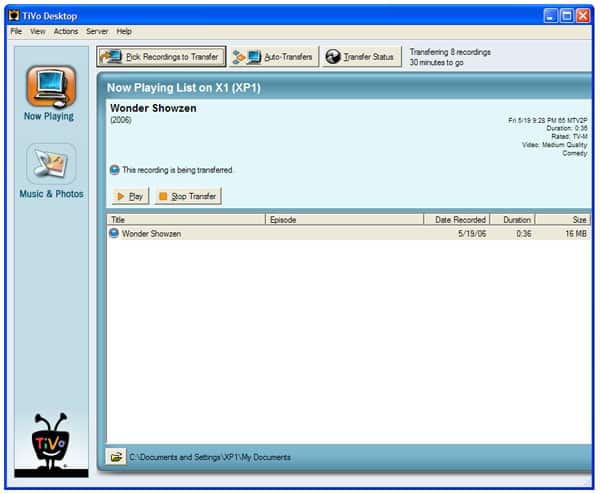
On a positive note, using Desktop Plus is very simple: after you’ve gone into its Preferences menu (above) and told the program to “Convert to portable media device format,” you’ll want to choose MPEG-4-compatible devices and click OK. Then, from the program’s main window, you click on the “Pick Recordings to Transfer” button (below), which calls up a list of programs on your TiVo box, and lets you select them individually or en masse. When you click on the Start Transfer button, files begin to transfer from the TiVo box to your computer, a process that will take roughly a minute or more per minute of the show if you’ve recorded on medium-grade recording quality, more or less depending on whether you’ve used less or more aggressive video compression.

The next step in the process is wholly automated. Once a video file has been entirely received on your computer – not when it’s partially or mostly finished – it’s converted to iPod format in the background by a desktop tray application called TiVo Server, which chugs along file by file until your specified conversion queue is entirely finished. You won’t really know how much time remains in the process – the Server only indicates percentages complete, and then, on a per-file basis.


At the end of the process, you’ll get what’s below: a fully converted, 320×240 video file that’s ready to play on your iPod.
And yes, it does play just fine on 5G iPods and computers, looking pretty good – better than the Neuros video, for sure, and very close to the exact same video downloaded from the iTunes Music Store for $1.99. It’s also tagged with TV Show and other metadata details the iPod and iTunes can understand. Minimal user involvement is required, but a lot of time will pass – most likely longer than it would take you to just sit down and watch each show from beginning to end. The idea here is to let the process happen in the background while you’re doing other things, or better yet, overnight. Desktop Plus even lets you schedule automatic transfers, and handles all the heavy lifting for you while you sleep.

To quantify what we mean by “pretty good” when describing Desktop Plus’s video quality, here’s a comparison shot that shows a direct comparison between the 320×240 video files sold through iTunes, generated by Desktop Plus, and finally, generated by AutoPilot. You’ll notice that the Desktop Plus video is a little blurrier than the iTMS video; the original image is also a hint more washed out. The AutoPilot video – created from the exact same TiVo-stored file – is a little brighter and more detailed, closer to the iTMS direct transfer. You’ll barely be able to tell the difference on an iPod screen, but on an iTunes-ready PC, you’ll notice the AutoPilot improvement more easily.

Our real problems with Desktop Plus – at least, version 2.3 – can be summed up in three words: speed, user-adjustability, and competition. The total time required for Desktop Plus’s processing and transferring is considerably longer than that demanded by other options we’ve tested, and only becomes bearable if you’re willing to let your computer run video processing tasks for what could be hours.











