
Pros: A three-tubed, 21-pound metal iPod speaker system, with two tubes that separate left and right audio at the top, and a large, down-firing subwoofer at the bottom of an almost 43-inch tall base. Delivers stronger bass thump than most all-in-one speakers at or below its price point, includes user-controllable bass and treble levels. Very good Infrared remote control.
Cons: Midrange and clarity are not standouts at this price level. Nichey size and shape will appeal more to some than others, especially given that most similarly space-consuming, multi-component speakers in this price range provide superior stereo separation. Small cosmetic and functional imperfections detract from otherwise solid build quality and design.
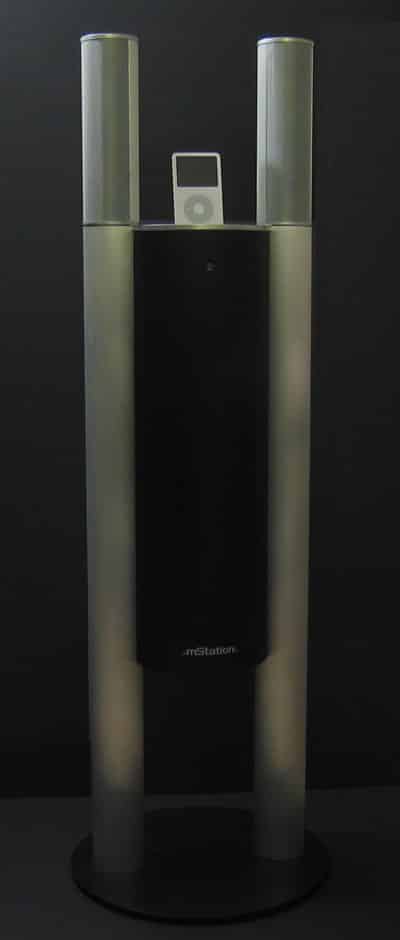
Weighing 21 pounds, this unique metal and plastic speaker tower from mStation stands almost four feet tall, and features a total of five drivers: four total high- and mid-range drivers in rotatable top pipes, and one down-firing 5.25″ subwoofer in the center. An iPod dock sits in the center of the two top pipes, along with volume and track controls; a remote control, audio cable, USB cable, and plastic dock inserts are also included.
If you have $300 burning a hole in your pocket, there are now many one-piece iPod docking speakers you can consider – some more unique-looking than others.
In much the same vein as Ignitek’s earlier iCarrier (iLounge rating: B), mStation has released the Tower 2.1 Stereo ($300), a floorstanding audio system that contains left channel, right channel, and subwoofer drivers in a super tall, iPod-docking enclosure. The mStation design is larger, at nearly 43” tall and 14” in diameter, and almost entirely made of metal, housing all five drivers inside of three tubes. Together, mStation’s components weigh 21 pounds, and possess 60 watts of power – a bit more than the 45 watts total found in Ignitek’s iCarrier.
As with iCarrier, four of Tower’s drivers sit to the left and right of an iPod dock, here in silver tubes that are connected only after you open mStation’s box. The fifth driver – a large subwoofer – sits roughly two feet underneath the dock, firing downwards at a matching black base, rather than serving as the base and firing from the side as iCarrier’s integrated subwoofer did. mStation also includes an Infrared remote control, three dock resizers for full-sized iPods, nanos, and minis, plus a plate to cover the dock for use with an iPod shuffle, 1G/2G iPod, or non-iPod device, a power cable, audio cable, and USB cable. The USB cable lets you use the dock with a computer for iPod synchronization and charging – even if the Tower is unplugged – and the audio cable brings input from non docking iPod headphone ports into the speakers.
Both use ports found on the back of Tower’s top dock surface.


Given the glut of iPod docking speakers now available from major manufacturers, we weren’t expecting to be impressed by an offering from a relatively new player, but Tower does a pretty good job for what it is – a non-audiophile stereo that’s designed to look interesting and sound good enough for most people. If you’re a fan of strong bass and equate that with good sound, you’ll be surprised by its low-end horsepower: there’s way more thump in the bass than in Altec’s tubular inMotion iM7 (iLounge rating: A-), and the 5.25” subwoofer is just as brawny as the one in Ignitek’s iCarrier. Adjustable bass and treble controls on the unit’s included remote control give you the ability to boost both high-end and low-end response above the levels of Apple’s iPod Hi-Fi (iLounge rating: B) – the differences are noticeable on both ends of the spectrum – though it takes a bit of button-tweaking to get the Tower’s sound balance tuned to a level that’s similar to Altec’s or Apple’s.

That’s primarily because we weren’t blown away with the clarity of Tower’s sound – it’s nothing special given the unit’s size, materials, and price – and because it’s not as well-tuned across any part of the spectrum, especially in the midrange, as the iM7 or Hi-Fi. Given that the Hi-Fi’s a bit more expensive, that’s not surprising, but since the iM7 can be had for under $200 these days, we’re not so impressed; except for the bass thump, why buy something so large when something smaller (and portable) sounds as good? Additionally, like iCarrier, iM7, and iPod Hi-Fi, Tower situates its left- and right-channel speakers around ten inches from each other, a distance that normally doesn’t afford much stereo separation unless you’re sitting up close. mStation lets you turn the left and right tube enclosures gently from 90-degree (straight on) angles 20 degrees to their sides for modestly added separation.
Like iCarrier, Tower is also not without its minor cosmetic faults. There were a number of small blemishes in our review sample’s paint and metal that can’t be seen from a distance, and the unit’s included remote control uses cheap-feeling membrane buttons that were occasionally sticky and less responsive than we’d prefer.











