
Pros: A simple white and gray wireless remote and receiver that enable you to wirelessly control your 4G, 5G or mini iPod from a 50-foot distance, and/or through walls and fabrics. Included belt clip and Velcro remote holder enable outdoor use.
Cons: Look, feel, and practicality of iPod receiver are unimpressive by comparison with company’s prior versions of the product, as well as proper docking remote systems; iPod can’t be stood up on its own with AirClick attached, or attached to chargers, docks, speakers, or other accessories, except through its headphone port. Dock Connector is not perfectly straight on our review unit. Fewer buttons/functions than certain earlier iPod remotes.
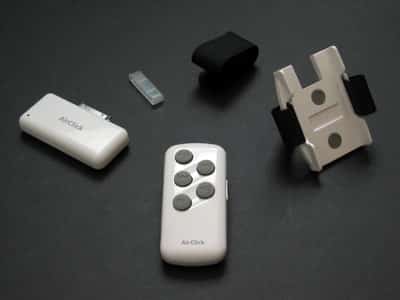
Nine months ago, we reviewed and very much liked Griffin’s AirClick Remote Control (iLounge rating: A-), which was briefly the most powerful iPod wireless remote control available. But two things have changed since then: first, rival company ABT released iJet, a competing iPod wireless remote that outperformed the old AirClick on distance by a factor of two. Second, Apple removed the top-mounting accessory port from its most recent iPod models – iPod nano and the fifth-generation iPod (with video) – forcing every remote control maker to re-do its perfectly good product in the process.
But changing top-mounting accessories into bottom-mounting ones isn’t as simple as it sounds. Besides the physical challenge of finding something that works with the now numerous iPod thicknesses, developers have to consider the iPod’s bottom Dock Connector port, which is also used to connect to docks, speaker systems, and power sources.
Unless a bottom-mounting accessory is designed with a pass-through port – one supported by other products – you won’t be able to charge your iPod and use the accessory at the same time. And there are worse consequences, too.
Unfortunately for Griffin, no accessory has been more negatively affected by this change than AirClick, which has become much less useful in its newer, Dock Connecting form ($40). If you’re interested in the history of this product and its prior usefulness, we’d strongly urge you to read our earlier review, which goes into the details. In summary, an iPod attached to the old AirClick could be connected to a dockable speaker system that lacked a remote control – say, JBL’s On Stage – and you could control the iPod’s tracks or play/pause status with AirClick, or even its volume if you were willing to use the iPod’s headphone port rather than its Dock Connector port for audio output. This way, you’d get the best of all worlds – iPod control, charging, and audio output all at once. Griffin made separate AirClick receivers for full-sized iPods, iPod minis, and USB port-equipped personal computers, each of which looked good when attached to its respective device.

In a bottom-mounting form, AirClick has changed a lot. Visually, it’s bland by comparison with its predecessor, now nothing more than an oversized white Chicklet with AirClick and a red light on the front, plus a Griffin logo and pairing button on the back.
(See our prior review for details on pairing.) Griffin touts the new AirClick as “made for” the fifth-generation iPod, both color and black-and-white fourth-generation iPods, and iPod mini (note the omission of iPod nano), and though it fits the Dock Connector ports on all of these models, it only looks right – substantially, at least – on white full-sized iPods. As with the initial iTrip with Dock Connector we received for review, our AirClick review unit similarly hangs off the iPod’s bottom on a slight angle rather than laying flat, and requires you to lay the iPod on its back or side in order to be used.

Practically, the new AirClick is more limiting to use than before. No iPod can stand up on its bottom with the new accessory attached – either alone, or otherwise. Critically, you can no longer place your iPod in a dock or dockable speaker system at the same time as the new AirClick, or for that matter charge the iPod while AirClick’s in use; there’s no pass-through port. At best, you can lay your iPod down and connect something to its headphone port, which is a comparatively weak compromise. For this reason, if you intend AirClick for in-home use, you’d be better off buying a speaker system that includes a remote – as JBL’s On Stage II (iLounge rating: B+) does, using AirClick as its controller – or a dock with an included or optional remote, such as Kensington’s Stereo Dock (iLounge rating: A-), Apple’s Universal Dock (iLounge rating: B+) or Pacific Rim’s nano iCradle (iLounge rating: B-). And for in-car use, or if you’re planning on tossing your iPod into a backpack, you’ll need to be sure that your battery has some charge left before connecting AirClick.
On a more positive note, the unit’s included RF-based remote control is as solid as ever – arguably more so for certain users.











