
Pros: An affordable bundle of a very good iPod nano-specific FM transmitter and car charging cable, available in black- or white-colored versions. Low static levels, dynamic sound, and easy tuning make transmitter easy to use; runs off of iPod power when not in your car.
Cons: Transmitter is optimized for in-car and close-to-antenna listening, quality falls off dramatically beyond five feet from antenna. Bottom-dangling design isn’t as inherently sturdy as sled-like design of top competitor; buttons and on-iPod menu interface aren’t as elegant as that competitor’s, either.
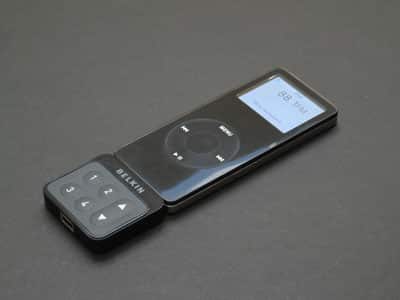
Freshly launched by Belkin, TuneFM for iPod nano first appeared in the Holiday 2005-2006 iLounge Buyers’ Guide – it’s a FM transmitter with on-iPod station tuning, easily accomplished using six buttons (four presets and two up/down arrows). But it’s changed a bit since then: now Belkin actually includes a car charger in the package for the same price, letting you keep your iPod’s battery topped off and likely improving its broadcasting performance whenever you’re driving. The transmitter is said to be the same as the one in the company’s earlier TuneBase FM car accessories for iPod 5G and nano, which we liked; it permits stereo/monaural modes and U.S./Japan station tuning.
If you’re stuck using your car’s FM radio as a receiver for your iPod’s music, there’s some good news today. Our past FM transmitter reviews and standard warning on FM transmitters have said repeatedly that it’s hard to find a powerful, clean-sounding FM transmitter no matter how hard you look. But there are exceptions.
Griffin recently did an especially good job with its iTrip for iPod nano (iLounge rating: A-), and now Belkin has created a worthy rival in TuneFM for iPod nano ($50), sold in black- or white-colored versions.
As we’ve previously noted, FM transmitters fall generally into two categories: portable and car-only. Portable transmitters let you broadcast your iPod’s audio through any FM radio you find, and run off of iPod battery power, while in-car transmitters are permanently tied into car charger cables and often sound better, but won’t work on the go. TuneFM for iPod nano offers the best of both worlds: it’s truly portable and can run off of iPod battery power, but impressively, Belkin also includes a detachable car charger cable in the package. This solution is simple, and it works, plugging first into your car’s cigarette lighter power port and then the transmitter, indicating that it’s working with a single LED light. Since TuneFM sells for the same price as the chargerless iTrip, and for $10 less than XtremeMac’s similar transmitter AirPlay2 (iLounge rating: B), including this charger was a very smart move on Belkin’s part, and a great deal for consumers.


That major benefit aside, TuneFM has ups and downs – mostly ups. Like iTrip and AirPlay2, Belkin’s plastic enclosure connects to the nano’s bottom, adding physical FM station tuning buttons to the iPod’s body. Unlike AirPlay2, and like iTrip, TuneFM lacks its own LCD tuning screen.
Instead, pressing any of its buttons will activate a menu on the nano’s own display, allowing you to manually tune stations or access four numbered FM preset stations. You can select stations in U.S. (88.1 to 107.9FM in .2 increments) or Japanese (76.0 to 90.0FM in .1 increments) tuning modes, toggling between them by simultaneously pressing buttons 1 and 4, then the tuning buttons; unlike iTrip, there’s no European tuning mode. But you can in iTrip fashion switch between stereo or a low-static mono mode, here by pressing buttons 1 and 3 together.


In short, and as the pictures indicate, Griffin’s on-screen menus and tuning system are far more polished – using a single three-position switch rather than requiring six buttons and odd combinations – but Belkin’s work well enough, and are better than AirPlay2’s. Similarly, TuneFM is also a bit smaller and more sturdy than AirPlay2 – both dangle off of the nano’s bottom, but TuneFM connects with both a Dock Connector plug and headphone plug for a snugger fit. Yet it’s not up to the sled-like design of iTrip, which we still think is the best of several imperfect options.

Where TuneFM impresses the most is in near-distance broadcasting performance: as we found when testing the company’s earlier TuneBase FMs for iPod and iPod nano (iLounge rating: B+), Belkin has really improved its FM transmission quality recently, and TuneFM benefits from whatever tweaks the company has made under the hood. In cars, or within five or so feet of an in-home radio antenna, TuneFM delivers very low-static, dynamic sound that really impressed us – it was at least as good as iTrip’s on 87.9FM, for instance, especially on their respective monaural modes.











