
iLoungeiLounge
  • News
    • Apple
      • AirPods Pro
      • AirPlay
      • Apps
        • Apple Music
      • iCloud
      • iTunes
      • HealthKit
      • HomeKit
      • HomePod
      • iOS 13
      • Apple Pay
      • Apple TV
      • Siri
    • Rumors
    • Humor
    • Technology
      • CES
    • Daily Deals
    • Articles
    • Web Stories
  • iPhone
    • iPhone Accessories
  • iPad
  • iPod
    • iPod Accessories
  • Apple Watch
    • Apple Watch Accessories
  • Mac
    • MacBook Air
    • MacBook Pro
  • Reviews
    • App Reviews
  • How-to
    • Ask iLounge
Font ResizerAa
iLoungeiLounge
Font ResizerAa
Search
  • News
    • Apple
    • Rumors
    • Humor
    • Technology
    • Daily Deals
    • Articles
    • Web Stories
  • iPhone
    • iPhone Accessories
  • iPad
  • iPod
    • iPod Accessories
  • Apple Watch
    • Apple Watch Accessories
  • Mac
    • MacBook Air
    • MacBook Pro
  • Reviews
    • App Reviews
  • How-to
    • Ask iLounge
Follow US

News › iPod

iPod

How do I use the iPod shuffle as a portable hard drive?

Last updated: May 12, 2021 7:25 pm UTC
By Jerrod H.
How do I use the iPod shuffle as a portable hard drive?

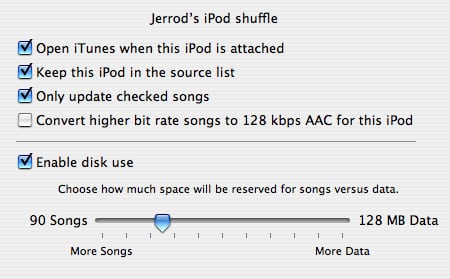
Like other iPods, the iPod shuffle can be used as a portable hard drive.  The average person is more likely to use this feature with the shuffle than with other iPods, because unlike them, the iPod shuffle does not require the user to carry a connection cable, and it works equally well on Macs and PCs without drivers or reformatting.


By default, the ability to access the iPod shuffle as a hard drive is disabled.  To enable it, enter the iPod Preferences page as we did above. 
How do I use the iPod shuffle as a portable hard drive?


Here you’ll find an option entitled “Enable Disk Use.”  When checked, iTunes will allow the iPod shuffle to appear in Windows Explorer (or the Mac OS’s Finder) as a detachable hard drive.  The slider positioned below the checkbox instructs iTunes how much space to leave empty for data when filling the iPod via either Autofill or manual management.  For example, in the photo above, we’ve reserved 128MB for non-audio use.  Autofill will only fill the other 380-some Megabytes with music.

Why don’t I have the full drive capacity I paid for?


Using either Windows Explorer or the iTunes capacity bar at the bottom of the iPod shuffle page, you’ll notice that your iPod shuffle is reporting a slightly smaller total hard drive capacity than the number on the box.  Don’t worry… this is completely normal for all storage media.

Contrary to popular belief, this anomaly is not caused by factory-installed programs, file system overhead, or swap space… it’s an unfortunate consequence of little more than math and marketing.

Hard drives are sold and marketed using decimal gigabytes. That is, a “GB” consists of 1,000,000,000 bytes.  However, computers interpret gigabytes in binary. To a computer, 1 GB = 2^30 bytes, or 1,073,741,824 bytes.

The ratio of “actual” to “marketed” file size is the ratio of these two interpretations, or roughly 0.931.

Therefore, a 512MB iPod shuffle actually has 0.9313225*512MB, or about 476.8MB of space usable to a computer.  A 1GB iPod shuffle will similarly report approximately 953.7MB.

.


Latest News
The 14-inch MacBook Pro with M5 Chip 16GB RAM/512GB is $250 Off
1 Min Read
Noise and Static on AirPods Pro 3 Still Unfixed
1 Min Read
New iMac with 24-inch OLED Display May be Brighter With 600 Nits
1 Min Read
The 15-inch M4 MacBook Air 256GB Is $250 Off
1 Min Read
Internal Kernel Debug Kit from Apple Reveals Tests for a MacBook with A15 Chip
1 Min Read
Apple Currently In Talks With Suppliers for Chip Assembly & Packaging of iPhones in India
1 Min Read
Apple Allows Easier Battery Replacement For M5 MacBook Pro with 14-inch Display
1 Min Read
The Apple Watch SE 3 44mm GPS is $50 Off
1 Min Read
20th Anniversary iPhone May Launch in Two Years
1 Min Read
Better Image Generation Capabilities and Apple Music Integration Coming to ChatGPT
1 Min Read
A20 Pro Chip Coming to Next Gen iPad Mini OLED
1 Min Read
Amazon has the AirTag 4 Pack Marked $29 off
1 Min Read

iLounge logo

iLounge is an independent resource for all things iPod, iPhone, iPad, and beyond. iPod, iPhone, iPad, iTunes, Apple TV, and the Apple logo are trademarks of Apple Inc.

This website is not affiliated with Apple Inc.
iLounge © 2001 - 2025. All Rights Reserved.
  • Contact Us
  • Submit News
  • About Us
  • Forums
  • Privacy Policy
  • Terms Of Use
Welcome Back!

Sign in to your account

Lost your password?









