
So you read our last Zune interface update on Backstage, and later saw most of the details confirmed by Gizmodo. But then you saw Microsoft’s official Zune Insider blog, where a company employee told readers, “Basically, I wouldn’t draw conclusions about Zune based on what you see in those places. Unless you see it in this blog or another official source, then just take it w/ a grain of salt.”
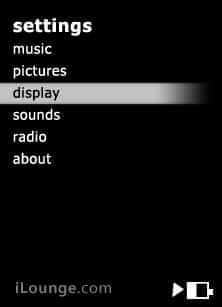
Great stuff – if it doesn’t come from Microsoft, you can’t trust it. Without dwelling on the wisdom of that particular suggestion, here’s a bunch more stuff you can choose to take “w/ a grain of salt,” courtesy of an anonymous tipster: the remainder of the details on the Zune’s user interface, with some nifty “not quite screenshot, but better than hand-sketch” artwork that explains pretty much how the whole thing works and looks. Since most of the UI is really plain – white text on a black background sort of stuff, except the background can be skinned with full-color artwork – these artists’ representations only highlight a few key points from the menus.
From what we know, Zune’s current top-level menu contains six plain text choices: Music, Videos, Pictures, Community, Radio, and Settings. They’re presented almost identically to the format seen above, which depicts the Settings menu.

Music presents you with a top-of-screen horizontal bar that scrolls endlessly through Albums, Artists, Playlists, Songs, and Genres; you use the unit’s left and right buttons to scroll. In every case except Albums, a vertical text-format list appears beneath the view bar (above); Albums uses album art thumbnails. As previously noted, the current alphabet letter appears in a big font to let you know where you are within the list.

This shows what the Zune’s equivalent of the Now Playing screen looks like. Album art is huge and detailed, with an MTV-style text display of track, artist, and album details at the screen’s bottom.

Videos presents you with a top-of-screen horizontal bar that includes options such as “all videos,” “all TV shows,” and other categories. Videos appear as icon and two-line items, as they might in Microsoft’s Windows OS, and Zune automatically flips them to display either in horizontal widescreen (16:9) or vertical fullscreen (4:3) mode based on their dimensions.
Pictures has a horizontal top bar with “view by date” and “view by folder.” Radio works as previously noted – left and right controls let you choose the station in locally appropriate tuning increments (say, .2 for North America), with a graphical display that shows the radio dial blurring as you move rapidly through stations. As with Apple’s iPod Radio Remote, RDS is supported for on-screen display of artist and song title data from stations that provide this data. It’s unclear whether you can “capture” (record) radio broadcasts with Zune, but you can add and delete presets, and turn a station seek feature on and off.
Alongside Radio, which was apparently previously found in a sub-menu called Extras, is Community – the code-word for Zune’s wireless music-sharing initiative. Here, there’s a top bar with choices “me” (describe yourself), “nearby” (find other Zune users in your proximity) and “inbox” (see files received). You’ll need to find another Zune user – and turn on the device’s wireless hardware from a separate settings menu – to use these features.
Finally, there’s the Settings menu.











