
iLoungeiLounge
  • News
    • Apple
      • AirPods Pro
      • AirPlay
      • Apps
        • Apple Music
      • iCloud
      • iTunes
      • HealthKit
      • HomeKit
      • HomePod
      • iOS 13
      • Apple Pay
      • Apple TV
      • Siri
    • Rumors
    • Humor
    • Technology
      • CES
    • Daily Deals
    • Articles
    • Web Stories
  • iPhone
    • iPhone Accessories
  • iPad
  • iPod
    • iPod Accessories
  • Apple Watch
    • Apple Watch Accessories
  • Mac
    • MacBook Air
    • MacBook Pro
  • Reviews
    • App Reviews
  • How-to
    • Ask iLounge
Font ResizerAa
iLoungeiLounge
Font ResizerAa
Search
  • News
    • Apple
    • Rumors
    • Humor
    • Technology
    • Daily Deals
    • Articles
    • Web Stories
  • iPhone
    • iPhone Accessories
  • iPad
  • iPod
    • iPod Accessories
  • Apple Watch
    • Apple Watch Accessories
  • Mac
    • MacBook Air
    • MacBook Pro
  • Reviews
    • App Reviews
  • How-to
    • Ask iLounge
Follow US

News

News

Wii News – in a word, awesome. Apple?

Last updated: May 15, 2021 7:27 pm UTC
By Jeremy Horwitz
Wii News – in a word, awesome. Apple?

Last year, Nintendo announced that it would be sending out several free updates (read: new applications, hear that, Apple?) for its Wii game console – a Weather Channel, a News Channel, and an Internet Channel (web browser). The Weather Channel was impressive, the web browser was nice, and now the News Channel’s out. It’s really, really well done, with live updated news content provided to your Wii via a wireless Internet connection by the Associated Press. Working through the features chronologically means that the good pictures are near the bottom, so click on the headline above to see what’s here.


Wii News – in a word, awesome. Apple?

Wii News – in a word, awesome. Apple?

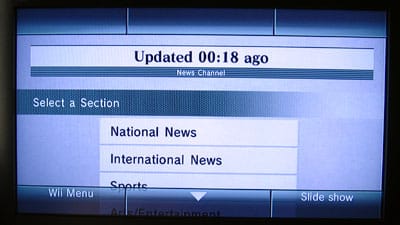
The channel defaults to a highly functional, but visually plain set of mostly text menus. On the first screen, you can pick from the standard news genres – national, international, sports, entertainment, technology, and so on – and then navigate all of the recent stories from a given genre using the second screen. Nintendo doesn’t appear to be filtering the news, so one of this morning’s top stories in technology was the announcement of the PlayStation 3’s European launch details, and stories about deaths and crimes are all part of the mix. (Parental controls are still part of the Wii for concerned parents, allowing you to turn Wii News off for kids.) The excitement starts when you hit Slide Show, a feature that provides quick news headlines (a few seconds each) using an animated, moving globe, plus AP photography if there is any.


Then it gets better. Much better.

Wii News – in a word, awesome. Apple?

Click the headline for the rest of the pictures and features.
Wii News – in a word, awesome. Apple?

So, while you’re reading national or international news stories, a map appears on the right side of the screen to show you where the news is originating from – or, at least, datelined. Clicking on the map brings up a zoomable globe, which you’ll recognize from Wii Weather, plus stacks of news stories from each country or region. The more you zoom out from the globe, the more the stories regionalize, becoming part of the “Tokyo Area,” “Caracas Area,” or even “Nashville Area” for all of America, improbable as that may seem. Region naming aside, this is a super cool way to show off what’s happening around the globe, even if the news volume skews towards North American because of the provider.


Wii News – in a word, awesome. Apple?

International slide shows will call up this nice map of the world at the top of the screen, along with pictures and headline summaries. A green screen comes up if no dateline’s provided, and the picture just disappears if no photo’s part of the news feed.

Nintendo’s handled this all beautifully.

Wii News – in a word, awesome. Apple?

The actual news reading portion’s not shabby, either. There’s a full-screen viewing mode – the default, it seems – and also a paned view where the map is shown on the right while the text is on the left. You can zoom the text to larger proportions for your TV, or keep it smaller if your vision (or TV) is better. Photos can also be scaled to full-screen display.

Wii News – in a word, awesome. Apple?

Missing? A way to call up older news stories. A way to force the Wii to call up breaking news and other new stories. And the ability to do anything – say, e-mail/Wii-mail – with the news stories other than read them.



Latest News
The Apple Watch Series 11 42mm GPS is $100 Off
1 Min Read
Apple Launching A New Education Hub In India Teaching Robotics and Swift Programming
1 Min Read
Women’s and Men’s Golf Added to Apple Sports
1 Min Read
Apple Adding Civilization VII and Other Games To Apple Arcade
1 Min Read
AirPods 4 ANC Is $59 Off
1 Min Read
Apple Using 2NM Process For Their M6 and A20 Chip
1 Min Read
iPhone 18 Models Will Not Have a Big Redesign
1 Min Read
Launch of MacBook Pro M5 Pro and M5 Max Models is Approaching
1 Min Read
Get the iPad Mini 7 256GB Wi-Fi at $99 Off
1 Min Read
Mozilla Now Allows Turning AI Features Off
1 Min Read
Barcelona Passeig de Gràcia Apple Store Temporarily Closing
1 Min Read
Apple’s Plans to Enter the Smart Glasses Market is Changing the Industry
1 Min Read

iLounge logo

iLounge is an independent resource for all things iPod, iPhone, iPad, and beyond. iPod, iPhone, iPad, iTunes, Apple TV, and the Apple logo are trademarks of Apple Inc.

This website is not affiliated with Apple Inc.
iLounge © 2001 - 2025. All Rights Reserved.
  • Contact Us
  • Submit News
  • About Us
  • Forums
  • Privacy Policy
  • Terms Of Use
Welcome Back!

Sign in to your account

Lost your password?








