
Immediately following Apple’s event last week we posted some thoughts on how the iPod touch would be handling FaceTime—clearly using a separate app and requiring an Apple ID and e-mail address to register with the FaceTime network. Now that we’ve had a chance to see the fourth-generation iPod touch in action, this has been confirmed. However, these changes only pertain to getting the phone numberless iPod touch onto the FaceTime network—the process for the iPhone 4 remains unchanged other than the ability to contact iPod touch users using an e-mail address.
Setting up FaceTime on the iPhone 4 has always been almost completely transparent to the end user. This is because every iPhone 4 is expected to have a unique cellular phone number that can be used to identify it for FaceTime. As a result, no other information is required, and the iPhone 4 just registers itself with your phone number and you’re ready to go. Users can turn FaceTime off completely under their Phone settings, but that’s about the extent of the configuration and customization options. Calling another iPhone user via FaceTime is therefore about as simple as calling their phone number.
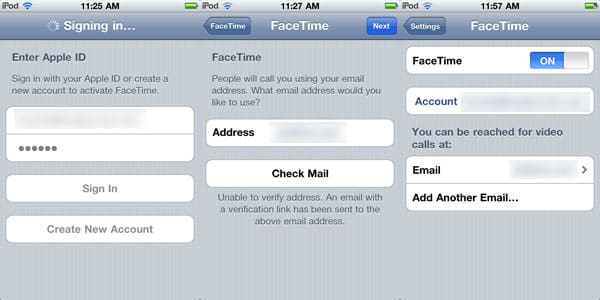
Life on an iPod touch is a different matter, however. With no phone number to work with, the device needs to register using an e-mail address. Since there’s no polite way for Apple to use your e-mail address without your consent, the FaceTime app on the iPod touch requires that you specifically sign up for the service with your Apple ID and provide the e-mail address that you would like to be used for FaceTime calls. You log in with your Apple ID and password—generally your iTunes Store account, supply your preferred e-mail address, and then verify your address by clicking a link in an e-mail message sent to that address. You can change your e-mail address or add additional addresses that you can be reached at by visiting the FaceTime section in your iPod touch Settings.
Once the relatively simple setup is complete however, it pretty much just works, although iPhone 4 users will also need to upgrade to iOS 4.1 in order to place or even receive FaceTime calls from iPod touch users.
Further, making FaceTime calls using an e-mail address is a feature for the iPod touch only; the iPhone 4 still registers using its phone number only as it did in iOS 4.0. This means that you’ll have to know what type of device the person you’re calling is using.
Another way to look at it is that your e-mail address is like a phone number to FaceTime, uniquely identifying the device rather than the person. Except that’s not entirely true—you can sign up more than one iPod touch for the same Apple ID and e-mail address, something that’s not easily doable with a phone number on the iPhone. Incoming FaceTime calls will ring on both devices, and can be answered from either one, but don’t expect to be able to use both devices for FaceTime at the same time.
The use of e-mail addresses and Apple IDs on the FaceTime network, however, opens up FaceTime to a whole new array of devices beyond the iPhone, since this change allows the FaceTime service to be accessible from any platform. It’s a fairly safe bet that the next-generation iPad will be the next device at the FaceTime table, but there are many possibilities beyond that…. FaceTime integrated with iChat on the Mac? A FaceTime app for Windows users? A camera and FaceTime on the Apple TV? In developing FaceTime, Apple has applied its usual panache at bringing technology to the masses, and it will be very interesting to see where FaceTime goes from here.











