
iLoungeiLounge
  • News
    • Apple
      • AirPods Pro
      • AirPlay
      • Apps
        • Apple Music
      • iCloud
      • iTunes
      • HealthKit
      • HomeKit
      • HomePod
      • iOS 13
      • Apple Pay
      • Apple TV
      • Siri
    • Rumors
    • Humor
    • Technology
      • CES
    • Daily Deals
    • Articles
    • Web Stories
  • iPhone
    • iPhone Accessories
  • iPad
  • iPod
    • iPod Accessories
  • Apple Watch
    • Apple Watch Accessories
  • Mac
    • MacBook Air
    • MacBook Pro
  • Reviews
    • App Reviews
  • How-to
    • Ask iLounge
Font ResizerAa
iLoungeiLounge
Font ResizerAa
Search
  • News
    • Apple
    • Rumors
    • Humor
    • Technology
    • Daily Deals
    • Articles
    • Web Stories
  • iPhone
    • iPhone Accessories
  • iPad
  • iPod
    • iPod Accessories
  • Apple Watch
    • Apple Watch Accessories
  • Mac
    • MacBook Air
    • MacBook Pro
  • Reviews
    • App Reviews
  • How-to
    • Ask iLounge
Follow US

News

News

Time-Lapse Photographs and the iPhone

Last updated: May 16, 2021 5:34 pm UTC
By Bob Levens
Time-Lapse Photographs and the iPhone

Two months ago, I wrote about a way to create panoramic photos using the iPhone’s camera. This week, during a visit to our in-laws in Cumbria, I decided to try and push the iPhone again and see if I could capture some worthwhile images of the birds that feed outside the house. Rather than just taking one or two pictures, or trying to make a bird feeding panorama, I used FotoTimer v2.0 to take a series of sequential, time-lapse shots.

Time-Lapse Photographs and the iPhone

Since the iPhone’s lens and color performance is limited, I decided to do a little testing to optimize the color balance and focus before taking the pictures.

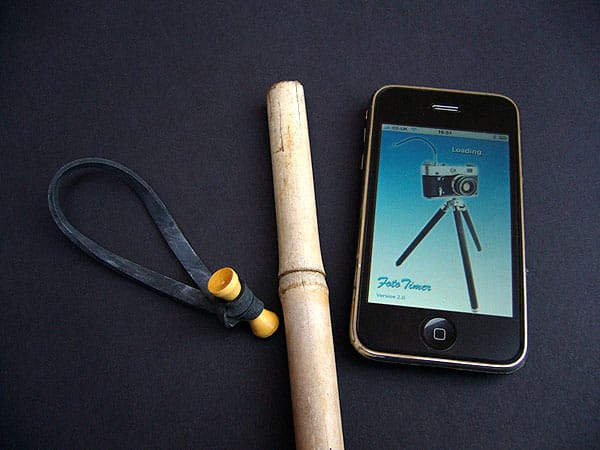
Once I felt comfortable that the shots were going to be exposed well, I set the iPhone up close to the actual feeding stations, and had to figure out how to hold it in the same spot for minutes at a time. After a bit of head scratching, I opted to use a big rubber band and a six foot garden cane which was in an outbuilding. After pushing the cane into the ground at a suitable distance to the bird feeders, I tied the iPhone to it with the rubber band tie. This isn’t the best or safest way to mount an iPhone, I know, but there’s no tripod… I wonder if Apple would mind if someone made one called “iPhone tripod?”


Time-Lapse Photographs and the iPhone

Setting FotoTimer to take a picture every 15 seconds for 15 minutes, I then left it running.


Time-Lapse Photographs and the iPhone

The resulting pictures, when viewed on the iPhone as a “slideshow,” gave the images a time-lapse effect, and after importing them into iMovie I produced a short film of the bird life visiting the bird feeders. You can view the iPhone time-lapse movie here.


Time-Lapse Photographs and the iPhone

Once again the basic iPhone camera plus one of the many photo apps available does produce some reasonable results. Even if the new iPhone does get a better camera and video recording functionality, it’s nice that current iPhone and iPhone 3G users at least have something cool to play with whilst we wait for contracts to expire.



Latest News
The Apple Watch Series 11 46mm GPS Is $100 Off
1 Min Read
Clamshell Style iPhone Being Looked Into By Apple
1 Min Read
Foldable iPhones May Have the Largest Battery Ever
1 Min Read
Apple and TSMC’s 10-Year Collaboration May Be Ending
1 Min Read
The 13-inch M5 iPad Pro 256GB Wi-Fi Is $149 Off
1 Min Read
M5 Pro and M5 Max Chips for the MacBook Pro could Roll Out with macOS 26.3
1 Min Read
Mac Ordering Process Revamped
1 Min Read
Check Signed By Steve Wozniak and Steve Jobs Sold For $2.4 Million
1 Min Read
The Anker 140W 4-Port GaN USB-C Charger is $35 Off
1 Min Read
No iPhone Air 2 This Year, according to Latest Report
1 Min Read
New Report Corroborates Split iPhone Release Dates
1 Min Read
Apple Losing More Researchers As They Plan To Release 2 Siri Versions
1 Min Read

iLounge logo

iLounge is an independent resource for all things iPod, iPhone, iPad, and beyond. iPod, iPhone, iPad, iTunes, Apple TV, and the Apple logo are trademarks of Apple Inc.

This website is not affiliated with Apple Inc.
iLounge © 2001 - 2025. All Rights Reserved.
  • Contact Us
  • Submit News
  • About Us
  • Forums
  • Privacy Policy
  • Terms Of Use
Welcome Back!

Sign in to your account

Lost your password?








