
iLoungeiLounge
  • News
    • Apple
      • AirPods Pro
      • AirPlay
      • Apps
        • Apple Music
      • iCloud
      • iTunes
      • HealthKit
      • HomeKit
      • HomePod
      • iOS 13
      • Apple Pay
      • Apple TV
      • Siri
    • Rumors
    • Humor
    • Technology
      • CES
    • Daily Deals
    • Articles
    • Web Stories
  • iPhone
    • iPhone Accessories
  • iPad
  • iPod
    • iPod Accessories
  • Apple Watch
    • Apple Watch Accessories
  • Mac
    • MacBook Air
    • MacBook Pro
  • Reviews
    • App Reviews
  • How-to
    • Ask iLounge
Font ResizerAa
iLoungeiLounge
Font ResizerAa
Search
  • News
    • Apple
    • Rumors
    • Humor
    • Technology
    • Daily Deals
    • Articles
    • Web Stories
  • iPhone
    • iPhone Accessories
  • iPad
  • iPod
    • iPod Accessories
  • Apple Watch
    • Apple Watch Accessories
  • Mac
    • MacBook Air
    • MacBook Pro
  • Reviews
    • App Reviews
  • How-to
    • Ask iLounge
Follow US

News

News

The Vaja Mouse Pad

Last updated: May 15, 2021 2:45 pm UTC
By Jeremy Horwitz
The Vaja Mouse Pad

Since my job at iLounge involves reviewing products rather than trying to sell them, I am not going to attempt to convince you that Vaja’s new Mouse Pad is something that you’re going to spend $60 or $70 to purchase. I can count the number of mouse pads I’ve purchased on one hand, with two fingers, and mention that both of them came from the same Apple Company Store two years ago. They’re circular, black with a gray Apple logo in the center, and cost something like $10 or $15 a piece. Because of that gray Apple logo, mice tend to get completely confused and skip locations when they’re run over that surface, but I liked how these pads look and kept using them anyway. They replaced a free mouse pad that came from Ofoto (remember them?) years earlier; in fact, most of the mouse pads I’ve used were given away with purchases I made.

The Vaja Mouse Pad

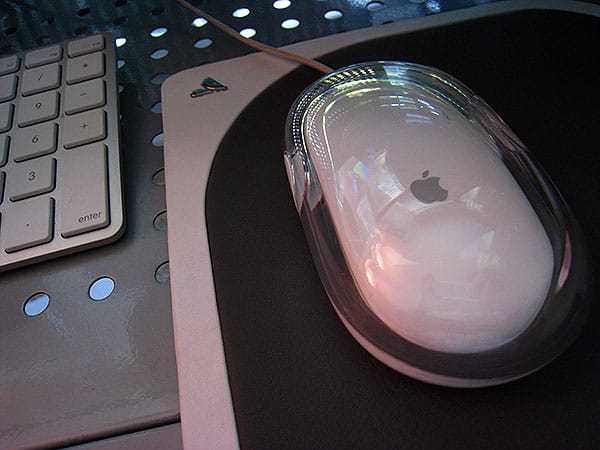
For obvious reasons, I like Vaja’s Mouse Pad better. As one might expect from both the company and the price, this is a beautiful design relative to most of the forgettable alternatives out there: rounded at the corners, it’s completely covered in the company’s classically impressive colored leather, which you can hand-select in two tones from a variety of choices. One of 37 colors becomes the frame, complete with a metal Vaja logo, while one of 10 colors becomes the mousing surface, slightly elevated over the frame thanks to soft padding.


The Vaja Mouse Pad
The Vaja Mouse Pad

Flip the pad over and you’ll see the company’s classic brown leather is used to create a hard bottom surface. Ours arrived with a bit of scuffing on the bottom, which isn’t a huge issue given that it’ll basically never be seen on a flat surface, and probably will accumulate additional marks from desktop grime as time goes on.

By comparison, the top surfaces were perfect—extremely clean, and a really sharp match for the Apple hardware they sit next to.


The Vaja Mouse Pad
The Vaja Mouse Pad

Other than the price, which like Vaja’s cases screams “luxury” rather than “necessity,” the only major question a leather mouse pad raises for me is this: how long will it last before scratching or scuffing to a different patina? Obviously, your color choices will have some impact on this—picking Apple-matching light colors rather than darker ones might make damage more visible—but ultimately, it’ll be up to you to keep it clean. The plasticy top surfaces of other mouse pads have lasted many years without showing marks, so it’ll be interesting to see how this one holds up, but I can say with some certainty that I’m looking forward to continuing the testing.

Updated June 26, 2008: After almost a month with the Vaja Mouse Pad, I wanted to update this story with some conclusions on its durability and utility. My suspicion in late May was that the Mouse Pad wouldn’t be able to stand up well to some of the stresses of use at my desk, such as occasional freshly-washed hands grabbing my mouse, exposure to a little dirt, food, or drinks nearby, scratches, or so on.



Latest News
The Apple Watch Series 11 42mm GPS is $100 Off
1 Min Read
Apple Launching A New Education Hub In India Teaching Robotics and Swift Programming
1 Min Read
Women’s and Men’s Golf Added to Apple Sports
1 Min Read
Apple Adding Civilization VII and Other Games To Apple Arcade
1 Min Read
AirPods 4 ANC Is $59 Off
1 Min Read
Apple Using 2NM Process For Their M6 and A20 Chip
1 Min Read
iPhone 18 Models Will Not Have a Big Redesign
1 Min Read
Launch of MacBook Pro M5 Pro and M5 Max Models is Approaching
1 Min Read
Get the iPad Mini 7 256GB Wi-Fi at $99 Off
1 Min Read
Mozilla Now Allows Turning AI Features Off
1 Min Read
Barcelona Passeig de Gràcia Apple Store Temporarily Closing
1 Min Read
Apple’s Plans to Enter the Smart Glasses Market is Changing the Industry
1 Min Read

iLounge logo

iLounge is an independent resource for all things iPod, iPhone, iPad, and beyond. iPod, iPhone, iPad, iTunes, Apple TV, and the Apple logo are trademarks of Apple Inc.

This website is not affiliated with Apple Inc.
iLounge © 2001 - 2025. All Rights Reserved.
  • Contact Us
  • Submit News
  • About Us
  • Forums
  • Privacy Policy
  • Terms Of Use
Welcome Back!

Sign in to your account

Lost your password?








