
iLoungeiLounge
  • News
    • Apple
      • AirPods Pro
      • AirPlay
      • Apps
        • Apple Music
      • iCloud
      • iTunes
      • HealthKit
      • HomeKit
      • HomePod
      • iOS 13
      • Apple Pay
      • Apple TV
      • Siri
    • Rumors
    • Humor
    • Technology
      • CES
    • Daily Deals
    • Articles
    • Web Stories
  • iPhone
    • iPhone Accessories
  • iPad
  • iPod
    • iPod Accessories
  • Apple Watch
    • Apple Watch Accessories
  • Mac
    • MacBook Air
    • MacBook Pro
  • Reviews
    • App Reviews
  • How-to
    • Ask iLounge
Font ResizerAa
iLoungeiLounge
Font ResizerAa
Search
  • News
    • Apple
    • Rumors
    • Humor
    • Technology
    • Daily Deals
    • Articles
    • Web Stories
  • iPhone
    • iPhone Accessories
  • iPad
  • iPod
    • iPod Accessories
  • Apple Watch
    • Apple Watch Accessories
  • Mac
    • MacBook Air
    • MacBook Pro
  • Reviews
    • App Reviews
  • How-to
    • Ask iLounge
Follow US

News

News

The Cube Project, Part 4

Last updated: May 15, 2021 2:59 pm UTC
By Jeremy Horwitz
The Cube Project, Part 4

After last week’s earlier, extensive and exciting overhaul, I thought that I would be content to let my Power Mac G4 Cube stay as it was: just about as powerful as it could get, except for a few small caveats: I hadn’t upgraded the video card or optical drive, and there was the matter of that not quite elegant USB-based 802.11n adapter. Then a few hours passed. Apple released the 802.11n version of AirPort Express. And I was inspired to do better.

The Cube Project, Part 4

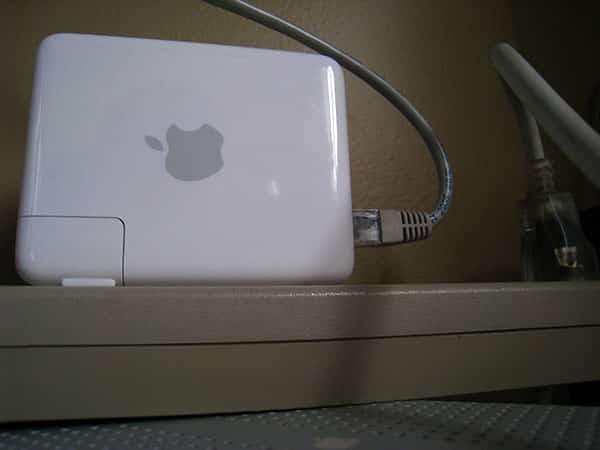
Rather than clogging the low-speed USB port with a high-speed network adapter, I set up the new AirPort Express as a wireless bridge to my existing 802.11n network, connecting the Cube to it with an Ethernet cable.

This solution, $44 or so more expensive than going with the USB adapter, struck me as a better overall option because it is comparatively invisible—except under a desk—and I can pull the Express to use when I’m on the road, too.


The Cube Project, Part 4

The optical drive was a somewhat different story. Apple’s stock drive in the Cube wasn’t having serious problems when I removed it—discs ejected only a hint on the slow side—and there wasn’t, strictly speaking, a “need” for an upgrade. But in the name of giving the Cube a full-fledged overhaul, I pulled the old drive out and replaced it with a Matsushita-built, Apple-picked SuperDrive, with 8X DVD burning and reading capabilities. The price was $199, and the drive removal and replacement process was comparatively straightforward, pulling off a metal panel at the bottom of the internal shell, taking out some screws, and replacing a couple of cables.


Again, this is an impractical addition for the value-conscious, but it brings the machine closer to a modern level of performance, with only one caveat: apparently all third-party drives sold for the Cube eject discs on the low side relative to the factory unit, which popped discs out roughly halfway. I wasn’t tremendously bothered by this.


The Cube Project, Part 4

Finally, there’s the video card. Apple shipped Cubes with cool-running ATI Rage 128 cards, offering an original Radeon or GeForce 2 MX as options, but neither is even close to the specs of current video cards; the Rage doesn’t run Quartz Extreme or Core Image, which add nifty visual effects to the Mac OS and recent apps. Unfortunately, most other video cards made from 2000 to the present day neither fit in the Cube nor work with its proprietary Apple-developed ADC connector, which is the only way to connect the Studio Display monitor.



Latest News
The AirPods Pro 3 is $20 Off
1 Min Read
Exynos 2600 Chip 2nm Process Revealed by Samsung
1 Min Read
New Celebrity Ad Campaign Featuring Travis Scott Released by Beats
1 Min Read
Australia Getting Hypertension Notification Feature
1 Min Read
The 14-inch MacBook Pro with M5 Chip 16GB RAM/512GB is $250 Off
1 Min Read
Noise and Static on AirPods Pro 3 Still Unfixed
1 Min Read
New iMac with 24-inch OLED Display May be Brighter With 600 Nits
1 Min Read
The 15-inch M4 MacBook Air 256GB Is $250 Off
1 Min Read
Internal Kernel Debug Kit from Apple Reveals Tests for a MacBook with A15 Chip
1 Min Read
Apple Currently In Talks With Suppliers for Chip Assembly & Packaging of iPhones in India
1 Min Read
Apple Allows Easier Battery Replacement For M5 MacBook Pro with 14-inch Display
1 Min Read
The Apple Watch SE 3 44mm GPS is $50 Off
1 Min Read

iLounge logo

iLounge is an independent resource for all things iPod, iPhone, iPad, and beyond. iPod, iPhone, iPad, iTunes, Apple TV, and the Apple logo are trademarks of Apple Inc.

This website is not affiliated with Apple Inc.
iLounge © 2001 - 2025. All Rights Reserved.
  • Contact Us
  • Submit News
  • About Us
  • Forums
  • Privacy Policy
  • Terms Of Use
Welcome Back!

Sign in to your account

Lost your password?








