
iLoungeiLounge
  • News
    • Apple
      • AirPods Pro
      • AirPlay
      • Apps
        • Apple Music
      • iCloud
      • iTunes
      • HealthKit
      • HomeKit
      • HomePod
      • iOS 13
      • Apple Pay
      • Apple TV
      • Siri
    • Rumors
    • Humor
    • Technology
      • CES
    • Daily Deals
    • Articles
    • Web Stories
  • iPhone
    • iPhone Accessories
  • iPad
  • iPod
    • iPod Accessories
  • Apple Watch
    • Apple Watch Accessories
  • Mac
    • MacBook Air
    • MacBook Pro
  • Reviews
    • App Reviews
  • How-to
    • Ask iLounge
Font ResizerAa
iLoungeiLounge
Font ResizerAa
Search
  • News
    • Apple
    • Rumors
    • Humor
    • Technology
    • Daily Deals
    • Articles
    • Web Stories
  • iPhone
    • iPhone Accessories
  • iPad
  • iPod
    • iPod Accessories
  • Apple Watch
    • Apple Watch Accessories
  • Mac
    • MacBook Air
    • MacBook Pro
  • Reviews
    • App Reviews
  • How-to
    • Ask iLounge
Follow US

News

News

The Case of the Really Naggy iPhone, Or: Stretching Your Original iPhone’s Life

Last updated: May 15, 2021 9:24 am UTC
By Jeremy Horwitz
The Case of the Really Naggy iPhone, Or: Stretching Your Original iPhone’s Life

Though early units might have been less reliable on the inside than later ones and sequels, the original 2007 iPhone was built pretty tough—enough that a family member’s hand-me-down that has been continually used (inside cases) for nearly three years now is still working fine. At least, it was until a week or two ago, when a certain little “nag screen” became way more naggy than normal. Even when the phone wasn’t actively being used, the “this accessory is not made for use with iPhone” screen would pop up for a brief second, then disappear, and the screen would randomly turn on now and again without a message, as well. Our family member asked whether she should just go to the store and get a cheap iPhone 3G. “No!” we said, “even Steve Jobs is saying already that the next iPhone is an A+ update.


Do you really want to buy into the nearly two-year-old iPhone 3G on the verge of something like that?”
The Case of the Really Naggy iPhone, Or: Stretching Your Original iPhone’s Life

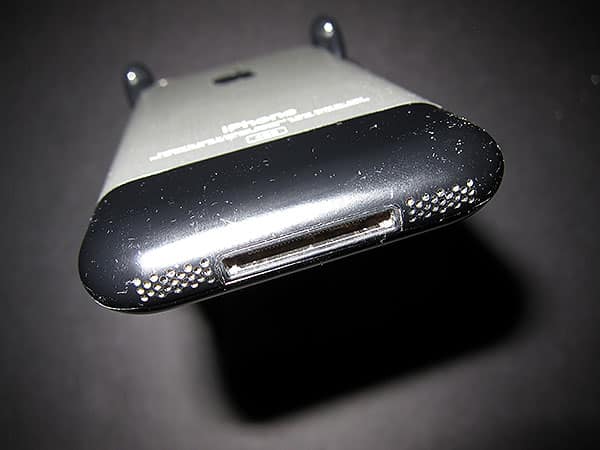
So we tried to fix the iPhone. The simplest “3 R’s” troubleshooting techniques suggested by Apple didn’t work: “Restart,” “Reset,” and “Restore,” respectively just turning the device off and on, clearing its settings, and then wiping its content altogether with iTunes. Restore seemed to have the greatest impact, but the nag screen quickly returned. There was clearly a hardware problem of some sort, and the most obvious culprits were a screwy Sleep/Wake switch or a dirty Dock Connector. If you haven’t seen what a typically pocketed iPhone’s bottom looks like after three years, these pictures tell most of the story—believe it or not, this is what the iPhone’s black plastic bottom panel looked like after it was cleaned.


Tiny specs of grime had probably found their way onto the Dock Connector.


The Case of the Really Naggy iPhone, Or: Stretching Your Original iPhone’s Life

Since it’s really, amazingly easy to damage the Dock Connector’s super thin, small pins with anything metallic and quite possibly even small pieces of plastic, we went after it with the gentlest and thinnest items we could find on hand—card stock that was a little thicker than paper, plus a little rubbing alcohol on the end of some tissue paper. This isn’t ideal for cleaning—something that doesn’t leave fibers behind would be better—but the junk we got out of the Dock Connector port, including bits of fuzzy lint, little crusty things, and who knows what else collectively left the iPhone in completely working order again. A little extra work with a toothpick after the first two photos were taken got the extra junk out of the port’s corners. Thus, after 15 minutes of careful attention, there wasn’t a need to toss the hardware away and replace it with its plasticy sequel.



Latest News
The AirPods Pro 3 is $20 Off
1 Min Read
Exynos 2600 Chip 2nm Process Revealed by Samsung
1 Min Read
New Celebrity Ad Campaign Featuring Travis Scott Released by Beats
1 Min Read
Australia Getting Hypertension Notification Feature
1 Min Read
The 14-inch MacBook Pro with M5 Chip 16GB RAM/512GB is $250 Off
1 Min Read
Noise and Static on AirPods Pro 3 Still Unfixed
1 Min Read
New iMac with 24-inch OLED Display May be Brighter With 600 Nits
1 Min Read
The 15-inch M4 MacBook Air 256GB Is $250 Off
1 Min Read
Internal Kernel Debug Kit from Apple Reveals Tests for a MacBook with A15 Chip
1 Min Read
Apple Currently In Talks With Suppliers for Chip Assembly & Packaging of iPhones in India
1 Min Read
Apple Allows Easier Battery Replacement For M5 MacBook Pro with 14-inch Display
1 Min Read
The Apple Watch SE 3 44mm GPS is $50 Off
1 Min Read

iLounge logo

iLounge is an independent resource for all things iPod, iPhone, iPad, and beyond. iPod, iPhone, iPad, iTunes, Apple TV, and the Apple logo are trademarks of Apple Inc.

This website is not affiliated with Apple Inc.
iLounge © 2001 - 2025. All Rights Reserved.
  • Contact Us
  • Submit News
  • About Us
  • Forums
  • Privacy Policy
  • Terms Of Use
Welcome Back!

Sign in to your account

Lost your password?








