
iLoungeiLounge
  • News
    • Apple
      • AirPods Pro
      • AirPlay
      • Apps
        • Apple Music
      • iCloud
      • iTunes
      • HealthKit
      • HomeKit
      • HomePod
      • iOS 13
      • Apple Pay
      • Apple TV
      • Siri
    • Rumors
    • Humor
    • Technology
      • CES
    • Daily Deals
    • Articles
    • Web Stories
  • iPhone
    • iPhone Accessories
  • iPad
  • iPod
    • iPod Accessories
  • Apple Watch
    • Apple Watch Accessories
  • Mac
    • MacBook Air
    • MacBook Pro
  • Reviews
    • App Reviews
  • How-to
    • Ask iLounge
Font ResizerAa
iLoungeiLounge
Font ResizerAa
Search
  • News
    • Apple
    • Rumors
    • Humor
    • Technology
    • Daily Deals
    • Articles
    • Web Stories
  • iPhone
    • iPhone Accessories
  • iPad
  • iPod
    • iPod Accessories
  • Apple Watch
    • Apple Watch Accessories
  • Mac
    • MacBook Air
    • MacBook Pro
  • Reviews
    • App Reviews
  • How-to
    • Ask iLounge
Follow US

News

News

TeleAdapt’s Mini DisplayPort + USB Audio To HDMI Adapter: Another Mac Video Solution

Last updated: May 15, 2021 9:25 am UTC
By Jeremy Horwitz
TeleAdapt’s Mini DisplayPort + USB Audio To HDMI Adapter: Another Mac Video Solution

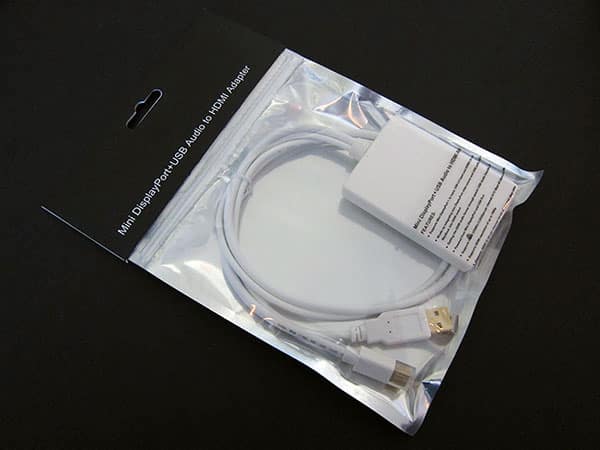
At the end of February, we looked at Griffin’s Video Display Adapter, a generically named, seemingly simple $40 adapter that converted a MacBook’s Mini DisplayPort video connector into an HDMI video connector. Soon thereafter, TeleAdapt contacted us with its own alternative, the Mini DisplayPort + USB Audio to HDMI Adapter shown here, which also sells for $40—only $3 more than the virtually identical-looking version sold by Monoprice.

TeleAdapt’s Mini DisplayPort + USB Audio To HDMI Adapter: Another Mac Video Solution

Unlike Griffin’s smaller adapter, the TeleAdapt part transforms both video and audio from a Mini DisplayPort-equipped MacBook computer, pulling the video signal from the Mini DisplayPort connector and stereo audio from an open USB port. The video and audio signals are then mixed together into a large, ventilated HDMI housing; once again, you supply the HDMI cable to connect this Adapter to your HDMI-ready TV set.

Once the TV is connected, you can output iTunes or other video—including high-definition iTunes Store movies—directly from your computer to the TV set, though some extra steps are needed.


TeleAdapt’s Mini DisplayPort + USB Audio To HDMI Adapter: Another Mac Video Solution

When we connected the TeleAdapt unit to a 720p HDTV, the connection didn’t start immediately: we had to go into the MacBook Pro’s Display settings, choose 720p output, and then choose 60Hz (NTSC) rather than 50Hz (PAL), extra steps that might confuse some users—the HDTV’s screen remained black until we picked the correct settings.


TeleAdapt’s Mini DisplayPort + USB Audio To HDMI Adapter: Another Mac Video Solution

At that point, the audio wasn’t working, so we had to go to the MacBook Pro’s Sound settings, choose the Output tab, and then pick USB Sound Device. As soon as this step was completed, the MacBook Pro’s video and audio were both working on the HDTV; getting the iTunes Store HD video to play in full screen on the TV required us to use monitor mirroring, another Display option.


TeleAdapt’s Mini DisplayPort + USB Audio To HDMI Adapter: Another Mac Video Solution

But after these settings were in place, audio and video were perfect going from the MacBook Pro to the HDMI-equipped HDTV. The left and right channels of audio performed correctly through the TV’s left and right speakers, and the 720p video was as clear on the TV screen as on the MacBook’s. By turning monitor mirroring off, we could use the HDTV as one display for windowed video, while using the MacBook’s screen for other content, or vice-versa. There was only one surprise: the connection worked in only one direction, so we couldn’t plug an HDMI device (the Xbox 360) into the TeleAdapt box, then the Adapter into the back of an iMac, and play the Xbox 360 on the iMac’s screen.



Latest News
The AirPods Pro 3 is $20 Off
1 Min Read
Exynos 2600 Chip 2nm Process Revealed by Samsung
1 Min Read
New Celebrity Ad Campaign Featuring Travis Scott Released by Beats
1 Min Read
Australia Getting Hypertension Notification Feature
1 Min Read
The 14-inch MacBook Pro with M5 Chip 16GB RAM/512GB is $250 Off
1 Min Read
Noise and Static on AirPods Pro 3 Still Unfixed
1 Min Read
New iMac with 24-inch OLED Display May be Brighter With 600 Nits
1 Min Read
The 15-inch M4 MacBook Air 256GB Is $250 Off
1 Min Read
Internal Kernel Debug Kit from Apple Reveals Tests for a MacBook with A15 Chip
1 Min Read
Apple Currently In Talks With Suppliers for Chip Assembly & Packaging of iPhones in India
1 Min Read
Apple Allows Easier Battery Replacement For M5 MacBook Pro with 14-inch Display
1 Min Read
The Apple Watch SE 3 44mm GPS is $50 Off
1 Min Read

iLounge logo

iLounge is an independent resource for all things iPod, iPhone, iPad, and beyond. iPod, iPhone, iPad, iTunes, Apple TV, and the Apple logo are trademarks of Apple Inc.

This website is not affiliated with Apple Inc.
iLounge © 2001 - 2025. All Rights Reserved.
  • Contact Us
  • Submit News
  • About Us
  • Forums
  • Privacy Policy
  • Terms Of Use
Welcome Back!

Sign in to your account

Lost your password?








