
We were curious. Puzzled, even. Why would Apple go through the trouble of completely redesigning the original iPad Dock—an accessory that is actually physically compatible with both the iPad and iPad 2—to release the considerably larger and even less compatible iPad 2 Dock, which is physically incapable of making an electronic connection with the iPad, and now has too little space to work with even slender iPad 2 cases?
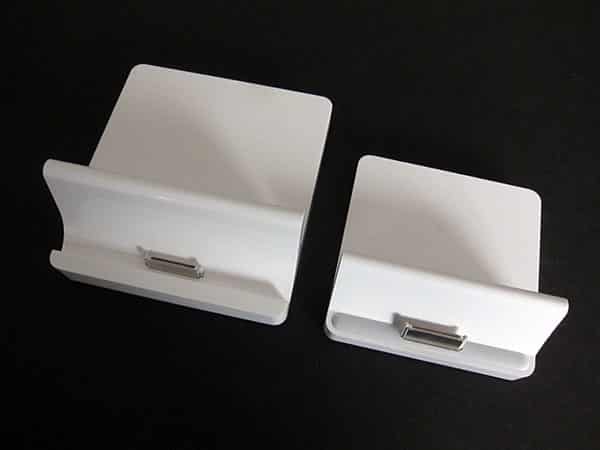
We posted a Backstage article on the two iPad 2 Docks and included a guess or two of our own. Maybe Apple needed or intended the extra space inside the iPad 2 Dock for more complex electronics, such as a late-omission Thunderbolt port. Perhaps it had learned something from the odd little gray pill below the Dock Connector on the original iPad Dock. A reader suggested that stress on the first iPad on the prior Dock had caused minor damage to the iPad’s rear casing. There wasn’t any one obvious answer.

So we cracked both the iPad Dock and the iPad 2 Dock open to take a look for ourselves, and what we found inside was surprising.
Read on for all the photos and details.
First, if you’ve ever wondered how Apple gets those docks to feel substantial, the answer’s not tiny sandbags. Each version of the Dock actually has a huge, heavy metal plate inside molded with a “Zinc-3” legend on its undercarriage.

These plates actually jut up to form the reclining mini-walls found behind the iPads, which is to say that Apple’s Docks are far sturdier than their pretty little glossy white plastic exteriors would suggest. The process of prying them open took nearly an hour per Dock, and included a series of little discoveries—glue-covered screws inside the original iPad Dock, replaced by cheaper and more easily removed melted plastic donuts to hold the iPad 2’s metal and plastic base pieces together. It was harder to get these Docks apart than any of the first three or four iPods, in some cases appearing that Apple was actively attempting to prevent disassembly.

What else was inside? Well, nothing that would explain the radical increase in size. Each Dock has a spring-loaded Dock Connector, as well as a long dark green Dock Connector cable running from one side to the other, seemingly with more surface area than the tiny circuit board inside. There’s at least as much empty space inside of each Dock as there is used area, with the ratio of unused space growing markedly in the iPad 2 Dock.

What changed on the iPad 2 Dock’s circuitboard? Well, the first version of the Dock had a 2009 copyright, two legends (“MFC HF/e1 DC 0810” and “Apple 821-1064-A), and a square chip that we believe to be the authentication hardware. The iPad 2 Dock has no copyright date on the top of the circuit board, one legend (“821-1219-A HF/e1 MFC 0911”) and what looks to be two square chips, one in the exact same place as before, and another that’s covered in silver—obscuring whatever markings it might have had—while sitting in a newly added square area on the circuit board. Thanks to their connectors, the Docks both include more conspicuous Foxconn or Foxlink branding than Apple markings, on the inside at least.

We know from testing the iPad and iPad 2 Docks that they don’t behave identically from an electronic standpoint—the newer version is a little faster and less glitchy when initiating screen mirroring, for example—but it’s pretty obvious now that there was no need for all that extra depth, height, and length to accommodate electronic changes. After going through the full teardown, our impression is that the extra footprint was solely or substantially to increase the iPad 2 Dock’s stability, and that the lip may be there to change the distribution of stresses, as suggested by our reader.

The biggest takeaway from the experience? Case incompatibilities aside—and they increasingly seem to be by design—Apple builds these docks amazingly well. Given that we’re talking about $29 accessories that look like they’re made entirely from plastic, they were surprisingly challenging to disassemble, resilient to all but surface damage, and unusually substantial for items that could have just as easily been rendered disposable. The industrial engineers only cut obvious corners on the sequel in ways that would never impact an average user, replacing internal screws and glue with more efficient fasteners.











