
To say that I’ve gotten used to using the Sidekick 2 would be an understatement: at some point after the first week of ownership, it had essentially melded with my hands, and even if I didn’t like all of Danger’s design decisions, they all made a lot of sense. The top and bottom rubber bumper-coated panels? Not great, but they sure absorbed an accidental drop or two. The just-a-little-soft keypad? Worked great 99.5% of the time. With the exception of the battery, which was obviously going to run down over two years of active use, these were the only two parts of my SK2 that ever had problems – one of the keys broke, so T-Mobile replaced the unit, and one of the bumpers snapped, so I bought a pack of replacements. Not bad.


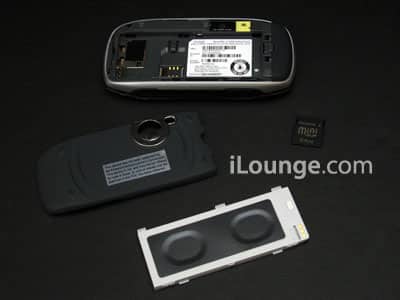
The Sidekick 3 has made changes in each of these areas. Most obviously, there’s a user-replaceable battery (hear that, Apple?), so you can have a spare when you’re travelling or just talking a lot between recharge sessions. I still think Apple’s out of its mind for missing out so long on the opportunity to sell overpriced replentishables for iPods, and can guarantee that if I buy myself a SK3 – that’s if – I’ll be buying a spare battery, too.


Danger’s also replaced the soft keyboard with one that has all the same keys, only made from clear hard plastic, and with just a hair more space between them. A friend with a Treo proclaimed that the SK3 had the best cell phone keyboard he’d ever seen.
I agree – the buttons are a little crisper, their letters a little larger for those who still type by sight, and the orange number pad screening has given way to purple and orange number keys. It just looks and feels a little better.


But I’m not as big a fan of the other button changes. The top shoulder buttons have become tiny and inconvenient to use when the top is flipped open; both they and the bottom buttons have shifted inwards just enough that fingertips can’t find them as easily. We’ll have to see whether I develop hand-meld with these soon, but so far, the answer’s no. Face buttons have also been tightened up, all moving closer to the flip-out screen, which is regrettably basically the same as the last one. These buttons look nicer than before, but their close spacing is less friendly to big fingers. I suspect I’ll get used to these even if I don’t get used to the new top and bottom buttons.


The big change, though, is the removal of the old right wheel in favor of a new high-speed trackball that feels just like the one on Apple’s Mighty Mouse. Danger went to the trouble of adding a colored light to the ball, emulating the glow feature that used to be found in the SK2’s joypad, and as always, the effect is nice – if a bit kiddie.
My suspicion is that, like similar balls in computers and mice, the SK3’s ball is going to get junked up over time and require service for cleaning, but I’m hoping I’m wrong about that. In the meanwhile, it does make menu navigation way fast, and no longer forces you to think in cardinal directions when navigating web pages. It also lets you dive into sub-menus with ease from the unit’s new layered main menu: there are three instant messaging services (AOL, MSN, and Yahoo), and rolling right takes you from the general Instant Messenging heading into separate menus for each of the three services. If you find the ball too sensitive, just recalibrate it in the settings.


For the first time, Danger now lets you choose from four backgrounds to semi-skin the interface. One is neutral and SK2-like (Liquid), two are girly (Madison and Rodeo), one is boy-ish (Surface). None is great; user-submitted art and icons would make this superb.

Pack-ins haven’t changed too much. As noted in the prior report, the headset now has two earbuds (and dual foams), intended for use with the built-in and widely pooh-poohed music player. There’s a handstrap, a grandpa-style carrying case, two manuals, and a slightly different power charger.











