
iLoungeiLounge
  • News
    • Apple
      • AirPods Pro
      • AirPlay
      • Apps
        • Apple Music
      • iCloud
      • iTunes
      • HealthKit
      • HomeKit
      • HomePod
      • iOS 13
      • Apple Pay
      • Apple TV
      • Siri
    • Rumors
    • Humor
    • Technology
      • CES
    • Daily Deals
    • Articles
    • Web Stories
  • iPhone
    • iPhone Accessories
  • iPad
  • iPod
    • iPod Accessories
  • Apple Watch
    • Apple Watch Accessories
  • Mac
    • MacBook Air
    • MacBook Pro
  • Reviews
    • App Reviews
  • How-to
    • Ask iLounge
Font ResizerAa
iLoungeiLounge
Font ResizerAa
Search
  • News
    • Apple
    • Rumors
    • Humor
    • Technology
    • Daily Deals
    • Articles
    • Web Stories
  • iPhone
    • iPhone Accessories
  • iPad
  • iPod
    • iPod Accessories
  • Apple Watch
    • Apple Watch Accessories
  • Mac
    • MacBook Air
    • MacBook Pro
  • Reviews
    • App Reviews
  • How-to
    • Ask iLounge
Follow US

News

News

Shrinking iPhone, Shrinking Interface: The Issues

Last updated: May 15, 2021 2:49 pm UTC
By Jeremy Horwitz
Shrinking iPhone, Shrinking Interface: The Issues

When Apple created the iPhone’s touchscreen interface, it also created a fundamental “going forward” challenge—how can the size-obsessed company keep making its devices smaller without over-compromising their usability? Steve Jobs, after all, dismissed with a “yuck!” the idea of using a stylus with the touchscreen, noting that a finger was the best possible way to interact with the device. Apart from shrinking users’ fingers, how can the screens of future iPhones and touch-based iPods fall in size without making the icons and other buttons too small to use?

Shrinking iPhone, Shrinking Interface: The Issues

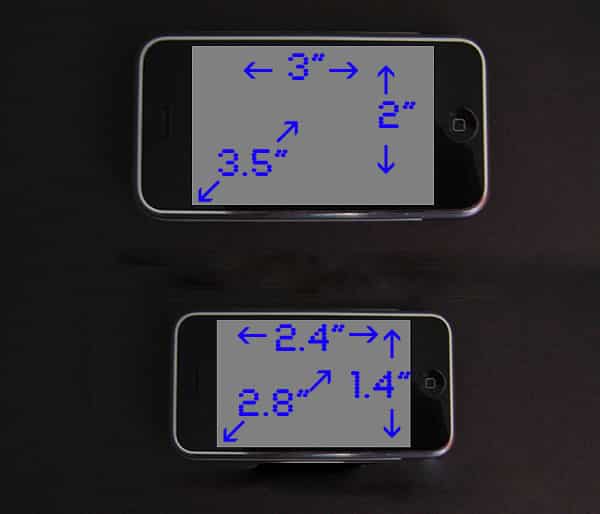
Today, a Taiwanese newspaper claimed that the new iPhone’s screen will be reduced from its current 3.5” diagonal size down to 2.8”—a compromise which will necessarily require Apple to do one of three things: shrink the current interface down, crop it, or shrink it and crop it. If this measurement is accurate, to merely shrink the interface would require a higher pixel density screen, and the user’s indulgence for icons and keys that would lose around 20% of their current size. Cropping the current interface would eliminate some of the icons and keys, while a combination of cropping and shrinking could preserve more icons and keys than the pure crop, making them more than 80% of their present size, but you’d still have to lose some size and white space to make it work.


pic

The picture above shows how icons currently fit on an iPhone screen, and how they’d fit on a purely cropped or a purely shrunk screen.

In the crop scenario, the 20-icon main menu becomes capable of holding 12 at full size; the shrunken version preserves all 20 but shrinks them down to around 0.3” per icon in width.

pic

The next picture shows what might happen on a 2.8” screen with the current vertical orientation keyboard. Apple’s already too-small keys would drop to baby finger-sized 0.2” by 0.1” keylets. Those who already find the iPhone’s keyboard marginal would find the miniaturized one useless unless new predictive software was developed to make it smarter at guessing the words they were trying to type.


pic

Another option would be to restrict the keyboard to operating solely in widescreen mode.

Here, the keys would remain substantially usable even on a 2.8” screen, falling to roughly 0.2” by 0.2” in size. While not as large as the .25” by .25” keys of the larger iPhone, these would have twice the surface area of the vertical keys.

Does any of this really matter? Yes. What Apple does with successive iPhones’ interfaces is literally all-important. Should the screen size shrink at the same size pixel density increases, Apple’s applications—and third-party ones—will need to be updated to be sure text and buttons aren’t too small to be used by most people.



Latest News
The 14-inch MacBook Pro with M5 Chip 16GB RAM/512GB is $250 Off
1 Min Read
Noise and Static on AirPods Pro 3 Still Unfixed
1 Min Read
New iMac with 24-inch OLED Display May be Brighter With 600 Nits
1 Min Read
The 15-inch M4 MacBook Air 256GB Is $250 Off
1 Min Read
Internal Kernel Debug Kit from Apple Reveals Tests for a MacBook with A15 Chip
1 Min Read
Apple Currently In Talks With Suppliers for Chip Assembly & Packaging of iPhones in India
1 Min Read
Apple Allows Easier Battery Replacement For M5 MacBook Pro with 14-inch Display
1 Min Read
The Apple Watch SE 3 44mm GPS is $50 Off
1 Min Read
20th Anniversary iPhone May Launch in Two Years
1 Min Read
Better Image Generation Capabilities and Apple Music Integration Coming to ChatGPT
1 Min Read
A20 Pro Chip Coming to Next Gen iPad Mini OLED
1 Min Read
Amazon has the AirTag 4 Pack Marked $29 off
1 Min Read

iLounge logo

iLounge is an independent resource for all things iPod, iPhone, iPad, and beyond. iPod, iPhone, iPad, iTunes, Apple TV, and the Apple logo are trademarks of Apple Inc.

This website is not affiliated with Apple Inc.
iLounge © 2001 - 2025. All Rights Reserved.
  • Contact Us
  • Submit News
  • About Us
  • Forums
  • Privacy Policy
  • Terms Of Use
Welcome Back!

Sign in to your account

Lost your password?








