
Longtime iLounge readers know that we love to try new products, a fact that’s borne out by the sheer number of software and accessory reviews we publish every week. To the best of our recollection, there hasn’t been a weekday in the past five or so years that we haven’t spent playing around with at least a few things, and the general rule of thumb is that if we test something, we review it rather than holding our opinions back. Unless we’re buried under a pile of new items and need to prioritize what’s most important, it’s very unusual for us to sit on a product for a really long time without saying something about it. What follows is the story of an exception—actually, a number of recent exceptions—to that rule.
We’re most concerned with Elgato Systems’ EyeTV Hybrid, which we started testing in January, then put down in hopes that a software update to its EyeTV 3.1 software would fix the major problems we were having. Last night, we decided to take another stab at reviewing it with the updated 3.1.1 software, and spent several hours this morning trying to get it working. The problems were still there. As our accessory reviewing policy is based on a simple premise—products are supposed to “just work” when we get them, without the need to spend time digging through arcane settings or talking with a company’s tech support department—the typical accessory we’d cover would have received a D or an F based on the experiences we had. But because we’ve tried to be accommodating of the recent, major growth of the iPod and iPhone software scene—particularly in the App Store—we decided some time ago to try taking a wait-and-see attitude on certain releases, watching to see whether they got fixed or changed significantly after they first began to be sold.
That’s turned out to be a mistake. It sent the message that users—including us—were willing to tolerate patch after patch after patch to make a program work properly, a state of affairs that Apple has allowed to develop since the App Store premiered, and arguably before that with buggy iTunes, iPod, and iPhone software releases.
Instead of software that “just works,” the App Store in particular has been spreading a staggering quantity of buggy, “we’ll fix it later” products and their updates alongside a small number of apps that are extremely polished, and a huge number that are utter junk, all apparently counting towards the same “billion downloads” number. As reviewers, we’ve had to decide whether and how to cover these releases, specifically whether to simply pan something outright when it doesn’t work properly on first release, or how to adjust a rating properly for various types and degrees of bugs. When possible, we’ve tried to explain our rationale in our reviews, but at some point talking about the process rather than the products takes a toll on us, and surely you, too.
There’s an additional behind-the-scenes component that you mightn’t know about, as well. Due to the sheer volume of products we review, and the requests we receive from developers for coverage, we now find our e-mail boxes filling up with requests for help finding, describing, and fixing bugs; you may have noticed that the App Store’s “reviews” these days often read more like bug reports than ratings of finished products. Unfortunately, we don’t have the time or desire to serve as beta testers, chasing down and reporting bugs to companies every time we find them; there are just too many products and too many bugs these days. Our job is to test products from the standpoint of the typical user, and tell you whether they work, or don’t, and we don’t have the ability to even respond individually to all of the e-mail requests we receive from software developers these days.
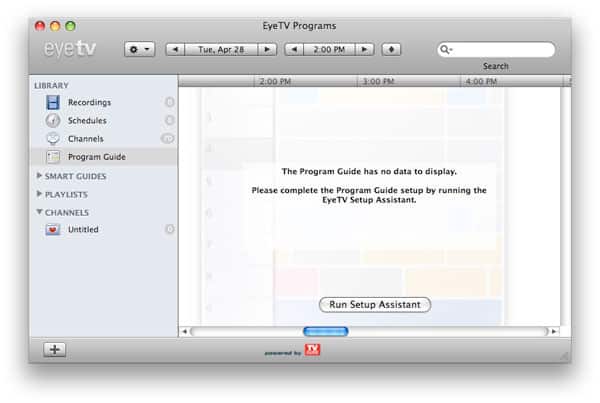
That brings us back to EyeTV Hybrid, a piece of hardware that depends upon a piece of software to be useful for anything. Back in version 3.0, which shipped with the prior version of the Hybrid hardware, the EyeTV software relied upon a free service for TV program listings, but then Elgato switched to TV Guide—and a $20 annual charge after the first year—for those listings. Upon getting the 3.1 software, we used the Setup Assistant to set up a TV Guide account, complete with a one-year listing service credit, and the listings didn’t work. We’ve had this sort of thing happen with Elgato software in the past, and know that we sometimes have to wait a couple of weeks for an updated release before it gets fixed, then add a postscript to our original review.
As you might imagine or know from our re-reviewing policy, which we changed back in 2005 because so many companies were releasing buggy products, this isn’t something we do or want to do with any regularity, and we don’t think it’s fair to either us or the early adopters who purchase new products and then have to wait around for them to work.

For whatever reason, the issues we were having with the EyeTV software continue today. Yes, we went back through the software again and repeated its setup and settings screens. Fruitlessly, we even went over to TV Guide’s web site and tried to set up an account there; this attempt at a workaround didn’t work, and we still couldn’t figure out what was going on. The program’s settings menu has a progress indicator that shows that it’s downloading listings, but it quickly stops, and never displays them. Separately, the software locates a huge number of local stations on the hardware’s TV tuner, but doesn’t identify any of the digital cable ones. And then there’s the new FM radio tuner that’s built into EyeTV Hybrid: we can only get the software to find a single local FM channel, and can’t figure out a way to manually tune others. Certainly, there are people out there who aren’t having issues with the software. But surely there are others out there, most likely people far less experienced with computer hardware, software, and accessories than us, who are having similar problems. We couldn’t quickly find answers on Elgato’s site, even if they’re buried somewhere there, and we feel strongly that users shouldn’t have to dig around or contact a company to make something like this work. For all of its limitations, a TiVo strikes us as a much easier, consumer-focused solution for TV recording at this point in time.











