
I’m going to begin this brief article by noting that I’m a huge fan of Apple’s laptops. I have absolutely loved my past PowerBooks, MacBooks, and MacBook Pros, praising Apple for the many things it has done right in this family, and have only felt it went off the tracks a couple of times—once with the initially crazy expensive MacBook Air, and later with the most recent plastic MacBook, which just struck me as way too easily scuffed up to be worth considering, even as a cheap notebook for kids.
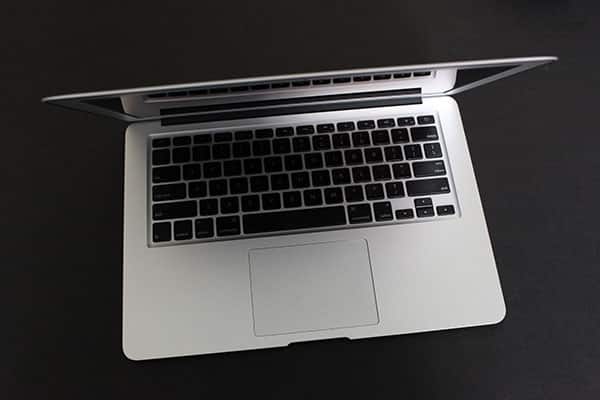
So, having waited nearly two years for Apple to bring the MacBook Air’s price and performance to a place where I could consider buying in, I was really excited when it held the Back to the Mac event last month. And I’d love to be able to tell you that I’m completely enraptured with the brand new MacBook Air I’m typing on right now, but I have to be honest with you—I’m not. Apple has done so much right with this model that I want to be telling you to rush out and grab one right now. And honestly, if the 11.6” version strikes you as right-sized (and right-powered) for your personal needs, don’t hesitate. That version is amazingly small, fast enough for anything but serious pro video and publishing work, and full of all sorts of things people have been dreaming about in a little Mac for years: proper full glass trackpad, superior screen resolution, acceptable storage capacity, and decent connectivity—all without scalding your lap, or forcing you to cramp your hands on a small keyboard, and now starting at $999. That’s a lot of awesome in a little package, and Apple deserves to sell them by the millions if it can make enough to go around. I’ve been telling friends to check them out, and they keep going to the store, then walking out with new Macs.

The new 13” MacBook Air is a somewhat different story. It has some even more compelling features—better screen resolution, better CPU and storage options, SD card slot built-in, and more battery life. These things alone checked off enough on my list that I jumped right in and bought one, sight unseen.
But since I actually took possession of my own Air, I haven’t been able to shake the feeling that it’s just a slimmer and lighter 13” MacBook Pro, one with a fairly heavy price premium and some unexpected surprises, positive and negative. The positive ones include much zippier app loading, dramatically faster wakes from sleep, and overall performance that feels extremely Pro-like in the 2.13GHz/4GB model I purchased. These features make me feel inclined to keep the Air. But it turns out that there’s a fairly significant negative one that makes it very close to ineligible to be reliable for my personal needs.

It’s called color gamut, and it’s not something you’re going to notice if you’re testing an Air at an Apple Store or reading about it in most reviews—AnandTech had the only review I spotted that picked up on this. Unlike the latest MacBook Pros, which render photographs (and other graphics) with a wide range of colors, the Airs do a noticeably worse job, enough that subtle shades can turn into blotchy messes. I noticed it the first night I was using my new Air, and saw that pictures of my daughter’s fuzzy orange outfit were suddenly looking blurry, as if my camera had been blowing out all the detail. But the pictures were taken with a Canon 5D Mark II, and had looked great before… on my MacBook Pro.


This didn’t make any sense at first. The Air’s screen was supposed to have even better detail than the 13” MacBook Pro’s. And in some ways, including sheer resolution, bright whites, and dark blacks, it does. But as it turns out, the new screen’s smaller dots do a less impressive job representing wide ranges of colors than the Pro’s screen.
Pictures seemed to be a little more blue, skintones a little less lifelike, and finely-shaded objects somewhat flatter. While otherwise praising the Air’s screen, Anandtech says that it displays just under 47% of Adobe’s RGB 1998 profile, versus slightly over 77% for the 13” MacBook Pro, far fewer colors. Normally, isolated spec differences like this don’t really matter too much to me—a product is the sum total of all of its features, not just one or two little stragglers—but this particular one strikes me as disproportionately important to people who want to use the new Air to edit or share photographs. If you can’t rely upon your screen to show you what your photos really look like, how can you properly edit them or even decide which ones are worthy of sharing?

Another point that really bears mention, having just made the switch from a 13” Pro to the 13” Air, is that even the newest, thinnest 13” model doesn’t really feel that much different from the current 13” Pro. It is certainly lighter, a major asset for people who don’t want something heavy in their backpacks, and so thin that you may initially feel uneasy slipping it under an arm and holding it there as you walk. Holding all other things equal, I’d take a lighter, smaller machine any day. But the Air is definitely a Mac. Apple didn’t want to compromise on the keyboard experience, screen size, or speakers on this one, so bravo to them for delivering all of those things within the same form factor, only slimmer. I haven’t once felt as if I needed to squint at the display, or cramp my hands to use the keyboard, or get some better headphones or speakers to use to hear the audio. Screen aside, the experience really isn’t diminished.

That said, there is actually a $600 price premium to build an Air up to the point where it nearly rivals the $1,199 13” Pro in performance—assuming you’re okay losing FireWire 800, the optical drive, some (actually, a fair bit of) battery life, Ethernet, and a little CPU power. Before I made the purchase, I felt that I was willing to lose all of those features and pay a premium to get the Air’s lighter profile, but now that I’ve made the switch and the screen is sort of iffy, I’m really not sure that going thinner was the best use of my money.











