
iLoungeiLounge
  • News
    • Apple
      • AirPods Pro
      • AirPlay
      • Apps
        • Apple Music
      • iCloud
      • iTunes
      • HealthKit
      • HomeKit
      • HomePod
      • iOS 13
      • Apple Pay
      • Apple TV
      • Siri
    • Rumors
    • Humor
    • Technology
      • CES
    • Daily Deals
    • Articles
    • Web Stories
  • iPhone
    • iPhone Accessories
  • iPad
  • iPod
    • iPod Accessories
  • Apple Watch
    • Apple Watch Accessories
  • Mac
    • MacBook Air
    • MacBook Pro
  • Reviews
    • App Reviews
  • How-to
    • Ask iLounge
Font ResizerAa
iLoungeiLounge
Font ResizerAa
Search
  • News
    • Apple
    • Rumors
    • Humor
    • Technology
    • Daily Deals
    • Articles
    • Web Stories
  • iPhone
    • iPhone Accessories
  • iPad
  • iPod
    • iPod Accessories
  • Apple Watch
    • Apple Watch Accessories
  • Mac
    • MacBook Air
    • MacBook Pro
  • Reviews
    • App Reviews
  • How-to
    • Ask iLounge
Follow US

News

News

How the iPod + Macs Appear in Metal Gear Solid 4

Last updated: May 15, 2021 2:34 pm UTC
By Jeremy Horwitz
How the iPod + Macs Appear in Metal Gear Solid 4

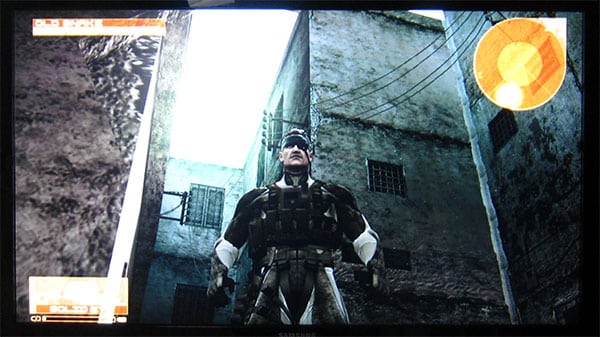
Last month, we mentioned that Konami’s Metal Gear Solid 4 for Sony’s PlayStation 3 was going to feature an iPod as an in-game item; now that the game is out, we’ve had a chance to see how both the iPod and Macs were used. It’s actually sort of surprising.

How the iPod + Macs Appear in Metal Gear Solid 4

As you may or may not know, Metal Gear Solid 4 is the latest in a series of military espionage and action games featuring a character named Solid Snake. The developers at Konami, led by Hideo Kojima, have spent years creating realistic guns, vehicles, armor and environments for the various games in the series, modeling them to an impressive degree of reality, and in some cases abstracting them into next-generation versions. So it’s no surprise that the company’s emulation of an iPod is fairly accurate—the only unusual part is that the device is a well-since-discontinued fifth-generation iPod in a world where nanomachines, night vision eye patches and genetically engineered battle machines are all apparently more common than iPhones or touch-screen iPods.


How the iPod + Macs Appear in Metal Gear Solid 4

How the iPod + Macs Appear in Metal Gear Solid 4

You actually use the iPod by holding down one of the top left triggers and then spinning the right analog joystick around in a circle to scroll on the Click Wheel.

A yellow beam indicates how your finger is currently sweeping the Wheel. Pressing the joystick inwards is the iPod’s central Action button; you can select items on the Wheel by sweeping the Wheel and pressing the X button on the controller as something’s overlaid with the yellow beam. It’s all an attempt to make the experience as much like using an iPod as possible on a PlayStation 3 joypad, with menu options that are familiar but stripped down for simplicity’s sake. The only setting under “Settings,” for instance, is “Repeat,” and both songs and podcasts are found under “Music.”


How the iPod + Macs Appear in Metal Gear Solid 4

The in-game iPod’s collection of songs consists of tracks that are pre-added by the game, as well as ones you find lying around in the warzones you walk through. Konami has included songs from past Metal Gear games, both console and handheld, as well as podcasts that break down the fourth wall and let you listen to the developers talking about the game. You’re supposed to use the iPod to listen to audio if you get tired of the default minimalist background music; it’s not a mandatory part of the game, but playing certain tracks can relax Snake or improve certain of his performance characteristics.


How the iPod + Macs Appear in Metal Gear Solid 4

While it’s cool to see the iPod in the Metal Gear universe, it’s also a little off-putting. By attempting to replicate the Click Wheel rather than just using a simpler joystick-style selection interface, Konami actually makes it more difficult to pick tracks than it would have been with just a simple menu. Apple understands this completely in its own design of TV- and computer-based interfaces—Apple TV and iTunes don’t try to use faux scroll wheels. The inclusion of the iPod appears to have been more for fun or stylistic reasons, or perhaps paid product placement, than anything else.


How the iPod + Macs Appear in Metal Gear Solid 4

Leaning in the “product placement” category are some of the cutscenes with your assistant, Otacon. He sits at a desk with a suspended Apple Cinema Display floating in the air, and a Mac Pro under the desk—or at least two items that look a lot like them.



Latest News
The Apple Watch Series 11 46mm GPS Is $100 Off
1 Min Read
Clamshell Style iPhone Being Looked Into By Apple
1 Min Read
Foldable iPhones May Have the Largest Battery Ever
1 Min Read
Apple and TSMC’s 10-Year Collaboration May Be Ending
1 Min Read
The 13-inch M5 iPad Pro 256GB Wi-Fi Is $149 Off
1 Min Read
M5 Pro and M5 Max Chips for the MacBook Pro could Roll Out with macOS 26.3
1 Min Read
Mac Ordering Process Revamped
1 Min Read
Check Signed By Steve Wozniak and Steve Jobs Sold For $2.4 Million
1 Min Read
The Anker 140W 4-Port GaN USB-C Charger is $35 Off
1 Min Read
No iPhone Air 2 This Year, according to Latest Report
1 Min Read
New Report Corroborates Split iPhone Release Dates
1 Min Read
Apple Losing More Researchers As They Plan To Release 2 Siri Versions
1 Min Read

iLounge logo

iLounge is an independent resource for all things iPod, iPhone, iPad, and beyond. iPod, iPhone, iPad, iTunes, Apple TV, and the Apple logo are trademarks of Apple Inc.

This website is not affiliated with Apple Inc.
iLounge © 2001 - 2025. All Rights Reserved.
  • Contact Us
  • Submit News
  • About Us
  • Forums
  • Privacy Policy
  • Terms Of Use
Welcome Back!

Sign in to your account

Lost your password?








