
iLoungeiLounge
  • News
    • Apple
      • AirPods Pro
      • AirPlay
      • Apps
        • Apple Music
      • iCloud
      • iTunes
      • HealthKit
      • HomeKit
      • HomePod
      • iOS 13
      • Apple Pay
      • Apple TV
      • Siri
    • Rumors
    • Humor
    • Technology
      • CES
    • Daily Deals
    • Articles
    • Web Stories
  • iPhone
    • iPhone Accessories
  • iPad
  • iPod
    • iPod Accessories
  • Apple Watch
    • Apple Watch Accessories
  • Mac
    • MacBook Air
    • MacBook Pro
  • Reviews
    • App Reviews
  • How-to
    • Ask iLounge
Font ResizerAa
iLoungeiLounge
Font ResizerAa
Search
  • News
    • Apple
    • Rumors
    • Humor
    • Technology
    • Daily Deals
    • Articles
    • Web Stories
  • iPhone
    • iPhone Accessories
  • iPad
  • iPod
    • iPod Accessories
  • Apple Watch
    • Apple Watch Accessories
  • Mac
    • MacBook Air
    • MacBook Pro
  • Reviews
    • App Reviews
  • How-to
    • Ask iLounge
Follow US

News › Mac › MacBook Pro

MacBook Pro

Griffin Elevates, Cards the MacBook Pro

Last updated: May 15, 2021 7:27 pm UTC
By Jeremy Horwitz
Griffin Elevates, Cards the MacBook Pro

Today’s entry in our ever-increasing flow of MacBook accessories: Griffin’s ExpressCard/34 5:1 Card Reader ($30, also called the Expresscard 34 Card Reader), and Elevator Desktop Stand ($40). A few short words on both of these neat little items as we head into the weekend.

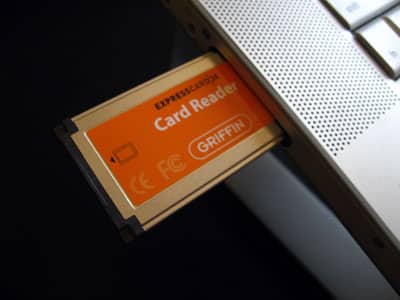

Express Card
Griffin Elevates, Cards the MacBook Pro

We’ve been waiting for something like the Card Reader since the MacBook Pro was introduced last year, as we’ve wanted a way to stop carrying around our larger USB 2.0-based memory card readers, but weren’t totally confident in the several no-name ExpressCard/34 readers that have been released to date. In our quick tests so far, Griffin’s Reader is what we’ve needed, delivering USB 2.0 speeds for access to SD Card, Memory Stick and Pro, MMC and xD Card media without requiring any drivers, and our memory cards come up instantly on our Mac’s desktop after insertion.


Unlike our separate cabled card readers, popping a card out of Griffin’s Reader quickly results in the Mac’s “Device Removal” warning, which is typically a good sign – re-inserting the card after further use won’t result in corruption of the card’s updated contents.


Elevator

Elevator’s totally different. It’s a notebook computer stand made from two aluminum posts and a clear plastic connector, designed to elevate your MacBook Pro (or most other machines) around 5.5 inches off a flat surface. See more details and pictures by clicking on the headline.


Elevator

Assembling Elevator isn’t too difficult, but you might do it the wrong way at first, placing the clear plastic piece upwards at MacBook level rather than table level, and flipping the metal pieces upside down.

Do it this way and Elevator will look nice, but won’t be stable. The clear part – with Griffin’s name inside – is intended to rest on the table, with large pads on the aluminum protecting the MacBook’s body, and smaller pads touching the table.


Elevator

Elevator

The MacBook sits on an angle that’s designed to be ergonomically beneficial, with the screen at a height approximating the “healthy” elevation for a standalone monitor. Above the flat surface, the airflow’s better, so it’s able to fully cool its body rather than overheating due to surface or skin contact.



Latest News
The Apple Watch Series 11 46mm GPS Is $100 Off
1 Min Read
Clamshell Style iPhone Being Looked Into By Apple
1 Min Read
Foldable iPhones May Have the Largest Battery Ever
1 Min Read
Apple and TSMC’s 10-Year Collaboration May Be Ending
1 Min Read
The 13-inch M5 iPad Pro 256GB Wi-Fi Is $149 Off
1 Min Read
M5 Pro and M5 Max Chips for the MacBook Pro could Roll Out with macOS 26.3
1 Min Read
Mac Ordering Process Revamped
1 Min Read
Check Signed By Steve Wozniak and Steve Jobs Sold For $2.4 Million
1 Min Read
The Anker 140W 4-Port GaN USB-C Charger is $35 Off
1 Min Read
No iPhone Air 2 This Year, according to Latest Report
1 Min Read
New Report Corroborates Split iPhone Release Dates
1 Min Read
Apple Losing More Researchers As They Plan To Release 2 Siri Versions
1 Min Read

iLounge logo

iLounge is an independent resource for all things iPod, iPhone, iPad, and beyond. iPod, iPhone, iPad, iTunes, Apple TV, and the Apple logo are trademarks of Apple Inc.

This website is not affiliated with Apple Inc.
iLounge © 2001 - 2025. All Rights Reserved.
  • Contact Us
  • Submit News
  • About Us
  • Forums
  • Privacy Policy
  • Terms Of Use
Welcome Back!

Sign in to your account

Lost your password?








