
iLoungeiLounge
  • News
    • Apple
      • AirPods Pro
      • AirPlay
      • Apps
        • Apple Music
      • iCloud
      • iTunes
      • HealthKit
      • HomeKit
      • HomePod
      • iOS 13
      • Apple Pay
      • Apple TV
      • Siri
    • Rumors
    • Humor
    • Technology
      • CES
    • Daily Deals
    • Articles
    • Web Stories
  • iPhone
    • iPhone Accessories
  • iPad
  • iPod
    • iPod Accessories
  • Apple Watch
    • Apple Watch Accessories
  • Mac
    • MacBook Air
    • MacBook Pro
  • Reviews
    • App Reviews
  • How-to
    • Ask iLounge
Font ResizerAa
iLoungeiLounge
Font ResizerAa
Search
  • News
    • Apple
    • Rumors
    • Humor
    • Technology
    • Daily Deals
    • Articles
    • Web Stories
  • iPhone
    • iPhone Accessories
  • iPad
  • iPod
    • iPod Accessories
  • Apple Watch
    • Apple Watch Accessories
  • Mac
    • MacBook Air
    • MacBook Pro
  • Reviews
    • App Reviews
  • How-to
    • Ask iLounge
Follow US

News

News

GPS, Apple-style, in Guide + Play by Harman Kardon (20 pictures)

Last updated: May 15, 2021 7:01 pm UTC
By Jeremy Horwitz
GPS, Apple-style, in Guide + Play by Harman Kardon (20 pictures)

Two days ago, something happened. Dennis and I met with representatives from Harman Kardon to check out the Drive + Play 2, which is presently featured in a First Look on the main iLounge site. As noted there, D+P2 is a really nice car kit, and one we’re actively looking forward to fully reviewing. But what really got us talking was Guide + Play ($400), a totally separate little device that Harman’s reps happened to have in their test car at the same time.

GPS, Apple-style, in Guide + Play by Harman Kardon (20 pictures)

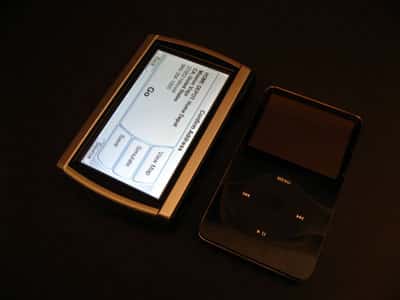
As noted in this brief prior Backstage article, we were originally going to pass on covering Guide + Play because it’s not iPod-specific. In fact, it’s sort of an iPod alternative. Measuring 4.5” by 2.875” by 0.75”, it packs a comparatively huge screen, advanced GPS software, and the ability to play back MPEG-4 videos or MP3 music files on the go. You can even listen to music through its integrated speaker while it’s acting as a GPS system for your car. And man, is the GPS performance a knockout. Menu graphics aside, it’s as good as an Apple design from a GPS interface standpoint, and that’s really saying something.


GPS, Apple-style, in Guide + Play by Harman Kardon (20 pictures)

I’m going to preface the following comments with what I told Harman’s representatives the other day: I’m really, truly frustrated with the current state of iPod car integration into GPS systems. Ideally, Guide + Play would be merged with Drive + Play 2 for one uber-car kit with GPS, iPod connectivity, hands-free Bluetooth calling, and more.

But even as the owner of a car with a larger touchscreen GPS unit with iPod integration, I’m seriously considering junking that system for Guide + Play just as it is right now. Dennis is thinking the same way. It’s just that impressive. More details are at Read More, below.


GPS, Apple-style, in Guide + Play by Harman Kardon (20 pictures)

Harman’s kit comes with car and wall chargers, a standard USB cable, mounting hardware for your car, and a carrying case for Guide + Play. A carrying case? Yes. As explained to us, the idea’s simple: charge the internal rechargeable battery, which lasts around 6 hours, carry the unit iPod-style onto an airplane and use it for movies and music, and then set it up on car power in your rental car to serve as a GPS unit. The unit’s iPod-like shape and size makes it a great travel companion, and its 4-inch, 480×272 touchscreen is larger than the current iPod’s for MPEG-4 format videos; maximum supported video resolution is 624 x 352 at 24fps. It also plays back WMA10 and WMV9 files, the latter at lower 320×240 resolution, too.


GPS, Apple-style, in Guide + Play by Harman Kardon (20 pictures)

GPS, Apple-style, in Guide + Play by Harman Kardon (20 pictures)

GPS, Apple-style, in Guide + Play by Harman Kardon (20 pictures)

Multimedia content can be synced into SD cards—up to 4GB—using your computer and the included USB cable. The SD slot is up top alongside the power button, which is alongside the unit’s GPS antenna nub. GPS map data is stored in separate integrated memory, and isn’t editable; future upgrades will be sold, apparently.


GPS, Apple-style, in Guide + Play by Harman Kardon (20 pictures)

On back is a speaker, perfect for hearing GPS voice instructions, and a mounting nook that fits with the included car mount hardware.

Popping the unit in and out of the car mount is very easy.


GPS, Apple-style, in Guide + Play by Harman Kardon (20 pictures)

GPS, Apple-style, in Guide + Play by Harman Kardon (20 pictures)

The side has a headphone port for when you don’t want to use the speaker, as well as a volume knob and USB port for media synchronization or charging. There aren’t any ports on the other side, but there is a locking switch to prevent accidental button presses.


GPS, Apple-style, in Guide + Play by Harman Kardon (20 pictures)

GPS, Apple-style, in Guide + Play by Harman Kardon (20 pictures)

GPS, Apple-style, in Guide + Play by Harman Kardon (20 pictures)

Harman’s star in this show is the GPS interface. It’s not flashy—it just works. Thanks to an Atlas II dual-core processor and some simplifying interface screens, Guide + Play manages to fly from menu to menu even with Windows CE 5.0 software under the hood. (We’ve not been impressed by the performance of Windows-based automotive interfaces in the past; this one’s an exception). You’re always presented with very clear, intuitive choices that literally anyone can figure out within seconds.


GPS, Apple-style, in Guide + Play by Harman Kardon (20 pictures)

GPS, Apple-style, in Guide + Play by Harman Kardon (20 pictures)

GPS, Apple-style, in Guide + Play by Harman Kardon (20 pictures)

Smart predictive typing makes address entry stunningly fast. Guide + Play figures out city and street names more rapidly than any in-car interface we’ve yet seen, and helps you make trip plans within literally seconds. If you pick “go,” it plots your course and you’re on the way. Simulate will show you the entire route beforehand.



Latest News
The AirPods Pro 3 is $20 Off
1 Min Read
Exynos 2600 Chip 2nm Process Revealed by Samsung
1 Min Read
New Celebrity Ad Campaign Featuring Travis Scott Released by Beats
1 Min Read
Australia Getting Hypertension Notification Feature
1 Min Read
The 14-inch MacBook Pro with M5 Chip 16GB RAM/512GB is $250 Off
1 Min Read
Noise and Static on AirPods Pro 3 Still Unfixed
1 Min Read
New iMac with 24-inch OLED Display May be Brighter With 600 Nits
1 Min Read
The 15-inch M4 MacBook Air 256GB Is $250 Off
1 Min Read
Internal Kernel Debug Kit from Apple Reveals Tests for a MacBook with A15 Chip
1 Min Read
Apple Currently In Talks With Suppliers for Chip Assembly & Packaging of iPhones in India
1 Min Read
Apple Allows Easier Battery Replacement For M5 MacBook Pro with 14-inch Display
1 Min Read
The Apple Watch SE 3 44mm GPS is $50 Off
1 Min Read

iLounge logo

iLounge is an independent resource for all things iPod, iPhone, iPad, and beyond. iPod, iPhone, iPad, iTunes, Apple TV, and the Apple logo are trademarks of Apple Inc.

This website is not affiliated with Apple Inc.
iLounge © 2001 - 2025. All Rights Reserved.
  • Contact Us
  • Submit News
  • About Us
  • Forums
  • Privacy Policy
  • Terms Of Use
Welcome Back!

Sign in to your account

Lost your password?








