
I’ve had Apple’s program Address Book sitting on my Macs for years, and in all honesty, I’ve barely used it. As useful as it may have been in concept, I’ve never found the need to manage my lists of friends, family, and business contacts like my iTunes library. Who needs such lists, or wants to spend all the time updating those details as they change? And why did Apple have to keep all the Address Book stuff separate from the program it most benefits, Mail? For once, Microsoft seemed to have the right idea with its more integrated Outlook contacts system.
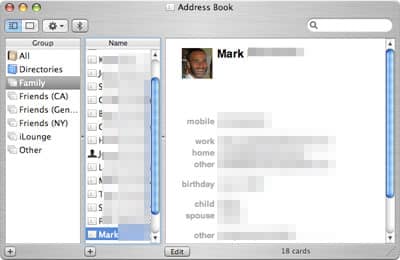
The point at which I began to realize small benefits from Address Book was when I became a serious iChat user: creating contacts meant that my Buddy List started to look like a list of names rather than AIM and .Mac accounts. But until the iPhone’s release was imminent, I was pretty content not to update Address Book or, generally, care about contacts. Being able to store them in the iPod had never really been important to me, because they were at best a passive reference, and not useful for anything. Apple’s widely publicized “get ready for iPhone” e-mail was a really smart way to let people know that contacts were about to become important, and soon.

Over the last month, and because the iPhone more or less depends upon them, Address Book and contacts have become nearly critical parts of my daily existence, and some of the application’s subtle brilliance—its ease of use, clean organization of information, and ability to manage contact photographs or icons—has become apparent. I decided this was worth writing about when I started to have an unusual experience with friends who weren’t computer nerds: in order to build up our databases, we’ve started to trade contacts almost like baseball cards, rather than trying to create them all from scratch.

What’s cool about Address Book is that a contact, once created, becomes an open format virtual Rolodex card that can be dragged and dropped into an e-mail message or an iChat session for immediate transfer. A friend who just got an iPhone was planning to type in my phone numbers; instead, I just dragged my card over to the Buddy List and dropped it on his name. Similarly, my wife had much better contact details for her side of our family than I did, complete with mailing addresses, birthdays, multiple phone numbers, and even photographs. She gathered up her contacts and e-mailed them to me. Done.

Thanks to iTunes and some other software Apple has either developed or encouraged, iPhone has a couple of neat and not especially well discussed ways of dealing with contacts. The friend I previously mentioned just bought a MacBook before getting his iPhone, and was still in the process of transitioning his old contacts from a PC—specifically, AOL software—to his Mac. A few hours after setting up his iPhone, he told me he had found it easier to import his AOL contacts directly to the phone with AOL Service Assistant (“zero steps” after that, he told me) than to use Bluetooth to transfer his old cell phone’s contacts to the Mac. PC users will find that iTunes actually does a good job of bringing over contacts from other programs, too.
My friend’s biggest complaint was that he needed to add more detail to those contacts once they were transferred. Join the club.

iPhone also respects Address Book’s categorization of contacts. When I realized that my list was getting much too long to conveniently scroll through, I went into Address Book and created a bunch of smaller, sorted categories, guessing that—like many phones—iPhone would not even recognize them. Wrong: the next time I synced iPhone, the categories (“Groups”) were there, and I now had shorter, easier lists to scroll through, as well as Apple’s more obvious shortcuts (Favorites and Recents).
What’s odd about all this is that I actually sort of enjoy playing with Address Book contacts now. I want to have complete information so that I can easily call someone, e-mail them, or get quick directions to their addresses through Google Maps. It’s also great to have some high-resolution, screen-filling contact photography so that I see more than just a little icon when they call me. Meanwhile, Address Book has been sitting on the Mac for years with all this cool stuff built in, and based on my experience, I don’t think it’s as well known or widely used as it could or should be.











