
There are five or six different ways to measure the inherent value of a device, or lack thereof, but the deliberate simplicity of Pure Digital Technologies’ Flip UltraHD reduces the need for such analysis. It has been designed to do a total of two things—record and play back 720p videos—and do so at a lower price than products that attempt to do more. There are no complex controls to master, batteries to replace, or memory cards to fool around with. Everything you need to make it work and work well is in the package when you open it. And when you’re finished using it, there’s no series of special steps to follow to get your videos off of it, recharge it, or anything else. It is Apple-style simplicity applied to HD video recording, in a boxy package that would not pass Apple industrial design muster, yet has surpassed any Apple device yet released in video recording functionality.
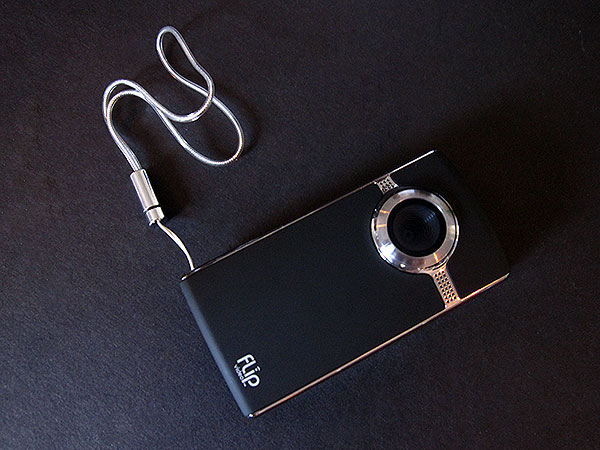
Flip UltraHD measures roughly 4” by 2” by 1”, has a lens on the front, a 2” color screen and buttons on the back, a power button on the left, full-sized USB and mini HDMI connectors on the right, and a standard tripod-compatible screw mount on the bottom. You can choose a soft touch rubber black or white coating for most of the body, with the rest in chrome. Each comes with a hand strap, a rechargeable battery, and a carrying bag. That’s it.

Notable is the fact that Pure Digital’s included battery can be popped out at any time and replaced with a simple pair of AA batteries if you need extra juice. This is the sort of nice design decision that lets users have a great solution in the box—a seemingly proprietary rechargeable cell—plus the temporary, non-proprietary additional power flexibility they need in emergencies. If only Apple could learn from these guys.

Want to record a video? Press the power button, then the big red button on back to record, and hit it again to stop. Point at your subjects and shoot video; your only controls while recording are plus and minus buttons for very limited 2x digital zoom functionality. When you’re done, you can press a play button to watch and hear your recorded video, skip through previously recorded videos with forward and back buttons, adjust the volume of the unit’s integrated speaker, and delete videos with a trash can button.


Apart from initially telling it the current date, time, and your preference for confirmation tones and a light to let people know they’re being recorded, there’s nothing else to do—no focus requirements, filters, lens cap, nothing. Every H.264 video it makes is recorded with the same 1280×720 resolution, 9Mb/s bit rate, and stereo audio format, consuming roughly 65MB per minute. UltraHD includes 8GB of storage space, good for two hours of video recording, and the included battery came out of the box with enough power to record over 30 minutes of video; fully charged, it can roughly fill the 8GB before needing recharging or replacement. To recharge, you simply leave UltraHD plugged into the same USB port you’re using to extract its videos; a pop-out USB arm connector eliminates your need to carry around a cable, and computers treat the device like a plugged in camera for easy file copying.

Pure Digital’s approach obviously has its positives and negatives. On the positive side, it has come up with a device that creates 720p movies so effortlessly that anyone could make them, remove them from the device, and play them back; the only thing it doesn’t include in the box is the mini HDMI cable needed to watch the videos immediately on a TV. Videos are colorful, entirely audible, and more detailed than the lower-resolution ones created by most digital still cameras today. UltraHD’s lens is fixed and not capable of either true depth of field or close-up macro videos, but it creates entirely acceptable videos of its subjects at distances greater than a foot or so away. Color balance is handled automatically, and quite well under normal indoor and outdoor lighting conditions. There’s no need to convert the videos in order to start watching immediately on a Mac or PC, via iTunes or other software. (See video samples here and here.)

But on the negative side, for whatever reason, once they’re in iTunes, the H.264 videos can’t be viewed on an Apple TV without conversion, despite Apple TV’s support for both H.264 and 720p video playback. They also need to be converted if you want to watch them on an iPod or iPhone. iTunes will handle both types of conversions for you, slowly; Pure Digital includes free Mac and PC FlipShare software right on the device, as well, capable of creating DVDs, YouTube and MySpace videos from its own files, but nothing specific to Apple’s devices. Whatever else might be said about the iPhone 3GS’s comparatively low-resolution 640×480 video recording capabilities, at least the video files it creates will be immediately viewable on all of Apple’s increasingly popular portable devices.











