
iLoungeiLounge
  • News
    • Apple
      • AirPods Pro
      • AirPlay
      • Apps
        • Apple Music
      • iCloud
      • iTunes
      • HealthKit
      • HomeKit
      • HomePod
      • iOS 13
      • Apple Pay
      • Apple TV
      • Siri
    • Rumors
    • Humor
    • Technology
      • CES
    • Daily Deals
    • Articles
    • Web Stories
  • iPhone
    • iPhone Accessories
  • iPad
  • iPod
    • iPod Accessories
  • Apple Watch
    • Apple Watch Accessories
  • Mac
    • MacBook Air
    • MacBook Pro
  • Reviews
    • App Reviews
  • How-to
    • Ask iLounge
Font ResizerAa
iLoungeiLounge
Font ResizerAa
Search
  • News
    • Apple
    • Rumors
    • Humor
    • Technology
    • Daily Deals
    • Articles
    • Web Stories
  • iPhone
    • iPhone Accessories
  • iPad
  • iPod
    • iPod Accessories
  • Apple Watch
    • Apple Watch Accessories
  • Mac
    • MacBook Air
    • MacBook Pro
  • Reviews
    • App Reviews
  • How-to
    • Ask iLounge
Follow US

News

News

Backstage: StyleFi Music Sphere, revealed

Last updated: May 16, 2021 8:57 am UTC
By Jeremy Horwitz
Backstage: StyleFi Music Sphere, revealed

Back a few weeks ago, we mentioned that Oregon Scientific was preparing a major music initiative called StyleFi, a collection of new audio accessories with sleek designs. One of those designs is iPod-bound, and not yet publicly revealed, but there’s something you might want to take a look at in the meanwhile.


It’s called Music Sphere. To underscore the point for speed readers, this is not Oregon Scientific’s iPod product, hence the lack of iPod-specific functionality – and our placement of it on Backstage instead of the main iLounge site. But the ideas and design cues incorporated within it are pretty interesting nonetheless.
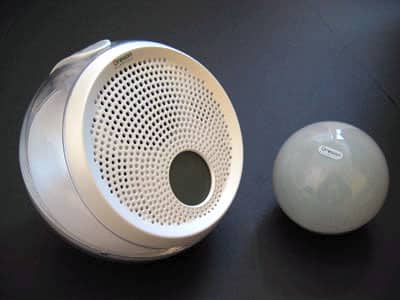
Backstage: StyleFi Music Sphere, revealed

Click on Read More below for a ton of pictures and information, including an explanation of how those two balls work together in your home.
pic

The basic idea is this: you get two globes, one big and very classic iMac-like, and one small and lightbulb-like. You plug any audio device of your choice into the little globe – actually, up to three devices can be connected simultaneously – and then put the big globe (with three speakers inside) somewhere else.


As in, 100 feet or more somewhere else. pic

pic

There’s a control panel on the speaker with a collection of eight buttons, including power, volume up and down, muting, and audio input selection. Flipping between the three inputs changes the color of the Sphere’s LCD face from blue to red to green, as below.

pic

pic

pic

There’s an analog clock in the center of the screen, which you can set using the clock button on the control panel, and there’s a half circle worth of volume bars that run across the screen’s top. Pressing the volume buttons will increase or decrease the number of bars, and with them, the volume. (Surprise.)


pic

Of course, the audio inputs can be used for anything you desire – an iPod shuffle or anything else with a headphone jack, really – and you’ll need to adjust the device’s volume to a decent level at the start. From there, the Sphere’s built-in amplifier will handle the rest of your volume controls.

But you’ll need a separate remote, such as a Griffin AirClick or ABT iJet, to change tracks. If this doesn’t make sense using an iPod as an example, consider how it might work with an iTunes-equipped computer – plug your computer into the small globe, start a playlist going, and listen to music in your bedroom, bathroom, or your backyard. Or all three, with multiple Spheres.


pic

Then there’s the mounting hardware. With the included white bracket and screw kit, you can wall mount a Sphere in the corner of a room – or on the wall of an art gallery, etc. – or you can just use it as a tabletop listening station. Though each Sphere has left and right separated audio (from three total speakers, with relatively rich bass), Oregon Scientific says that Spheres can easily be networked together in pairs, and it’s wisely looking into adding a remote control to the equation, too.



Latest News
The Apple Watch Series 11 46mm GPS Is $100 Off
1 Min Read
Clamshell Style iPhone Being Looked Into By Apple
1 Min Read
Foldable iPhones May Have the Largest Battery Ever
1 Min Read
Apple and TSMC’s 10-Year Collaboration May Be Ending
1 Min Read
The 13-inch M5 iPad Pro 256GB Wi-Fi Is $149 Off
1 Min Read
M5 Pro and M5 Max Chips for the MacBook Pro could Roll Out with macOS 26.3
1 Min Read
Mac Ordering Process Revamped
1 Min Read
Check Signed By Steve Wozniak and Steve Jobs Sold For $2.4 Million
1 Min Read
The Anker 140W 4-Port GaN USB-C Charger is $35 Off
1 Min Read
No iPhone Air 2 This Year, according to Latest Report
1 Min Read
New Report Corroborates Split iPhone Release Dates
1 Min Read
Apple Losing More Researchers As They Plan To Release 2 Siri Versions
1 Min Read

iLounge logo

iLounge is an independent resource for all things iPod, iPhone, iPad, and beyond. iPod, iPhone, iPad, iTunes, Apple TV, and the Apple logo are trademarks of Apple Inc.

This website is not affiliated with Apple Inc.
iLounge © 2001 - 2025. All Rights Reserved.
  • Contact Us
  • Submit News
  • About Us
  • Forums
  • Privacy Policy
  • Terms Of Use
Welcome Back!

Sign in to your account

Lost your password?








