
To say that we’re excited about Augmented Reality would be an understatement. The concept—overlaying computer-generated graphics and data on top of live video feeds—quite literally has the potential to change the way we travel, shop, and acquire information on all sorts of things. Imagine being able to hold your iPhone up in a store and see prices for all the items inside at a distance, or walk down the street and see menus for all the restaurants. One just-released iPhone app is already offering Paris street and Metro navigation tools with an Augmented Reality interface, overlaying subway entrance details and point of interest data on top of whatever your camera is looking at. It is unbelievably, seriously cool stuff, though currently limited to the iPhone 3GS as the feature depends on compass, GPS, and camera hardware. If Apple tosses them all into the iPod touch 3G, plus a battery capable of actually powering all three at the same time, we might just see these apps seriously take off.
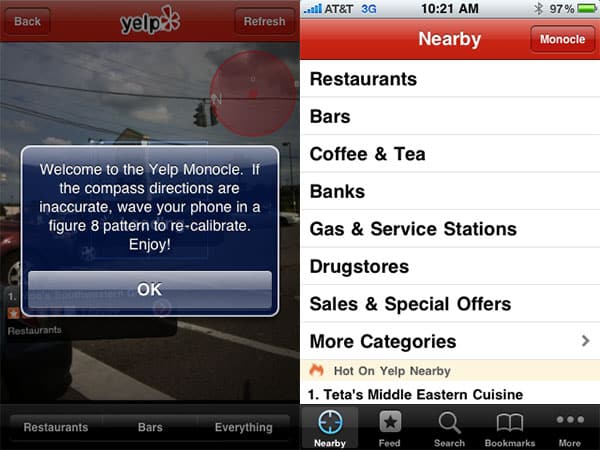
There are, of course, two other potential stumbling blocks: the reliability of Apple’s compass and GPS tools, and the quality of the augmented reality software itself. We’re still in the process of sorting out which is to blame for some very different experiences we’ve had with the new version of Yelp for iPhone, which just launched with an augmented reality mode as an easter egg. Download the app, the instructions go, shake your iPhone 3GS three times, and up will pop a dialogue box for The Monocle, a hidden feature that overlays your current live camera video with Yelp’s local business data. We followed the instructions, and after way more than three shakes, several reloads, and a prayer, a Monocle button did appear.
We pressed it. And that’s when the confusion began. What we saw on our iPhone 3GS, running iPhone OS 3.0, could only be described as a very poor implementation of augmented reality—so weak that we initially felt that Yelp shouldn’t have included it in the app at all. A reader echoed our thoughts in a comment this morning: “I see this more as a proof of concept than a working feature.”

In initial tests, there were so many things wrong with Yelp’s implementation that we couldn’t believe what we were seeing. Unless we were really close to a business in its database, the data overlays were unreadably small, and couldn’t be made larger without literally getting up and walking towards the places that were being identified. Then, they were so rarely in the proper position on screen to be interacted with that we needed to turn ourselves around to see them, even when the places are physically nearby. Next, there was the loading—data isn’t cached, which would kill the feature for hypothetical iPod touch 3G users—so the data was all but completely worthless when we tried the app as passengers in cars. Every few seconds, a “Loading” box appeared, updating the list with such frequency that we couldn’t even see the choices—we took a bunch of screenshots and only could only find one where options were actually, albeit very briefly, visible at the center of the screen. Even then, they were stacked in a basically useless list form with restaurant names blocked out for four of the 11 listings, and unreadable in three more.

But this wasn’t the only Yelp story.
Despite the reader comment above, we were so surprised by what we were seeing that we asked around to see whether other iPhone 3GS users were experiencing the same things. One, based in another city, said no. He was getting very good results, he said, almost excellent ones. Labels were large and easy to read. The compass appeared to be stable, rather than jittery. And oh, by the way, he was running iPhone OS 3.1, whereas we were running iPhone OS 3.0. Maybe that was the difference?

In light of reports that Apple will be officially supporting augmented reality applications with version 3.1 of the iPhone OS, this could make some sense. But for the time being, it’s hard to know whether the performance problems we were seeing were a result of wonky iPhone 3GS hardware, a feature that doesn’t work the same in every city, or less than 3.0-optimized software. We’ve asked Yelp for comment and will let you know what we find out.
Once Apple enables full support for this feature, we predict that there’s going to be a goldrush-caliber series of efforts to augment reality with all sorts of questionable data and algorithms—tons of cheesy apps like “McDonalds Finder” and “Toilet Locator 3GS” and, of course, “Nearby Farts.” Please, developers, before you spend your time and labor on applications like this, please take note: the goal is to usefully augment reality with information people actually care about, can read, and rely upon.











